Looks good in editor, lacks styling and graphics

Cannot see any pics, also looks like styling is missing when previewing the page
-

Hi Piotr,
Thank you for contacting us.
To help us reproduce the issue on our end, please provide temporary FTP/cPanel access. You can send the required FTP/cPanel login details to communitysupport@brizy.io.
Here are the details we need:
Community Post link: https://support.brizy.io/hc/en-us/community/posts/31478416237842
FTP/cPanel Host name:
Username:
Password:Looking forward to your response.
Best regards,
Ariel H.0 -
I do not think you need access to cPanel, the same (faulty) result is when I click Preview in Brizy cloud editor.
0 -
Oh I got it. Since I connected to my hosting, Preview shows result from hosting... I have disconnected.
What should I check or assure on hosting for the connection to work good?
0 -

Hello Piotr,
Can you share with us the the brizy.site URL of the project so that we can take a look?
0 -
Hello Piotr,
The Brizy Cloud website appears working fine. Have you followed the procedure at https://support.brizy.io/hc/en-us/articles/360027008491-Server-Sync to publish the above wesbite on an external server? If you are encountering an an error while following the above procedure, kindly give us access to your server, so that we can make it work for you.
0 -
Well, I have checked access rights, htaccess - none of those helped. I finally downloaded html and it is working. Additionally it was redirecting to adres with www prefix, which caused certificate problems.
Sync is a good idea but to much troublesome.
0 -
Now, when trying to use login popup, I get error 500
What am I doing wrong?
0 -
Hi Piotr,
Thank you for the update.
To help us better understand the issue, could you please share the exact steps you’re taking to replicate the issue? If possible, a screenshot of the error would also be very helpful.
Looking forward to your update.
Best regards,
Ariel H.0 -
during registration process:
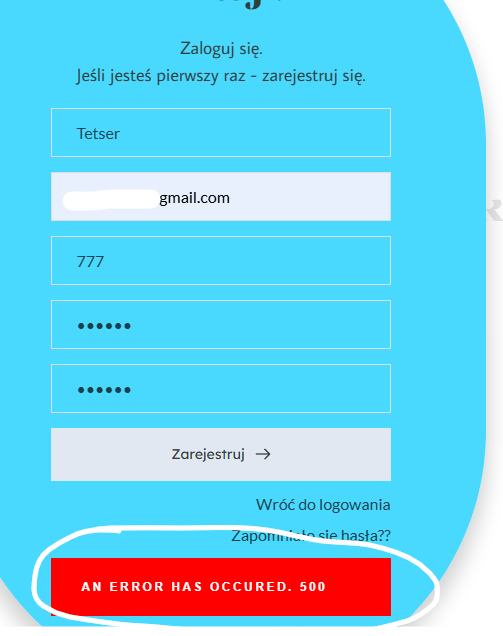 0
0 -
Hi Piotr,
Thank you for the update.
I’ve created a new account and can confirm that the login is working on my end https://youtu.be/FoKZYy1Lwsw
If the issue persists for you, please try clearing your browser cache or accessing the page using a different browser, and let me know if that helps.
Kind regards,
Ariel H.0 -
When I try it now, I get error 404
0 -
Hi Piotr,
Thank you for the update.
We’ve tested this on our end, and it appears to be working properly. It’s possible that this could be related to browser cache. Kindly check this short screencast for reference: https://streamable.com/lovtfm
Could you please try accessing the page in Incognito/Private mode and see if the issue persists?
Best regards,
Ariel H.0 -
Yes, I just did it in incognito mode. The issue persists.
0 -
One difference thou, I am trying this under my own domain
0 -
Hi Piotr,
Thank you for the update.
At the moment, the form element won’t work if the site was imported as HTML, as it runs independently and isn’t connected to Brizy Cloud. When published using Sync, the site stays connected, which enables forms and registrations to function properly.
We would recommend considering publishing the site using Sync instead of importing it as HTML, as this will ensure the forms and registration features work as expected.
Kind regards,
Ariel H.0 -
I tried sync but had issues. Will get back to you when I upload script again.
Thank youUPDATE: I redownloaded the script and uploaded to my hosting again and it does look ok now.
Thanks!!!
0 -
And now after couple of changes, the page again has issues.
The acordeon element on the page not working.
The login popup does not show up.It does work in editor. Does not on live page.
it.chantal.com.pl
Please check ASAP, thank you
0 -
Hi Piotr,
Thank you for reaching out.
Could you please log in to your server via FTP or use the built-in File Manager, then navigate to public_html > var and delete the cache folder?
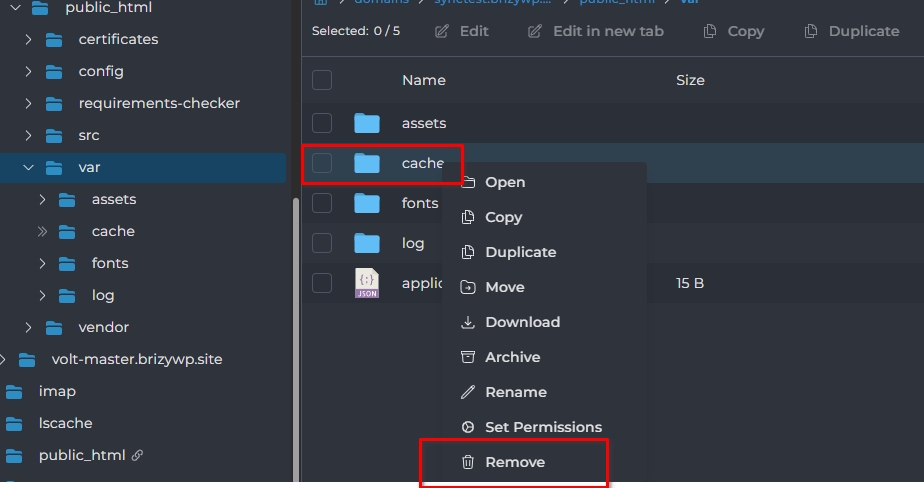
After that, please go back to your browser, reload the site, and check if the issue is resolved.
If the issue persists, kindly share your FTP details with us so we can take a closer look and assist you further.
Best regards,
Ariel H.0 -
Unfortunately didn't help.
How do I share credentials to ftp with you not to be publicly visible?
0 -
Hi Piotr, please send it here, it won't be visible unless we approve the community post.
Looking forward to your update.
Kind regards,
Ariel H.0 -
Hi Piotr,
I just wanted to follow up regarding the FTP access we requested so we can check the issue mentioned in your community post.
Best regards,
Ariel H.0 -
Hi Piotr,
Thank you for your patience. I’ve escalated this issue to our senior support team for further investigation. I’ll get back to you as soon as I have any updates.
Best regards,
Ariel H.0 -
There's embedded content under accordeon element, which contains script sorting table elements. Maybe that is the problem?
0 -
Hi Piotr,
I tried removing the embedded script, but the issue still persists.
I’ll reach out as soon as I have any new updates. Thank you for your patience.
Best regards,
Ariel H.0 -
Hi Piotr,
Thank you for your patience.
It appears there may be an issue on the server side. We tested syncing using our test site (https://synctest.brizywp.site/), and everything is working as expected from our end.
Could you please provide temporary access to your hosting control panel so we can investigate this further?
Looking forward to your update.
Best regards,
Ariel H.0 -
Hi Piotr,
Just following up on my previous email to check if you had a chance to review it. Please let us know when you’re ready to share the details so we can proceed and help you fix the issue.
Kind regards,
Ariel H.0
Please sign in to leave a comment.
Comments
26 comments