Exit Popup Doesn't Work On Some Browsers

Hello,
Exit Popups are not working on my website on some browsers like Microsoft Edge, Chrome or Opera. It works only on Safari.
Are you having the same issue by checking?
Thanks.
-

Hi Jerem,
Thank you for reaching out to us.
Could you please provide us with the URL of your website so we can inspect it?
Best regards,
Ariel H.0 -
Hello,
The exit popup doesn't work all the time, it works on Safari but not on other browsers, I have to clear the site cache again for it to work sometimes.
Could you also put this conversation in private to avoid any indexing of our urls please?
Thank you.
0 -

Hello Jerem,
I do not see a popup getting triggered on exit intent on your website in Google Chrome, Microsoft Edge and Opera browsers as well. However, on all three browsers, I can see the popup appearing when I attempting to exit the page https://brizy.online/brizy-design/
Please remove all Display Conditions added to your popup, excluding the one shown below, and see if it resolves the issue.
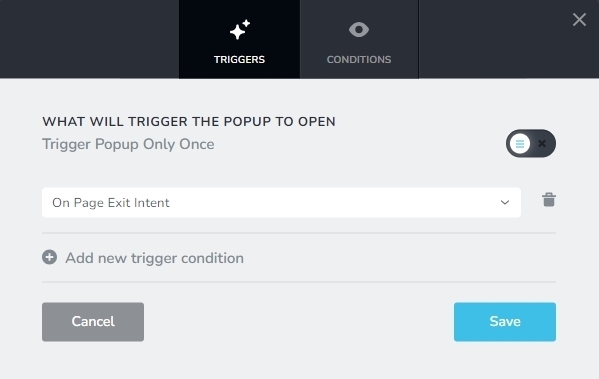
If this does not help, we may need access to your WordPress Dashboard to offer further help.
0 -
The problem is that we only want to show the exit popup once because showing it every time is too aggressive for the visitor.
0 -
Have you checked on your side by showing the exit popup only once per visitor by checking "Trigger Popup Only Once" and see if the problem is also on your side ?
0 -
Hello Jerem,
I have now enabled the option "Trigger Popups only once" After enabling this option the popup seems to work in Google Chrome and Edge browsers. It did not work in Opera.
Could it be possible that the popup does not trigger in your development computer because it has already triggered once in the past? Kindly test both pages in other devices/ computers.
0 -
No, because I’ve already tested with a different IP and cleared the browser cache and history, but it still doesn’t work. As you can see, the exit popup doesn’t function on Opera. I can assure you that it also doesn’t work on Chrome, Edge, Firefox, or Opera, as can be observed on our site. However, it works fine on Safari. Why does the exit popup work on Safari but not on other browsers for our site? There seems to be an issue with your Brizy plugin.
0 -
Hi Jerem,
The cookies (to be more precise "Local Storages") we store in each browser keeps track of number of times a popup was shown to a user. Kindly refer to the knowledgebase article at https://support.brizy.io/hc/en-us/articles/7421688586385 Before testing the popup on a browser on your development computer for the second time, kindly delete cookies associated with your website. For different browsers, the procedure can be slightly different. Follow the procedure at https://jmp.sh/45v2SDJR to delete your website cookies in Google Chrome. Follow a similar procedure in other browsers.
0 -
We followed your video, but when checking third-party cookies on Chrome, our site wasn't listed, and the third-party cookie settings were already clear. As a result, it still isn't working. Have you tested this on our site using your Chrome browser? Do you see the Exit Popup on your end? Because we don't understand why it’s not appearing for us or for our associates on other computers.
0 -
Hello Jerem,
The popup does not trigger on your website after clearing cookies. However the popup setup at https://brizy.online/brizy-design/ triggers once after clearing cookies in Chrome and Edge browsers. Your website has a browser console error "Unchecked runtime.lastError: The message port closed before a response was received" Kindly see the screenshot at https://jmp.sh/eDkcltvr We are currently working on a fix for this error and when we release a fix for this error as part of a future Brizy update, this issue can be resolved.
You could try rolling back to previous versions of Brizy and check it can help fix the popup issue. First, take a full backup of your website an download these versions of Brizy to your computer.
- Brizy 2.5.2: https://jmp.sh/2bXHLvAZ
- Brizy Pro 2.5.1: https://jmp.sh/s29vW87t
And follow these steps to roll back
- Deactivate and delete Brizy Pro
- Deactivate and delete Brizy
- Download Brizy 2.5.2 and in your WordPress Dashboard under Plugins - Add New - Upload Plugin, upload Brizy
- Download Brizy Pro 2.5.1 and under Plugins - Add New - Upload Plugin, upload Brizy Pro
- Make a minor change to the global header, (like increase the padding by 1 pixel), reverse the change and update your project.
0 -
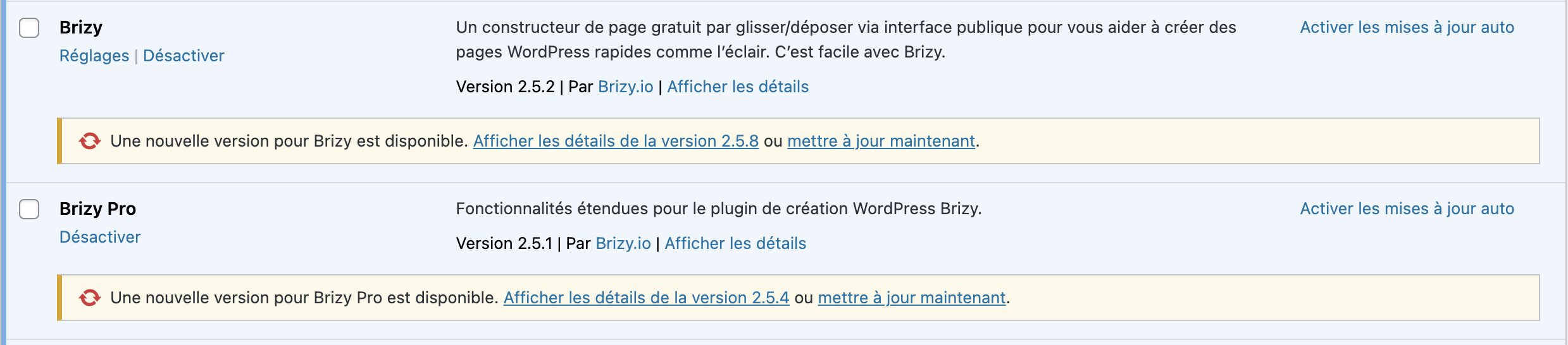
We are already on the old version of Brizy and the problem is the same.
 0
0 -
Hi
You also have the option to rollback to older Brizy versions and check if it helps.
- Brizy 2.4.45: https://jmp.sh/6w60BmCr
- Brizy Pro 2.4.38: https://jmp.sh/5610QZIA
Please follow this procedure to rollback.
- Deactivate and delete Brizy Pro
- Deactivate and delete Brizy
- Download Brizy 2.4.45 and in your WordPress Dashboard under Plugins - Add New - Upload Plugin, upload Brizy
- Download Brizy Pro 2.4.38 and under Plugins - Add New - Upload Plugin, upload Brizy Pro
0 -
It isn't better with this versions, it doesn't work on our home page : But it's work on our "About Us" page :
However, the exit popup is activated in our settings on these 2 pages.
0 -
Do we have to wait for the next Brizy update before you can solve this problem?
0 -
Hi Jerem,
When a feature does not work for all users, we treat it as a bug and work towards a fix. When it works on some computers and does not on other, we usually check the WordPress Dashboard to troubleshoot the cause. If you want us to take a look at your WordPress Dashboard, please add a new user to your WordPress Dashboard and send the following details to our email: communitysupport@brizy.io
- Support Forum link: https://support.brizy.io/hc/en-us/community/posts/21531411233170
- WordPress Admin URL:
- Username
- Password
Please let us know in this forum when you send us the email.
0 -
Done. I sent you the email.
0 -
Hi Jerem,
When you activate WP Rocket on your website, the Exit Intent popup does not function. The popup appears to function well if you deactivate WP Rocket. Check out my test at https://jmp.sh/71tnVHPY
I will escalate this issue and will work on ensuring Brizy popup compatibility with WP Rocket. It is possible that a certain WP Rocket setting causes the Brizy popup to stop functioning. Regretfully, we were unable to identify the conflicting setting. Feel free to disable various plugin features and see if your website displays the Exit Intent popup.
If you can't identify the conflicting setting, kindly consider an alternate caching/performance plugin.
0 -
Ok we will try to temporarily exclude the Brizy script from WPRocket, I hope you will fix the problem quickly.
0 -
Could you please make our discussion private or hide our site links to avoid any public indexing of our links on Google? Thanks.
0 -
After conducting checks on our site and performing multiple tests with the WPRocket plugin, we did not find any issues related to this plugin. Even with the plugin completely deactivated, your exit popup still does not work.
We therefore conclude that this is likely a bug with your Brizy builder. Anyway if WPRocket were truly the cause, the exit popup would not work on any browser. However, it functions perfectly on Safari only.
Could you please review this issue with your builder and resolve it for the other browsers as soon as possible?
Thanks.
0 -
Hi Jerem,
Enabling Cloudflare as an add on to WP Rocket seems to cause CORS error on your website. Pease see the screenshot https://jmp.sh/3UWjWXPE Disabling Cloudflare in WP Rocket seems to help with the exit intent popups. Please check if the popup are working now.
0 -
Hello,
We don't see any improvement.
The problem doesn't seem to come from Cloudflare or WPRocket.
0 -
Hi Jerem,
Please see my test at https://jmp.sh/sUekAiJm While testing the popups on your end, kindly
- Reload the page on your browser to ensure that you are seeing the latest changes (and not a cached copy of your page)
- Delete cookies after every page you test
0 -
We had already cleared the history, cache, and cookies on other browsers such as Firefox. However, we notice that you are only testing on Chrome. We encourage you to also test on other browsers, like Firefox, where the issue still persists.
0 -
Hi Jerem,
Your exit intent popup triggers on Firefox. Kindly have a look at https://jmp.sh/felMIn2C
0 -
Indeed, it works, it seems that the issue is coming from Cloudflare. However, the problem is that we are using Cloudflare's CDN to optimize the loading of the site, and without it, the site could be slower.
- Is there a setting in Cloudflare that we could disable to allow the exit pop-up to continue working?
- Or do you think that switching to a different CDN (using the one from our Hostinger webhosting) could resolve the issue?
0 -
Hi Jerem,
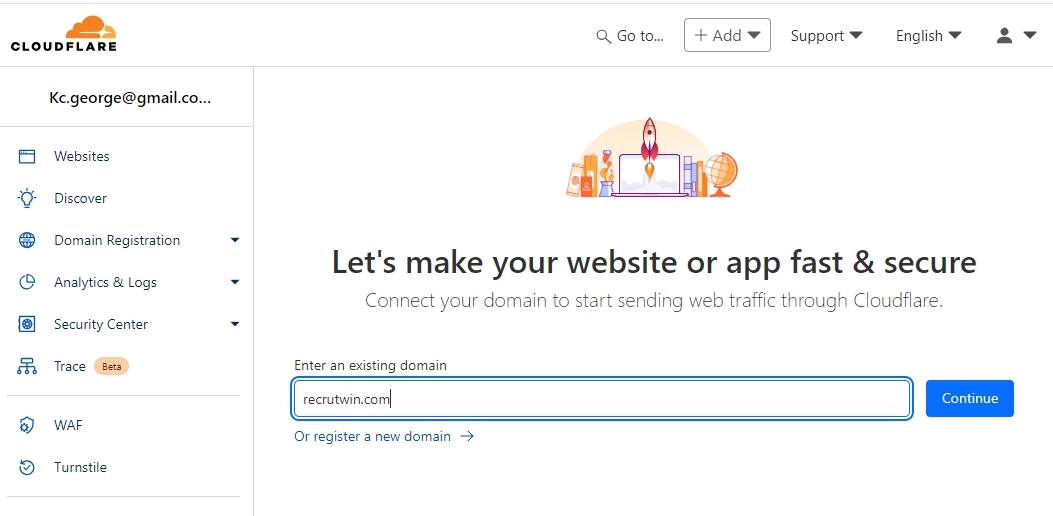
Instead of enabling Cloudflare as an addon within WP Rocket, kindly try to add your site in Cloudflare following the procedure at https://developers.cloudflare.com/fundamentals/setup/manage-domains/add-site/ You can use their free plan to start with
 0
0 -
Cloudflare is already set up for our site without WPRocket, do you know why when we enable it and link it with WPRocket this bug is present?
0 -
Hello Jerem,
If you have already setup Cloudflare CDN for your site, you don't need to do it again through WP Rocket.
As I had mentioned above, enabling Cloudflare as an add on to WP Rocket seems to cause CORS error on your website. Pease see the screenshot https://jmp.sh/3UWjWXPE This error seems to interfere with the Brizy popup.
0 -
Hello George,
We will disable the Cloudflare option in WPRocket to resolve this issue.
Thank you very much for your help!
0
Please sign in to leave a comment.
Comments
35 comments