cURL error 28: Connection timeout after 10000 ms

can activate my license
it brings up the error below
cURL error 28: Connection timeout after 10000 ms
-

Hi Omoya,
Kindly contact your hosting company and ask the hosting support team to check the following:
- Make sure your server is running a latest version the cURL library. cURL version 8.1.2 or above is ideal
- The cURL error can be a DNS related issue. Your hosting company might need to switch DNS configuration to OpenDNS : https://www.howtogeek.com/164981/how-to-switch-to-opendns-or-google-dns-to-speed-up-web-browsing/
- Check with your host if there a firewall or security modules (e.g. mod_security ) that could block the outgoing cURL requests.
0 -

I have the same problem. I can't even deactivate the licence key. It's very annoying and nobody can really help!
cURL error 28: Connection timed out after 10001 milliseconds0 -
Hi Beat-Hans,
This error is related to your server and not so much related to Brizy. Kindly have look at troubleshooting guide available at https://www.hostinger.in/tutorials/curl-error-28
0 -
i sent you guys an email. its now 2 days no reply
0 -

Hi Robert, I replied to you on this support thread - https://support.brizy.io/hc/en-us/community/posts/20590847068562
0 -

Same problem here with the cURL error 28. We have multiple Brizy/WordPress installations on the same server, and they are all working.
Only this last installation won't allow us to activate the PRO license.
Hosting and DNS have been checked and don't show any anomalies. On the other hand, if it were a server problem, the other instances shouldn't be working either.
Any other ideas?
The fact that suddenly multiple users have the same problem seems a bit suspicious.
0 -
Hi,
Thank you for contacting us.
Unfortunately, this is something we can't fix on our end. Please reachout to your hosting provider and ask them to whitelist brizy.io.
Please try this and let me know how it goes.
Best regards,
Ariel H.0 -
Hi Ariel,
The hosting provider has not identified any issues on their end.
To be fair, they may have a point, as everything else—such as plugins, themes, authorizations, backups, webhooks, etc.—is functioning flawlessly. The sole problem lies with the Brizy licensing! Additionally, I have 20 other installations of Brizy that are properly licensed on the same server from previous setups.
The issue started only recently. Any chance to check this from your side? Thanks
0 -
Hi
In your hosting control panel, kindly set these PHP Configurations
- Memory Limit: 512 M
- Post Max Size: 512 M
- Upload Max Filesize: 512 M

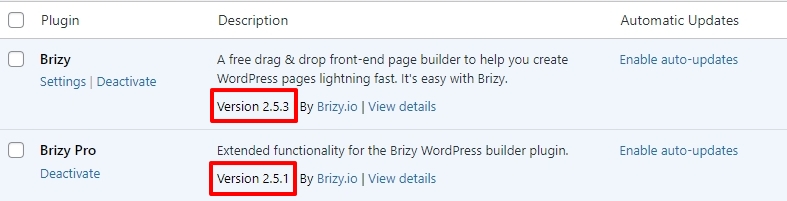
Update Brizy to these versions, if you have not already and check if you see the cURL error 28.
 0
0 -
Thank you for the suggestion.Unfortunately, it didn’t help.
Settings updated, Brizy versions are correct, but the problem persists.
Please note also that I have only a standard theme and Brizy's plugins installed on this WordPress site.
Would it be possible for someone in support to take a direct look at the WordPress installation? I can send an admin access privately.0 -
Hi
We are happy to take a look at your WordPress Dashboard to troubleshoot this issue. Please add a new user to your WordPress Dashboard and send the following details to our email: communitysupport@brizy.io
- Community Post link: https://support.brizy.io/hc/en-us/community/posts/20582067849746
- WordPress Admin URL:
- Username
- Password
Kindly also share with us credentials to your server admin software like cPanel.
- cPanel URL
- Username
- Password
Please let us know in this forum when you send us the email.
0 -
Email sent to communitysupport@brizy.io .
Thanks
0 -
Hi,
Thank you for the update.
Upon checking, we've determined that the problem you're experiencing is related to a server-side timeout. Specifically, the error `cURL error 28: Connection timeout after 100004 ms` indicates that a request made by your WordPress site to the server is taking too long to process, resulting in a timeout.
We replicated the same setup on a test site that we manage, but the issue did not occur, which suggests that the problem is specific to your hosting environment. This type of timeout typically happens when the server is under heavy load, has network latency issues, or is being blocked or delayed by firewall or security settings.
I've set up a test environment for you where you can try activating your license to confirm that this issue is specific to your hosting environment. I have sent the link in a separate email from communitysupport@brizy.io.
You can also provide this testing environment to your hosting provider so they can compare.
To resolve this issue, we recommend reaching out to your hosting provider and asking them to check the server log files. The logs might provide clues as to why these requests are taking so long to process. They may also be able to adjust server configurations, such as increasing resource allocations or adjusting firewall settings, to prevent this from happening.
Please let us know if you need any further assistance. We’re here to help!
Best regards,
Ariel H.0 -
I can confirm that this is a server problem. I had the same error message on all Brizy installations in Wordpress. The provider's support was unable to help and referred me to Wordpress specialists. I have tried 2 other providers, with none of them I had this problem. I have therefore decided to change provider.
It has to do with the fact that providers occasionally completely overload their servers and then this error message appears. Even logging into the Wordpress system then takes half an eternity!
Thanks to Ariel H. for all his usefull help!0 -
Hi,
Thank you very much for your effort and assistance.
I had already contacted my hosting in this regard, but even from their side no solution to the problem could be found.
It was not even necessary to create the test account.
On the same server where we have this issue, there are 20 other sites with Brizy where it was possible to authorise the licence without any hiccups.
If it were a server configuration problem, it would not have been possible to carry out the authorisation with the other sites either.Only this particular Wordpress install shows this hitch.
As you requested I will pass on your answer to my hosting, but I remain of the opinion that the solution must be sought elsewhere, because the proposed fix does not have any logic, considering the fact that this server does not give any kind of problem, not even with other Brizy sites.
I hope you have alternative ideas.
Thanks. Best.
0 -
Hi
Is it possible to give us access to your hosting control panel? We want to try and activate the Brizy Pro licence using the command-line interface for WordPress, WP-CLI.
0 -
Hi KC George,
I believe this could be a great idea.
The only problem is that we use ServerAvatar as the control panel for our servers. It's a great panel, but it has one significant drawback: it allows only global server admin users and not users specifically for a single application.
I hope you understand that we need to limit access to other applications on this server, particularly to comply with GDPR regulations.
May you can provide me with the instructions, and I'll carry them out on my own? Thank you.
By the way, I have even gone the long way by upgrading the server specs. Still, the same problem persists.0 -
Hi
If WordPress CLI is available in the Server Avatar control panel, to activate Brizy PRO license key , please enter this command to the CLI tool
wp brizy-pro license activate <license-key>
Kindly also consider the solution provided at https://gist.github.com/sudar/49455880 -
Hi KC George,
The other solution didn't make any difference.
Tested with CLI. Here is the response from the hosting provider:
"...we're still experiencing timeouts. Could you please inquire about the port and URL so we can check from our server whether the port and URL are accessible?"
0 -
Hi
Here are the details
- The cURL URL: https://www.brizy.io/
- Port 443
- IP Address :192.124.249.103
0 -
Hi,
Thank you for the update.
We've now whitelisted 49.**.1**.215, please check if you can activate your license.
Best regards,
Ariel H.0 -
Sadly is still blocked from your side.
0 -
Hello,
Based on your previous feedback, it seems that you have other websites hosted on the same server that are not experiencing this issue.
Could you please set up a new testing environment on this server and attempt to activate the license? Once you've done this, please let me know the outcome.
Best regards,
Ariel H.0 -
Tested just now with a fresh WP installation. The same problem persists.
The old sites you mention were authorized before the IP was blocked.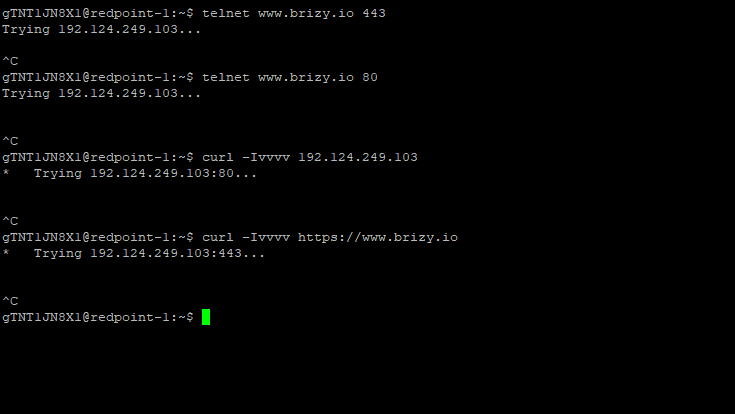 0
0 -
Hi,
Thank you for your cooperation.
Although we've whitelisted the requested IP address, the issue persists and appears to be specific to your websites.
Based on similar cases with other users, we have found that reporting this issue to their hosting provider often leads to a resolution. Many users have had success after their hosting providers investigated and addressed the issue on their end.
Since we have exhausted our available solutions, we recommend reaching out to your hosting provider to see if they can offer further assistance. If the issue continues, considering a move to a different server managed by your hosting provider might be a viable option.
We apologize for any inconvenience this may have caused and appreciate your understanding.
Best regards,
Ariel H.0 -
Hi,
I'm trying to understand your last answer. So, you mean that while we can communicate with other plugins we install, sell WooCommerce products, use webhooks with external applications, and run smoothly 20 sites, this server is not good enough to authorize Brizy? Your solution is that we move the entire server to another provider just to add a Brizy license?
I would have expected at least a check on your logs to see if our test ping/curl command went through, or a test from your side to ping our server.
Sorry, but that's not exactly what support should be.
0 -
UPDATE: I changed the IP provisionally for the entire server, and I was able to connect.
Sorry, guys, but our IP is DEFINITELY blocked on your side.
0 -
Hi,
Thank you for the update.
I have now escalated this issue to one of my colleagues for further investigation. A new ticket will be created, and you will receive a notification as soon as possible. Also, access token to your site has expired. Please extend the token or reset the access for at least 72 hours or more. Alternatively, you can send a new link to support@brizy.io.
Best regards,
Ariel H.0 -
Token extended. Thanks
0 -
Hi,
Thank you for the update. I have now forwarded the details to my colleague, including your FTP credentials.
Best regards,
Ariel H.0
Please sign in to leave a comment.
Comments
32 comments