This page needs a refresh...

Hello Brizy,
Great software you have, I like it :) Though I have some problems.
Suddenly one of my blocks on the homepage rearranged: it’s position went under the footer. What?! So I opened the builder, seams the block is gone… How is this possible?
Luckily I saved this block in my favorites. So I set it back in position and saved. Then this message appears: "This page needs a refresh. You’ve probably updated this page (or another page) in a different tab or browser".
So I can't update my website, this is incredibly frustrating… I’m getting this error on every page, so no specific page. I’m the only user who is working in WP and I don’t have any other (build) page open in another window or tab.
I’ve done some Brizy help center research, the following solutions I’ve already tried (and failed…):
1) Deleted Chrome cache > same error
2) Tried in Incognito mode > same error
3) Browser change from Chrome to Safari > same error
4) Increased the PHP memory limit to 512MB. > same error
5) Cleaned database (plugin Advanced Database Cleaner) > same error
6) PHP version from 8.3.9 to 8.2.21 > same error
7) Updated all my plugins > same error
8) Updated WordPress > same error
9) Updated theme Kadence > same error
10) Cache reset all pages NitroPack > same error
11) Re-start MacBook ten times > same error
12) Disabled WordFence > same error
Version specs (latest versions):
• WordPress 6.6.1
• Brizy 2.5.1. Pro: 2.5.0
• Kadence theme 1.2.7
• NitroPack 1.16.4
• WordFence 7.11.7
I’ve also made a screen record so you see how this problems occurs: https://youtu.be/PClpAL8G7cg
I could add you as a WP user, so you’ll get access. Please provide a mailaddress. I’ve already made a back up.
Please help, thank you.
-

Hi Xander,
Thank you for reaching out to us, and we appreciate the time you took to create the screencast to explain the issue.
This is something we need to inspect from your WP Admin page. Please add us as an Admin user to your WordPress Dashboard and send the following details to: communitysupport@brizy.io
Community Post link: https://support.brizy.io/hc/en-us/community/posts/20483055852434
WordPress Admin URL:
Username:
Password:Please make a full backup of your site as a precaution.
Best regards,
Ariel H.0 -

I am facing the same error
0 -
Hi Kingsley,
Thank you for contacting us.
This issue seems to be related to WordFence. If you have it installed on your site, please consider trying the following steps to resolve the issue.
1. In the WordFence plugin settings, go to Firewall;
2. Turn on Learning Mode - https://imgur.com/TucapoH;
3. Go back to your Brizy page, make some minor adjustments, and then save the changes;
4. After completing the changes, go back to the WordFence settings and re-enable the 'Enabled and Protecting' option.If you don't use WordFence, please also verify if you have access to temporarily disable the Firewall/Mod Security in your hosting console. This should help resolve the issue.
Also please confirm that you are already using the most recent versions of Brizy and Brizy Pro.
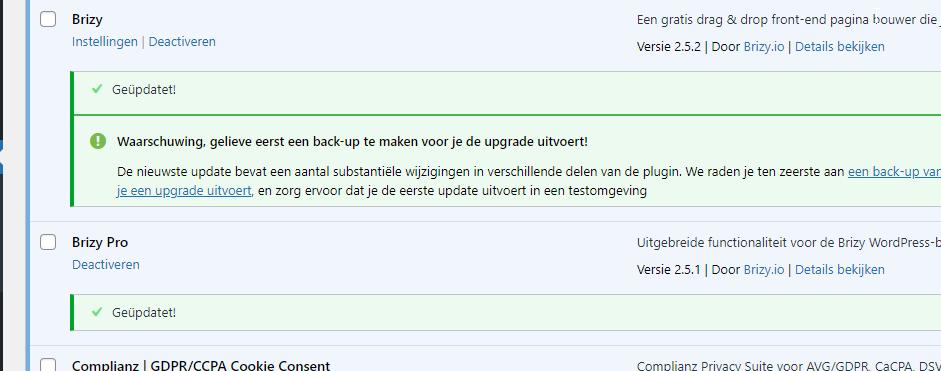
If the issue continues, this is something we need to inspect from your WP Admin page. Please add us as an Admin user to your WordPress Dashboard and send the following details to: communitysupport@brizy.io
Community Post link: https://support.brizy.io/hc/en-us/community/posts/20485903754386
WordPress Admin URL:
Username:
Password:Please make a full backup of your site as a precaution.
Best regards,
Ariel H.0 -
Hello Ariel,
Is there any news? It's been almost two weeks ago, we can't save any of our pages... Please help because we can not work this way. I hope you'll understand.
I also saw that there hasn't been any WP activity on the user we made for you.
When do you expect any news?
0 -
Hi Xander,
Thank you for the update.
We have found that this issue is prevalent among users who have WordFence installed.
To resolve the issue, please set WordFence to Learning mode by following the steps below:
A. In the WordFence plugin settings, navigate to Firewall;
B. Enable Learning Mode and set it to automatically switch back to "Enabled Protecting" in 2 days; this will allow WordFence to learn the actions from the Brizy editor.
C. Save your WordFence changes.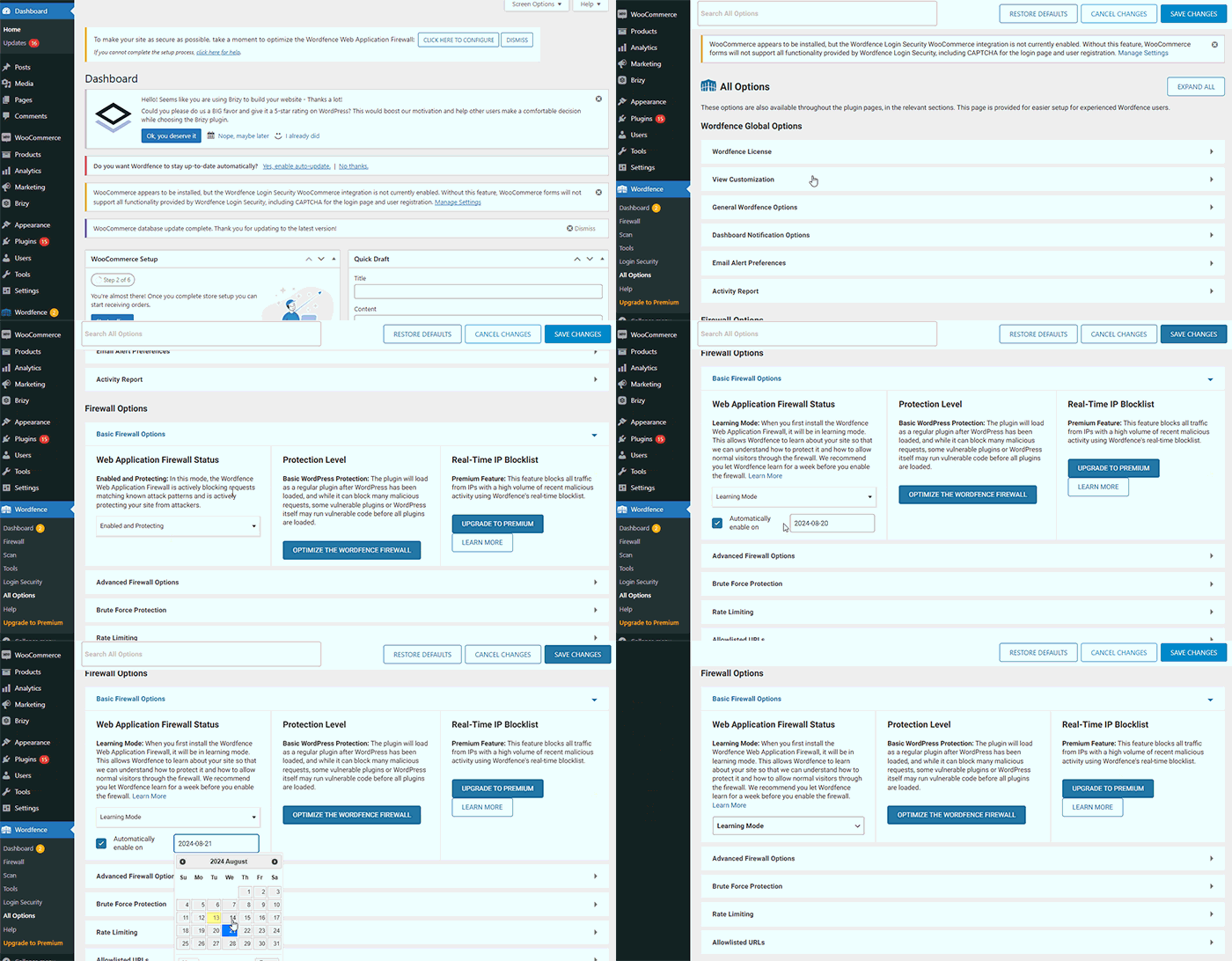
By following these steps, you can save or update your Brizy pages.
If you do not have WordFence, please also check if you have access in your Hosting panel to disable Firewall/ModSecurity, as this may help resolve the issue.
Please try this and inform me of the outcome.
Best regards,
Ariel H.0 -
Hello Ariel,
Thank you, we’ve set WordFence to learning mode and tested all our pages last days. Some pages can be saved after making slightly changes (great!!), other pages couldn’t be saved…
This is the overview:
Total pages: 30
Successfully saved: 22The following pages couldn’t be saved in learning mode (the “this page needs a refresh error”):
• _Collectiepagina2
• _template blokken
• _test
• Dienblad medium (collectiepagina)
• Koffieboeren
• Kussens loungekussens large (collectiepagina)
• Wanddecoratie recht s + m + l (collectiepagina)
• Wanddecoratie rond (collectiepagina)Could you please look in our backend to see what’s causing this error?
Thank you 🙏
0 -
Hi Xander,
Thank you for your cooperation.
From my observation, the issue appears to be related to pages with so many page revisions. You may also need to optimize your database.
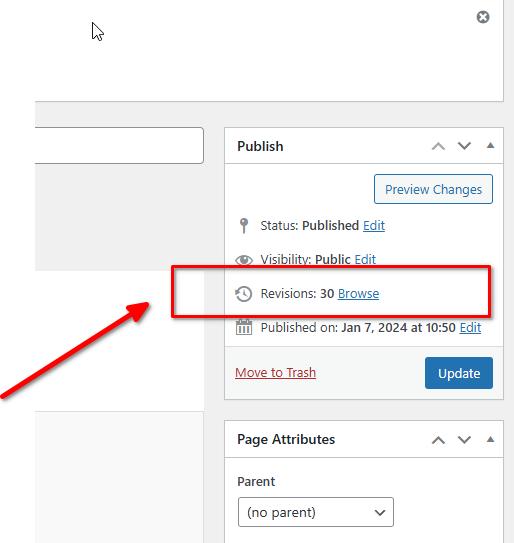
To address this issue, I recommend trying the steps outlined in this link to see if it resolves the issue:
https://www.elegantthemes.com/blog/wordpress/how-to-manage-wordpress-revisions-to-optimize-site-performanceIn the above article offers a manual method of limiting page revisions using PHPMyAdmin, or you can opt for WP Optimize, which is simpler to operate.
Please give this a try and inform me of the outcome.
Best regards,
Ariel H.0 -
Hello Ariel,
Thank you, we'll optimize our database and get back to you with the outcome. 👍🏻
0 -
Hello Ariel,
Last weeks we've investigated this issue and tried the steps from the blog you'd suggested. Since we've already using a caching plugin (NitroPack) we couldn't also install WP Optimize, so we used WP-sweep to clean all of our revisions.
Still the same refresh error occurs at the following pages:
• _Collectiepagina2
• _template blokken
• _test
• Dienblad medium (collectiepagina)
• Koffieboeren
• Kussens loungekussens large (collectiepagina)
• Wanddecoratie recht s + m + l (collectiepagina)
• Wanddecoratie rond (collectiepagina)To be honest with you: we get a bit hopeless... 😔 We really want to use Brizy, but in this way it's impossible.
What could be the solution? Please help us.
0 -
Hi Xander,
I'm sorry to hear you're running into this issue with Brizy. To help us troubleshoot the problem, could you please provide us temporary access to your WP Admin page?
Please add us as an Admin user to your WordPress Dashboard and send the following details to communitysupport@brizy.io:Community Post link: https://support.brizy.io/hc/en-us/community/posts/20485903754386
Username:
Password:Please make a full backup of your site as a precaution.
Best regards,
Ariel H.0 -
Hello Ariel,
Thank you, there has been send an e-mail with al the details.
Please let us know if there is anything we can do.
Best regards, Xander
0 -
Hi Xander,
Thank you for your cooperation.
Upon checking, we found this error in the console: "413 Request Entity Too Large."
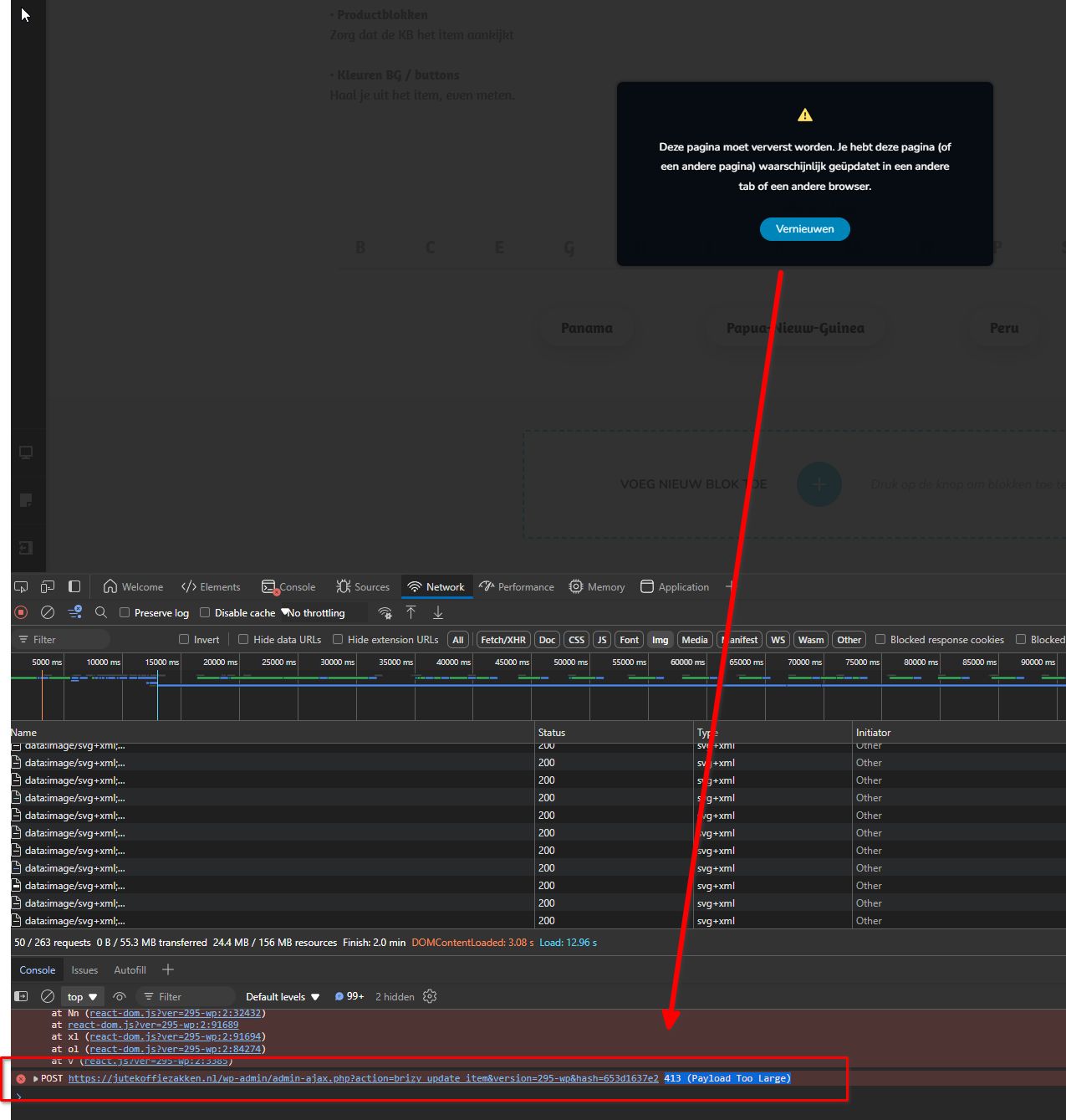
This error indicates a server issue where the file being uploaded exceeds the maximum file upload limit set on your hosting account. You can find detailed information about this error in the following article:
https://www.wpbeginner.com/wp-tutorials/how-to-fix-the-413-request-entity-too-large-error-in-wordpress/However, looking at Site Health on your website, it appears your server meets the settings explained in the above article.
I recommend reaching out to your hosting provider to investigate the issue further and possibly modify their settings to fix it.
If you need work done on this website urgently, try rolling back to previous versions of Brizy to see if that resolves the issue. Please make sure to take a full backup of your website first, then download the following versions:
- Brizy 2.5.2: https://jmp.sh/2bXHLvAZ
- Brizy Pro 2.5.1: https://jmp.sh/s29vW87tTo roll back, follow these steps:
1. Deactivate and delete Brizy Pro.
2. Deactivate and delete Brizy.
3. In your WordPress Dashboard, go to Plugins → Add New → Upload Plugin, and upload Brizy 2.5.2.
4. Repeat the same for Brizy Pro 2.5.1.If the menu element doesn't work, try making a minor change to the global header (e.g., increase padding by 1 pixel). Then, hit the update button to save your changes and preview your site to see if this fixes the issue. You can revert your changes if necessary and hit update again. This should also apply to blocks with broken layouts after the update.
Best regards,
Ariel H.0 -
Hello Ariel,
Thank you for this new information, we'll contact our hosting provider.
When there is any news, I'll get back to you.
Best regards, Xander
0 -
Hello Ariel,
Our hosting provider mijndomein.nl solved the issue! 😁
They have increased the LimitRequestBody which eliminated the error message. An explanation can be found @ https://www.cyberciti.biz/faq/apache-limiting-upload-size/
We've been testing last months and everything works great. No saving errors anymore.
I hope this solution could also help other Brizy users all around the world.
Best regards, Xander
0
Please sign in to leave a comment.
Comments
14 comments