A critical error has occurred on the site.

Hello! There is a problem, the admin panel of the site is working and you can even make edits, but when you click "go to the site" or "open" the finished page, this message appears on a white screen - A critical error has occurred on the site
https://disk.yandex.ru/i/Iht_a0s-lauvnw
https://disk.yandex.ru/i/U5PYjyZd1q8w-Q
I contacted the hosting support, they said that the problem arises due to the incorrect operation of the php script. I attach a fragment of the error log:
28-Sep-2022 12:52:59 UTC] PHP Fatal error:  Uncaught Error: Call to undefined function wc_get_page_id() in /home/m/mcholod/mcholod.beget.tech/public_html/wp-content/plugins/brizy/admin/rules/manager.php:22
Stack trace:
#0 /home/m/mcholod/mcholod.beget.tech/public_html/wp-content/plugins/brizy/admin/templates.php(363): Brizy_Admin_Rules_Manager::getCurrentPageGroupAndType()
#1 /home/m/mcholod/mcholod.beget.tech/public_html/wp-content/plugins/brizy/admin/templates.php(446): Brizy_Admin_Templates->getTemplateForCurrentPage()
#2 [internal function]: Brizy_Admin_Templates->templateFrontEnd(Object(WP))
#3 /home/m/mcholod/mcholod.beget.tech/public_html/wp-includes/class-wp-hook.php(307): call_user_func_array(Array, Array)
#4 /home/m/mcholod/mcholod.beget.tech/public_html/wp-includes/class-wp-hook.php(331): WP_Hook->apply_filters(NULL, Array)
#5 /home/m/mcholod/mcholod.beget.tech/public_html/wp-includes/plugin.php(524): WP_Hook->do_action(Array)
#6 /home/m/mcholod/mcholod.beget.tech/public_html/wp-includes/class-wp.php(787): do_action_ref_array('wp', Array)
#7 /home/m/mcholod/mcholod.beget.tech/public_html/wp-includes/functions.php(1330): WP->main('')
#8 /home/m/mcholod/mcholod.beget.tech/public_html/wp-blog-header.php(16): wp()
#9 /home/m/mcholod/mcholod.beget.tech/public_html/index.php(17): require('/home/m/mcholod...')
#10 {main}
thrown in /home/m/mcholod/mcholod.beget.tech/public_html/wp-content/plugins/brizy/admin/rules/manager.php on line 22-

Hi Andrey,
Few other users have also reported the same issue. We are looking into this issue now. Once we find a fix, we hope to release an update.
0 -
After the update, the problem disappeared, but a new one appeared... Tables began to be displayed incorrectly.
https://disk.yandex.ru/i/4POd0KTG2FY8Sw
https://disk.yandex.ru/i/TaButSzkgEbItw0 -
Hi Andrey,
Can you please open these pages in Brizy and click on Update and and check if it resolves the problem?
If it does not, I would like to take a look at your WordPress Dashboard to help you further. Please add me as a user to your WordPress Dashboard if you need this help. My email: kc.george@brizy.io. As shown in this screenshot: https://jmp.sh/sOSGGR3, please turn on the option "Send the new user an email about their account"
Please let me know here when you send me an invitation.
0 -
https://disk.yandex.ru/i/K3Pgo4LyXnMNLQ
Alas, but everything is still the same. This is a screenshot from the Brizy template about football. Everything is fine on the demo site, but with the new plugins it is displayed crookedly.0 -
Added You
0 -
Did you manage to log in to the admin panel?
0 -
Hi Andrey,
I apologize for not being able to resolve this problem sooner. Following the most recent update, the table's width has decreased. The problem at http://mcholod.beget.tech has been temporarily resolved by increasing the table width by a larger proportion (like 1000% for desktop).
The temporary work around needs to be implemented at https://disk.yandex.ru as well. Please send me the credentials if you need me to do this.
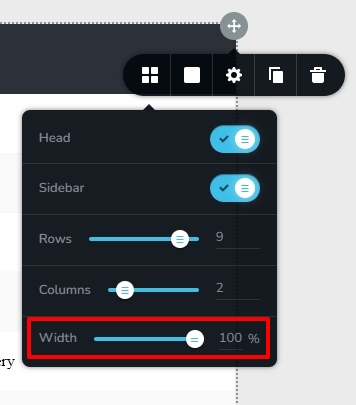
I will let our developers know about this bug, and we work on fixing it
0 -
Hi! Yes, it works, thank you! You are working on improving the table to be able to independently change the width of columns in % ratio. I mean, for each column, is it planned to be introduced in the near future?
0 -
Hi Andrey,
Currently, every table column has the same width. Are you requesting that we offer the option to set the column width for various columns, similar to the Brizy column element?
For this, we don't yet have a feature request. We can include this as a request if you confirm.
0 -
Hi! Yes, because the text in the columns sometimes has a short name, and as a result, the column takes up a lot of space, and the other has a lot of text, but occupies the same width
0 -
That would be cool!
0 -
Hi Andrey,
I have added a feature request for this.
0 -
Hi,George! Thanks for the help. I would like to ask why they removed the "eyes" function to show or not the block on the PC version, it's only on a smartphone and tablet, why not on a PC?
0 -
Hi Andrey,
There has never been an eye icon for the Desktop. This was a result of a user interface design flaw at our end. Now we have a feature request for adding the eye icon for the desktop.
0 -
Hi, George! We can also ask you to add the possibility to diversify the Hamburger Menu, add the ability to install a logo, phone numbers, social network icons in it and diversify its styles in general, responding to the icon of the menu itself, various variations of floating this menu curtain, on the whole screen or from above, there are many options. This would make the sites more interesting.
And I would also like to ask, in order to diversify the current state with scrolling carousels, to add the ability to choose not just icons for flipping, but to change positions and design options for this flipping. Example of arrows in a square or rectangle located under the carousel at the bottom. That would be really cool.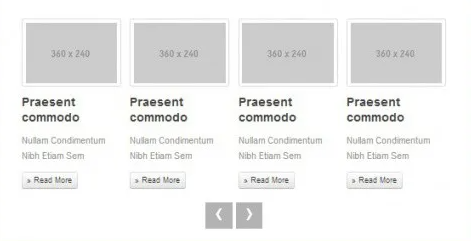

Or are you planning to do it again in the new year?
Thank you for your help and improving your wonderful Brizy system0 -
Hi Andrey,
Thank you for your suggestions. We will add it to your feature requests.
In the meantime, if you would like to be more creative with your hamburger design, you have the option to design your hamburger menu using the popup builder. For an illustration, please see https://www.rishikeshwalks.in/ Have a look at the first part of this video for the procedure to add a popup hamburger menu. https://youtu.be/ssbAxYXCte0
0 -
Hi! Thanks for the video and the idea, I already use some things from this, but I didn't guess with the menu))) I will take this method into consideration.
And I would also like to say that with repeated or repeated use of the same pop-up window, the close button just hangs until the moment of loading, appears ahead of the pop-up window itself, which is very striking and causes a little discomfort.
At the same time, the delay settings for the appearance of the closing cross do not respond to this.0 -
George and thank you for your support and quick response to requests!
0 -
Hi Andrey,
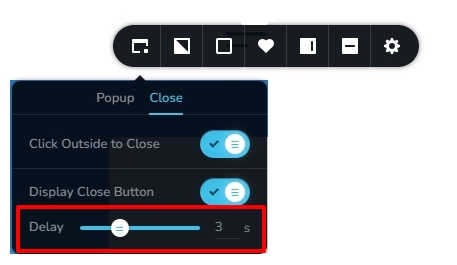
I have added a 3 seconds delay to the Close button on the hamburger popup menu of https://www.rishikeshwalks.in/. The close button appears to respond to the delay setting. Please check.
 0
0 -
Hi, George! The delay works, but in the browser, when the pop-up window is opened multiple times, the closing icon just hangs in one place. I meant such a case.
https://disk.yandex.ru/i/t5YvMTNUYBRtyw - Video
And this happens on all pop-up windows, with a delay in the appearance of the close icon or without delay, the same result always comes out.
You can even see it on your website, I think so.0 -
Похоже на эффект кэширования, но это не так.
0 -
Hi Andrey,
I now understand the problem. When a delay is applied for the close button, it only takes effect on the first popup run. The close button shows instantly and disregards the delay setting if the user initiates the popup a second time.
The majority of users in real life probably won't click the same popup two times, thus I guess this shouldn't be a big concern?
0 -
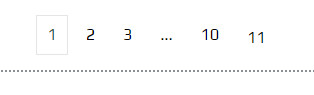
Hi, George! If there is one common pop-up window on the landing page, then it is very striking, And there is also such a bug in pagination, the number 11 is lower than the number 10. Also, many customers constantly point to this
 0
0 -
Hi Andrey,
I have reported this bug on Posts/Archive pagination page numbers and we will work on fixing it.
0 -
Hi, George! Thank you so much for your work!
0 -
Hi, George! Сan you tell me for what reason, Google fonts installed from the library of free fonts are slowed down and are not displayed properly, now I'm doing two sites there and there such troubles. As if Google doesn't work
0 -
Neither Montserrat nor Play with Cuprum and other fonts are displayed, what could be the matter?
0 -
They need to be loaded by installing on the site so that there are no problems, or how?
0 -
Hi Andrey,
Brizy has switched from Google Fonts to Bunny Fonts as the font hosting provider few months ago. Ideally a Brizy website should not send font requests to fonts.gstatic.com or fonts.googleapis.com. Instead, you should see font requests going to fonts.bunny.net
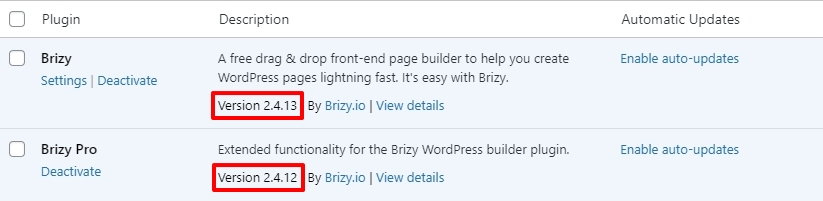
Please share the URL of the page where you are facing font issues. I will take a look. Please also share the Brizy versions you are using.
 0
0 -
Hi, George! Versions as you have in the photo, 2.4.13 and 2.4.12
Here are the links to the sites. Yes, I sometimes saw an inscription pop up at the bottom of the browser that fonts are loaded from Bunny Fonts, now there is no such thing and it works terribly, fonts fly off after any update in Brizy, sometimes they are restored, but sometimes, as in this case, there are no fonts on both sites0
Please sign in to leave a comment.
Comments
47 comments