Some issues/problems during my first few hours using Brizy Pro WP Plugin

I am super impressed mostly during my first few hours building my first client site with Brizy: slotcharmer.com
However, two things are super frustrating:
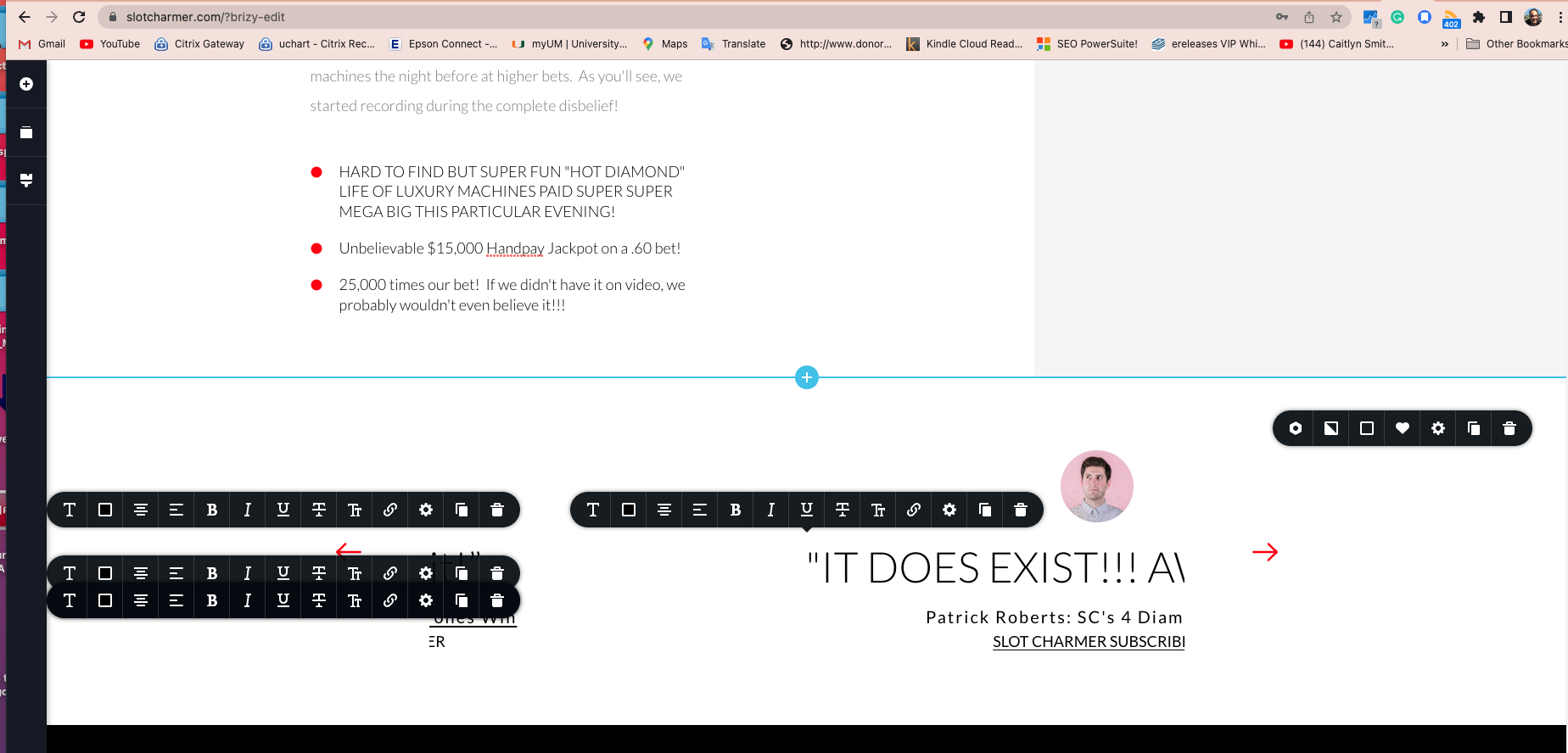
1. I used a testimonials block that is nearly impossible to edit. It brings up multiple edit popups and doesn't allow you to move the testimonial easily to edit it sometimes. See:
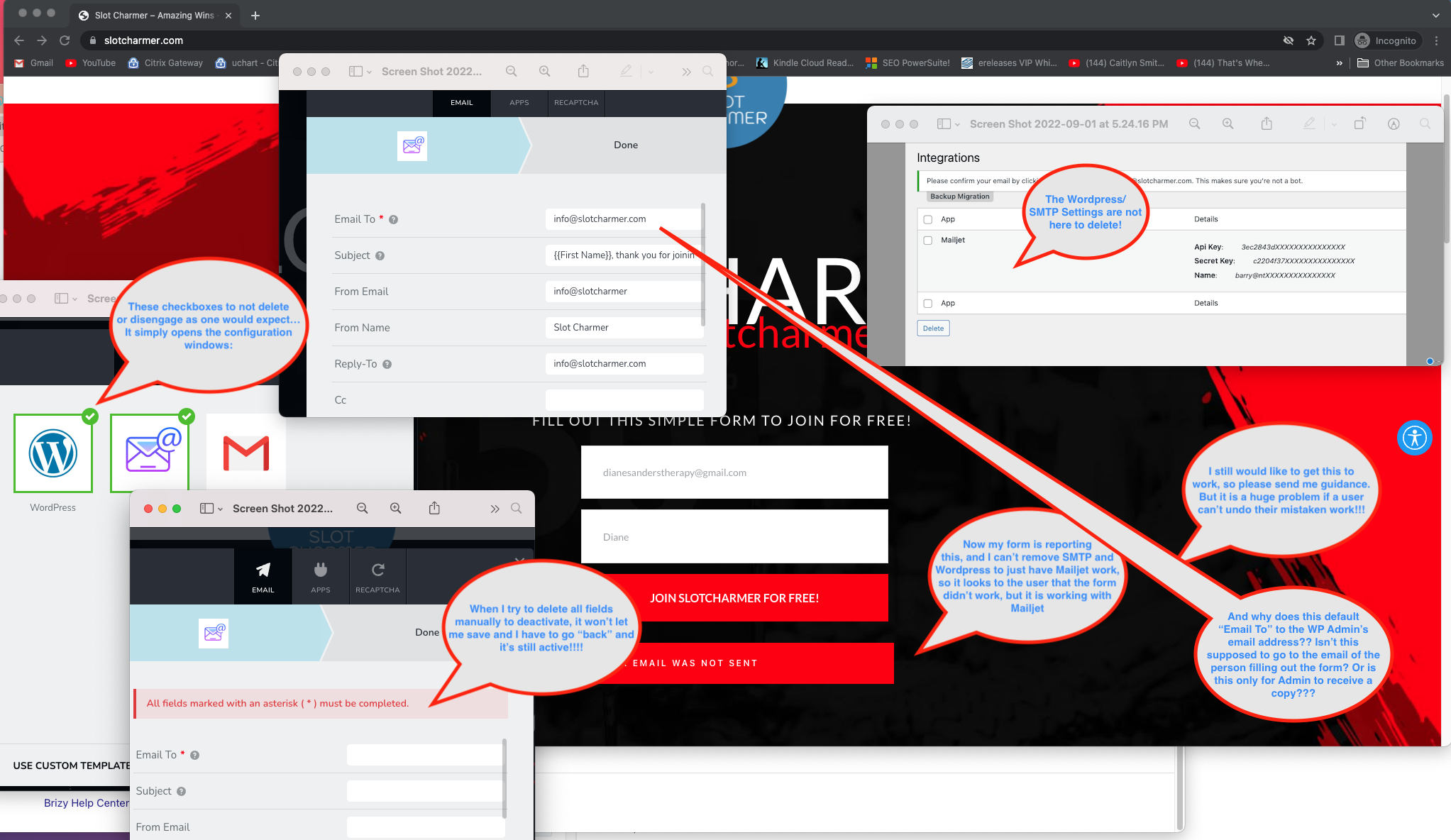
2. I watched your tutorial on forms and sending emails. But I think it was a bit incomplete. I connected MailJet, but then I wanted to see if SMTP and Wordpress can send mail. I couldn't get either of them to work, so that's the first problem. But the biggest problem: I can't delete what I entered in both of those sections (Wordpress and SMTP). When I try to deselect or clear all of the entries, it doesn't allow me to, and it doesn't appear in "Integrations" like mailjet does. How do I delete those? Now my form is telling users that "Your Email was not sent" but mailjet is getting the data. Very weird that the checkbox can't be deselected, or there's no "Clear all" or ???
Also, why is the "To" field autopopulated with my admin email (info@slotcharmer.com)...Isn't the idea that this would be sent to the person's email who is filling out the form? That confused me also!
Please advise.
Thank you,
Barry
-

Hi Barry,
1. At the moment, Brizy carousel has a bug. We will need sometime to fix it. Until we roll out a fix, it would be very difficult or impossible to edit the carousel. If you like, I can recreate your carousel using Block slider for you in the meantime (if you give us access)
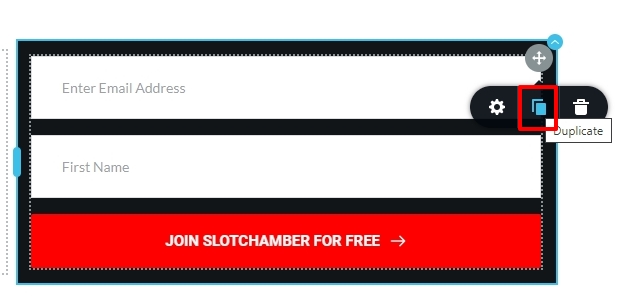
2. You are right, Brizy does not have a way to unselect a previously selected Email Notification option. Please use this work around to unselect both WordPress and SMTP options.
- Click on the right hand side top corner of your form and select 'Duplicate'
- The form will get duplicated. In the duplicated form, add the Mailjet Integration one more time.
- Delete the original form
 0
0 -
Thank you for your fast reply.
#1...That's crazy (why is that not being fixed, or why is it still available?), and yes, I'd love you to create a different version as long as I can add more testimonials easily. How do I get you credentials? (Does this reply post live to the forum?)
#2...Thanks for the workaround...I did that, but I still have unanswered questions (plus an additional one) from my screenshot:
a. Can you use both the Wordpress/SMTP and Mailjet? I don't have Mailjet triggering the email to the subscriber, nor notifying me either.
b. Do you have a guide specifically on those two functions (WP and SMTP mail) and their settings? (The tutorial video is a great overview, but doesn't go into details on each field and how to fill it)...Specifically:
c. Isn't this intended to go to the person who is filling out the form? (or is this for the admin only???) If the first is the case, why is the WP Admin noted in the required "To" email address field? d. How does Admin get notified of the entry/join/form submit?
I know that all of this can be solved with autoresponding, but I'm trying to learn Brizy for my Agency to use on every case. Some clients don't have autoresponders.
What is the normal support email/system if I want to share credentials, access, etc.?
Thank you! - Barry
0 -
Hi!
I just sent back some questions that were unanswered ( additional).
I see now that my response did not go to the post (thankfully), so I've created and included credentials for you to fix/redo the testimonials. (Thank you!). Please let me know what you used and how to edit/add more if it's not intuitive.
Thank you! - Barry
0 -
Hi Barry,
Let me answer your questions.
- I have recreated your testimonial using Brizy Block Slider. Please have a look at this video for the procedure to add more testimonials to your Block Slider. https://jmp.sh/DXovAfv
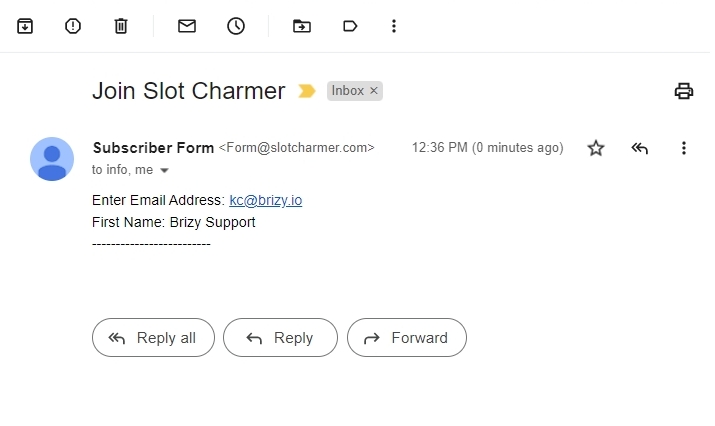
- Yes; you can send out Email Notification through WordPress/SMTP along with Mailjet. I have configured your form to send out Emails to info@slotcharmer.com. I have also tested and confirmed that Email Notifications are being delivered. Please see the attached image for the email I have received from your form. I have set the 'From Email' to Form@slotcharmer.com. If you want to change this, please change it to something@slotcharmer.com. Please do not use a 'From Email' with a different domain than your website. Your hosting company Easy WP does not permit it. You can read more about it here.
You can find instructions on setting up WordPress or SMTP email notifications here.
- WordPress: https://support.brizy.io/hc/en-us/articles/360043678972-Email-Notification-via-WordPress
- SMTP: https://support.brizy.io/hc/en-us/articles/360043766792-Email-notification-via-SMTP
 0
0 -
Hi KC George,
Thank you for your assistance...The video was very helpful.
I see that info@slotcharmer.com is now getting the notifications, but the customer was not getting a notification that they subscribed. I thought this would be the normal situation...But I discovered that I could add their variable as a recipient email with a comma (,) in the first field, and it worked!
Thank you for your excellent support. I hope that I don't find many more bugs or difficult things!
Best, Barry
0 -
Hi KC George,
Ok, here I go, already running into more things at SlotCharmer.com:
1. I tried adding a "Menu" from the add-ons. It noted that I should use Wordpress to build my menu, which made sense. But when I tried to click, it said that this theme didn't support menus. I went into Appearance Editor and created a menu there, saved it, but it never populated into that space (maybe size?)
2. So, I made a draft home page for you to see.
3. Then, I created my own menu with text and graphics...That seemed fine except when you view the live, published site, there's an extra scroll menu/navbar (a "sticky" menu/nav bar) that stays top of page when the page is scrolled down. Love that feature in websites but don't see that in the Brizy editor, and don't know how to edit it, or how to turn if off IF I didn't want it (I do want it in this site though).
Help again (you still have access),
Barry
0 -
Update: I got the scroll-appearing sticky navbar to appear to update it in the Brizy editor on the home page after another revisit to that page, but not for the /videosubmissions/ page (?), but my updates on the home page are appearing on the /videosubmissions/ page as well, in that sticky navbar, but I'm not sure why (if it's global or something), so I still don't know where it is or how to turn if off or on for the site or by page.
Barry Lippold
0 -
HI Barry,
The classic WordPress menu was not available to you because you were using the Twenty Twenty Two theme. I have changed your theme to Twenty Twenty One and have created a menu and have added two of your pages to it.
I have also added the menu to your header and made it global. When you are adding a new page, either you can manually add the header from the Global blocks or add a Display Condition to automatically add the header to all pages.
Please have a look. If you have any further questions, please get back to us and we will be happy to help. Feel free to look at this video too https://youtu.be/qY7xjLbyr2I
0 -
Thanks!
Well that's interesting that the default theme didn't have menus, but allowed me to edit one!
A couple of followups:
1. How did you get the "Appearance" menu in WPAdmin to show all the options like it was previously, like "Menu"? Before, it was only showing "Themes" and "Editor (beta)"? Was that also based on the theme, or what did you do to expand that menu? I like it to be like it was before in all of my installations!
2. I made the header global from the /videosubmissions/ page, but the home page doesn't have a "sticky" option when I scroll (it doesn't seem to be a menu). How do I make it so, or get the menu from /videosubmissions/ to appear there?
Thanks again for your amazing support as we're learning! - Barry
0 -
I was working in the plugin and I got signed out.. Now a menu is missing and a whole page (/videosubmissions/) is missing its content!
Were you working at the same time? How do I recover? (undo didn't do it!)
:( Barry
0 -
I recovered /videosubmissions/ via wordpress versions, but the Brizy builder is still not showing the content when I click "edit" ???
So, it's uneditable in Brizy at this moment (!) ... See the live screenshot comparison...Live on the left, the same page in Brizy.
Please advise, AND on my previous 3 emails.
Thank you,
Barry
0 -
Also, I have another question...
How do I add the sticky navbar menu to the /contact/ page? Choosing the global menu applying to that page didn't seem to work, and that's what damaged my page (or you working in there?) in the first place.
Thanks,
Barry
0 -
Hi Barry,
1. How did you get the "Appearance" menu in WPAdmin to show all the options like it was previously
The twenty twenty two theme is a block theme and you develop the menu following a different process. Appearance - Menu option came back when I switched to the twenty twenty one theme. If you like the previous way of creating menu, please stick to this theme.
2. I made the header global from the /videosubmissions/ page, but the home page doesn't have a "sticky" option when I scroll (it doesn't seem to be a menu). How do I make it so, or get the menu from /videosubmissions/ to appear there?
When you add a Display Condition to show the header block on all pages, it will automatically show on all pages. I have done this for you. Now the header from the /videosubmissions/ page shows on the homepage as well. To learn more about Global blocks and Display Conditions, please have a look at this video. https://youtu.be/4bjtTi67uv4
I was working in the plugin and I got signed out.. Now a menu is missing and a whole page (/videosubmissions/) is missing its content! Were you working at the same time? How do I recover? (undo didn't do it!)
I am sorry to hear this. I wasn't working when this happened 2 hours ago. The page is missing in the editor now. Looks like you may have to recreate it.
Please setup automated backup using the Backup Migration plugin you are using. In case if you have data loss, you can always recover from your backup.
0 -
Hi KC George,
Thanks again for your very organized detail. The weird thing was that after the block problem happened, I reverted Wordpress versions of the page to two days ago. I visually saw the page was correct live, but when I tried to edit in Brizy, the content block was missing. I tried another browser in case it was cache, but still, Brizy wasn't showing the content. And as soon as I clicked "update", the reverted was missing the content again. It was frustrating, but I rebuilt the page and now it's fine, but I still don't understand why the wordpress versioning/reversion didn't work (and you didn't mention that either). I setup Backup Migration to do auto backups, per your advice. But please let me know if I can't use previously saved WP versions of the document with Brizy, even though it was created in Brizy.
Another question: How do I change the lines (thickness and colors) and text color in a form element? I tried to edit them, but the text controls | color is not effecting the text, and the borders of the form box are very faint. See /contact/ I'm always concerned about website accessibility and readability.
Thank you,
Barry
0
Please sign in to leave a comment.
Comments
14 comments