Pop to Logged in User

Hello,
I wish to show a popup once to a logged in user? I do not see a membership option and conditions seem to permit to hide to logged in user but not hide to guest or not logged in. Can I show a pop up once to logged in only user?
Thanks!
-

Hi Brian,
We are sorry; our popup display conditions do not allow you to show a popup only to logged in users.
Please think about this work around. If you have one page for non-logged in users and if you redirect logged in users to another page, then you can use this display condition for your popup.
 0
0 -
Great and thank you. Is there a way to open a Brizy popup from a non Brizy page? I don't suppose a popup can be opened by a link? Thanks
0 -
Hi Brian
You can design a pop up in Brizy Cloud and embed it into a non Brizy website. Here is the procedure. https://support.brizy.io/hc/en-us/articles/360040773411-How-to-embed-an-External-Popup-on-your-website
You can also design an On-click popup in Brizy. To create an On-click popup, drag and drop a Text, Icon or Button element into your page, click on the Link option and choose Popup.
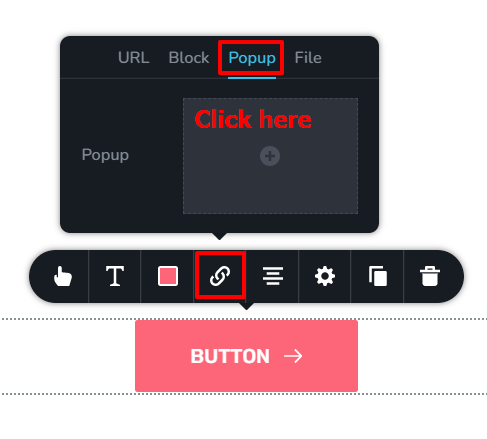 0
0
Please sign in to leave a comment.
Comments
3 comments