"Post Excerpts" displaying HTML on front end

Hi Brizy. We have a problem here on a site, where I have added custom post type, and then added the "Post Excerpts" blog trough "Posts" inside Brizy.
But there is some HTML being displayed on frontend. It seems to be the same as here: https://support.brizy.io/hc/en-us/community/posts/360074214571--Post-Excerpts-displaying-code-on-Front-End
I have tried to disable all plugins, but nothing is working. I can't add CSS classes to this, and the HTML code are with errors if I see inside console in browser.
Can you guys help us?
http://test2.mark-storm.dk/
Look in the bottom where:
class=”brz-css-tztlw brz-wrapper”>
Is being added
-

Hi Stefan
In the Post element, may be you have dragged and dropped the Text element and typed #post excerpt. Instead of this, please try this and see if it helps.
- Delete #post excerpt from the Text element
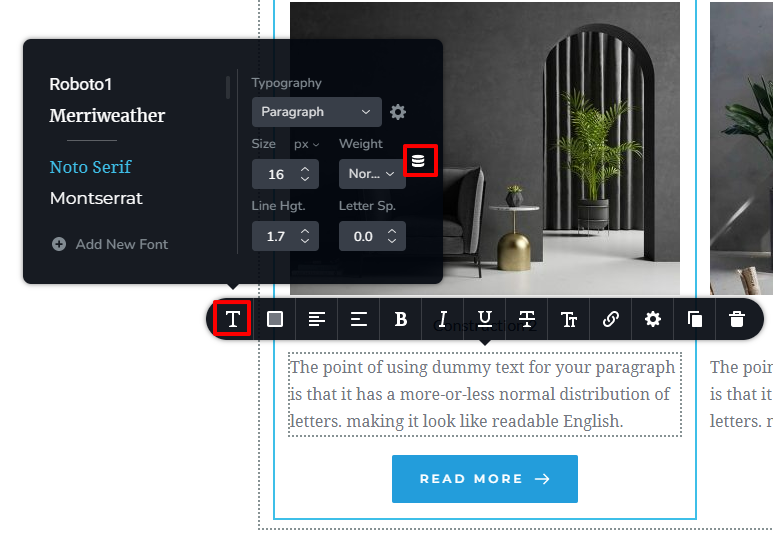
- Click on the Text element and select the Typography icon
- Click on the "Database" icon
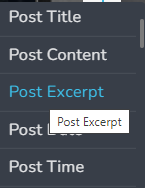
- Select "Post Excerpt"
 0
0 -
Hi there. Thanks for the quick support. This is working ;)
0
Please sign in to leave a comment.
Comments
2 comments