Remove duration

-

Hello,
Thank you for contacting us.
Can you please explain what exactly do you need to remove? What is the produce? Can you please send some screenshots so we could understand your issue?
Best regards, Nelea.
0 -
Hi Nelea, The product is an appointment for a 30min booking to undertake an assessment of a property. As you can see from the below it shows the duration of the booking by the price however we would not like this to be displayed. It is not so much of a problem on mobile but on desktop, which most of our visitors are using, the appearance isn’t great. We are using a front end tool (yellow pencil) to remove the duration but any new pages launched or updates to any page will bring the duration back, we then have to do the front end editor again on each page which is time consuming and this is actually also adversely affecting our SEO performance, so we’ve been told by our specialist. I hope you can appreciate our position and help us to resolve this issue. Thanks, Alam
0 -

Hi Alam
We are looking at your question in the Brizy Community Forum and we cannot see your screenshots. Please click on this link to see the forum page. https://support.brizy.io/hc/en-us/community/posts/5082478306577-Remove-duration.
Can you give us a link to your website so that we can see the problem ourselves? You can also attach screenshots in this Forum at https://support.brizy.io/hc/en-us/community/posts/5082478306577-Remove-duration.
0 -
Hi, The website is www.surveyingpeople.com Thanks,
Alam
Sent from my iPhone
0 -
Hi Alam
I have taken a look at your website. Please watch this video for what we have understood so far. https://jmp.sh/TRdOgrb
0 -
Hi, As mentioned, we use a front end editor plug-in called Yellow Pencil to remove the durations but I’ve just published a page for you to see what happens; www.surveying people.com/epc-landing-page-5/ As you can see this is what it looks like before we manually remove the durations from every product on every page which is very time consuming. Hoping you can help!
Thanks,
Sent from my iPhone
0 -
Hi Alam
I am not sure how you are displaying the price and the duration in this page. You should be able to disable the duration at the WordPress backend. Since I don't have access to your backend, let me suggest a CSS solution.
In the WordPress Dashboard under Appearance - Customize- Additional CSS, paste this code and see if the duration gets hidden.
.price .duration {
display: none;
}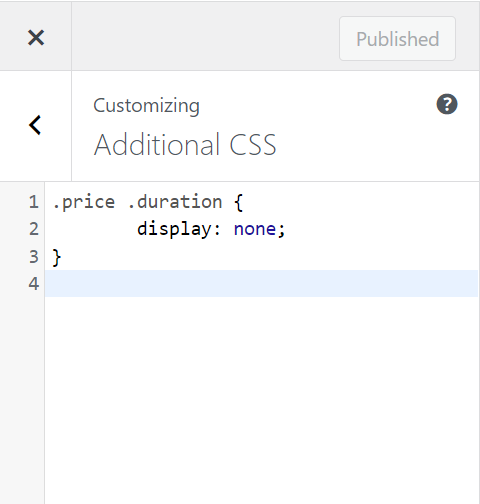 0
0 -
Thanks for the suggestion however, this has not helped. Thanks, Al Sent from my iPhone
0 -
Hi Alam
From your WordPress Dashboard under Plugins, can you please let us know the Woocommerce booking plugin you are using?
0 -
Hi, I am using; Woocommerce Appointments by Booking WP
Thanks,
Al Sent from my iPhone
0 -
Hi Alam
I went through Woocommerce Appointments by Booking WP documentation. I could not find much information about turning off the appointment duration. I will need to take a look at your WordPress Dashboard to help you further
Please add me as a user to your WordPress Dashboard. My email: kc.george@brizy.io. Please enable the option "Send the new user an email about their account" as in this screenshot https://jmp.sh/tSRznJX
Once you have sent me an invitation, please let me know here.
0 -
Hi, You’ve been setup with a user account, please confirm receipt.
Thanks, Al
Sent from my iPhone
0 -
Hi Alam
I logged into your WordPress Dashboard. I could not find an option to turn off of duration along with price. In the Product listing page, you can see that duration is always listed along with price. https://jmp.sh/8bdT4He Please check with Booking WP Support about how stop displaying duration along with Product price.
There was a mistake in the CSS code you had pasted (a dot was missing). I have corrected the mistake and now the duration does not show along with price. Please check
0 -
Hi, That’s great news! Thanks for fixing this - it will save us so much time. Have a great day.
Al
Sent from my iPhone
0
Please sign in to leave a comment.
Comments
14 comments