Products vanished from WooCommerce shop page but page remains.

Hi:
My theme is Blocksy on WP hosted by Namecheap. Have Brizy Pro. I built Brizy product listing template and individual product template. All worked fine for months. Added 1 new product today and all products vanished from product listing and, of course, from individual product pages. But if I revert to theme default all reappear, though shop listing page in particular is not attractive.
Tried deactivating/reactivating plugins, updated 1 plugin that had failed to auto-update, checked WC and WP settings, cleared Chrome cache, checked permalinks. Nothing brought back Brizy templates. The templates themselves are there and seem fine. Also Blocksy just updated.
Site: www.goodgranary.ca
Any suggestions appreciated.
Lydia
-

Hi Lydia,
now I can see the products on your page. So the problem appears when you activate the Brizy Template for the shop page? Can you please confirm that we are talking about the latest Brizy versions - Free 2.3.33. and PRO 2.3.26? Once confirmed, I will create a private ticket for you and we will inspect the issue on your dashboard.
0 -
Thanks for the quick reply.
I Have Brizy Pro Version 2.3.33. Yes, the products appear when I go to the default for the Blocksy theme. Then the products come back, obviously not through the Brizy template, so the look is not the same. But it still works.
Lydia
0 -

Hi Lydia
if you want us to take a look at your WordPress backend and help you fix the issue, please add me as a user to your WordPress Dashboard. My email: kc.george@brizy.io. Please enable the option "Send the new user an email about their account" as in this screenshot https://jmp.sh/tSRznJX
Once you have sent me an invitation, please let me know here.
0 -
Hello Kc: Happy to add you to account. Also, I gave you the wrong Brizy version; I have 2.3.26. Lydia
0 -
Hi Lydia
I looked at your WordPress Dashboard. For some reason, the shop page would not switch to the Brizy Shop Template. I deleted the Shop page and recreated it. Now https://goodgranary.ca/shop/ seems to be showing the Brizy Template. Please check if everything is working fine.
0 -
Thanks so much. What you did was well beyond my capabilities so I really appreciate your efforts and your time to help me. The shop looks fine now. Best regards, Lydia
0 -
Hi KC: Sorry to bother you again, but I am trying to reorder the products so they appear more mixed on the front-end Shop page. I tried "sorting" and can get the to list to reorder on the back end but they stayed the same on the front end. I then tried giving individual products different menu order numbers. For example the most recent product I added was Sampson Wheat. But I set it as 12 on the "Edit Product - Product Data - Advanced - Menu Order" setting. I figured it would appeared lower on the product page is the first product showing (because it's the last thing I uploaded). Is WooCommerce not recognizing my new Shop page? Or am I doing something wrong? I must be doing something wrong because when I fixed my menus (that no longer listed "Shop"), adding the new page worked perfectly. Is it somehow different for what I am doing now with rearranging the products? Really hoping this is a simple question. Thanks again, Lydia On Mon, Mar 28, 2022 at 11:24 AM Lydia wrote: Thanks so much. What you did was well beyond my capabilities so I really appreciate your efforts and your time to help me. The shop looks fine now. Best regards, Lydia
0 -
Hi Lydia
You can order products in your Shop based on ID, Title and Date. Here "Date" means the date of publishing the product.
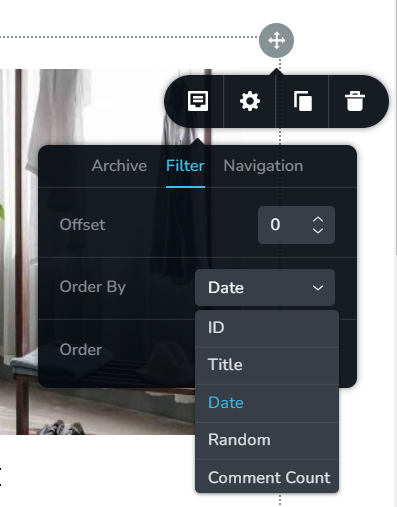
Please watch this video I had recorded for another client yesterday. In this video, I am discussing how you can use Publishing Date to order your Woocommerce products. https://www.loom.com/share/260521a1ed954c2b94d4b2e5d49a8820
After watching if you still have questions, please let me know
0 -
Hi KC
My Shop page has vanished. I thought it might be related to a bunch of fixes WooCommerce made, but they checked and said all their pages are working fine. Of course, with no Shop page, no way to access them. Pretty urgent as sales are stopped dead. Hoping to hear from you soon,
Lydia Early
0 -
Hi Lydia,
This is happening for the second time? It had disappeared once and I had recreated your shop page.
Can you please give me access one more time? The fourth comment from the top in this thread has instructions to add me as a user to your WordPress Dashboard.
0 -
Hi Lydia,
I have restored your shop page. I had to delete the Shop page and recreate it. Its working fine now.
I have also installed WP Vivid backup plugin. I wanted to take a backup before making changes to your project. I have also scheduled a weekly backup for you. If something breaks in the website, you can quickly restore your website from a earlier backup.
I have also changed your theme to Blocksy for testing. If you like you can keep this theme or change it back to Neve.
0 -
Hi KC:
I added you as a user for goodgranary.ca.
Thanks,
Lydia
0 -
Hi Lydia,
Have you not seen my earlier message that I have already fixed your shop page? Click on this link and check my reply. https://support.brizy.io/hc/en-us/community/posts/5015089704721
Please check https://goodgranary.ca/shop/
0 -
Hi KC:
I do see the "new" Shop page in the WP backend. Thanks.
It wasn't appearing in the menu but I fixed that. It all seems perfect now (fingers crossed!). Thanks for adding the automatic backup. Good idea. Thanks again,
Lydia
0
Please sign in to leave a comment.
Comments
14 comments