SSL certificated stop working (Urgent!)

Hello, my SSL certificate on www.healthglobal.life doesn't work anymore.
Please help.
-
Guys, 11 hours - no reply!
0 -

Hi,
Thank you for contacting us.
The SSL certificate was already propagated. We are sorry that we waited so long, usually, the SSL takes up to 24 hours to propagate. Let me know if you have any additional questions.
Best regards, Nelea.
0 -
Hello,
I have the same problem again with SSL and also I need to make my website work without "www",
how can I do it?
Thank you.
0 -
Hi,
Thank you for your message.
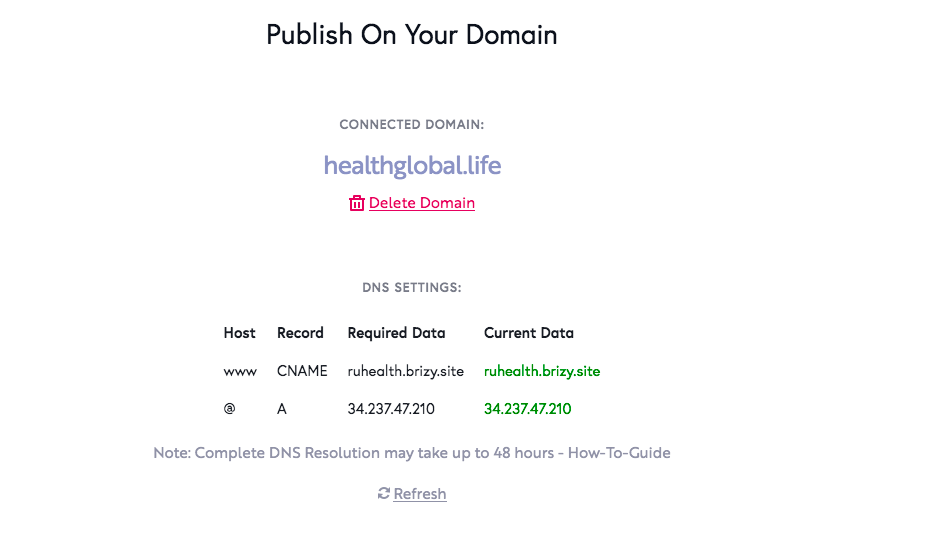
Could you please send us a screenshot of DNS settings from the domain registration? Did you follow all these steps https://support.brizy.io/hc/en-us/articles/360041764052-Custom-domain-A-Record-Redirect .Could you please check if you set up the AAAA record? If you have set up it, could you please delete it? Are the records in the project settings green? This is an indicator that the configuration was done correctly. If so, please send us a screenshot and the URL of your project.
Best regards, Nelea.
0 -
Hello,
Yes all settings DNS were set and domain worked correctly in past.
Screenshot is in attach.
 0
0 -

Hi,
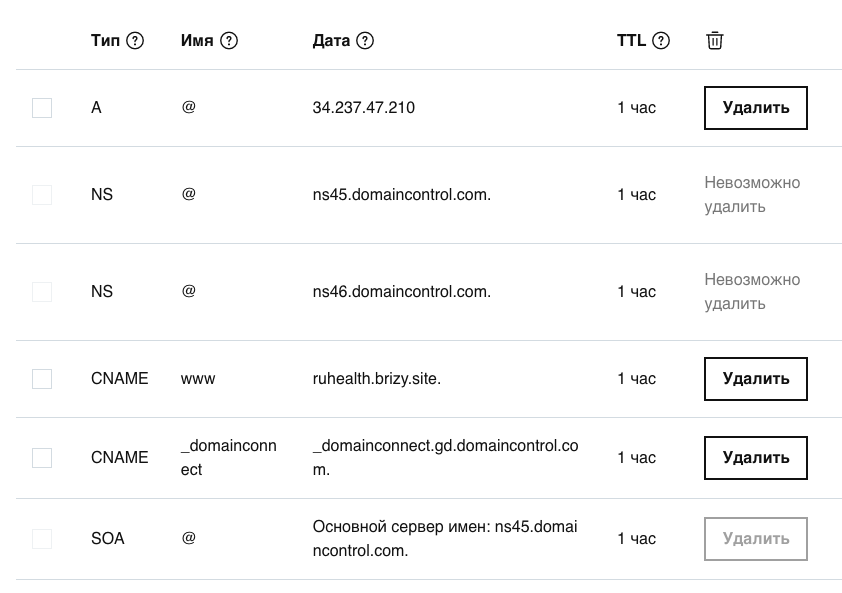
it seems that you have two A records for this domain: https://jumpshare.com/v/NsVfTky3CFAWyvS3Xsr8 You only need to have one A record for SSL to work. Please delete the 34.102.136.180 so that only the one from Brizy remains.
0 -
Hello,
Thanks for your reply. but I don't see this record (34.102.136.180) in my hosting admin panel.
Please check screenshot:
 0
0 -
Hi Alexander,
We already fixed the problem with SSL and now all is working fine.
The page is secured - https://jumpshare.com/v/HrNIiOgC1jRZ7VbppSG4
Best regards, Nelea.
0
Please sign in to leave a comment.
Comments
8 comments