Links to blocks not working

Several of my pages at fcgweb.com have stopped working properly. The links to blocks on the same page no longer work. An example page is https://fcgweb.com/acoustics/
I can see in the Status panel that the links are OK and are being seen by the browser, but none of them work.
What has happened to cause this?
-

Hi,
Sorry for late reply, support was limited these days.
I tested how anchor links work with latest update and everything is working as it should.
Please, make sure that you are using latest versions of Brizy (Brizy Free 2.3.13 and Brizy Pro 2.3.11). Also, please, clear browser cache and check if page will loaded correctly. If not, please, open your Home page in Brizy editor and click "Update" button. After that check how your Home page appears in live view.
Best regards,
Denis.0 -
My home page is not the issue. The problem is on pages that have internal links to blocks on the same page. I have the latest versions of Brizy, Brizy Pro, and all other plugins. I updated one of the pages that have such links, but the problem still persists. Examples are https://fcgweb.com/electronics/ , https://fcgweb.com/amplifiers/. and https://fcgweb.com/acoustics/
You can see in the Status bar that the links show a block ID or Name in the link, but the link does not function.
0 -
It seemed that my pages were now working! But after refreshing them, the internal links do not work. They used to work, so perhaps I was working with a cached page. Pages currently do not work as they should.
0 -
Hi Forest,
I tested this page again right now and still do not see any problem with anchor links as everything works correctly even after refreshing the page. I've recorded my screen to show that everything works correctly: Video.
Best regards,
Denis.0 -
Thanks, Denis. This strange off and on behavior may be due to problems with the shared server I am using. As you demonstrated, and as I verified again, the pages are working now.
I want to thank you for the speedy responses to my requests for help!
0 -
Hi Forrest,
No problem. Great to know that everything works fine.
If you will have any other questions, please, feel free to ask.
Best regards,
Denis.0 -

Hello,
on the top bar I have three bottoms linked to specific blocks inside the page. No one is working, could you please verify?
Here after the link page https://www.mitbox.it/
best regards
0 -

Hi,
did you use the "link to block" option? Try to add a name to your blocks: https://jmp.sh/QwmyJYP From what I see the buttons on your page contain ids that do not exist on any of the blocks on the page.
0 -
Hi I did but is not working. I tried to do it again naming the blocks but nothing has changed
0 -

Hi Alessio
If you would like me to take a look at your project and help you fix the anchor links, please send me an invitation as a Team Member with Manager privilege . https://support.brizy.io/hc/en-us/articles/360036481071-Team-Members-Roles
0 -
Hi, invitation sent. Please focus on "Landing Page" project. Kind regards
0 -
Hi Alessio
The column that has three buttons was linking an an anchor link earlier. Hence irrespective of the links you add to the buttons, the entire column was linking to the wrong link.
I have removed the anchor link attached to the column. Under Block settings - Advanced tab, you can see the name of each block I have used. I have added a link like in this image to each button.
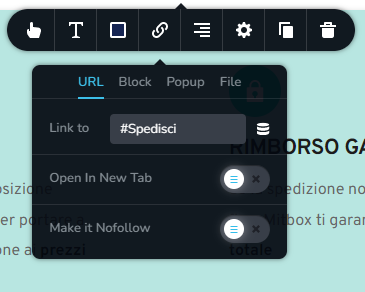
Please check if the links works fine
0 -
Yes! Thank you very much Alessio SPAM"
0
Please sign in to leave a comment.
Comments
13 comments