Email Not Sent Error Message on Contact Form (Brizy Plugin Wordpress)

Hello, I am having issues with the email not sending when I selected the Gmail Option for the Contact Form using the Brizy Plugin for Wordpress. I followed the steps with the two-step verification to get a password through my Gmail, but when I try to send a test email, it says the email was not sent. Please let me know what I can do to resolve the issue and thank you for your time.
https://deziraesmithdesigns.com/contact/?preview_id=3213&preview_nonce=1b8fe18124&preview=true
-

Hello Dezirae,
When testing the contact form on your website (https://deziraesmithdesigns.com/contact/), we encountered the following authentication error:
Request is missing required authentication credential. Expected OAuth 2 access token, login cookie or other valid authentication credential
You can see the error in this screenshot: View error screenshot. This error suggests that Google is rejecting the authentication credentials configured for sending email notifications.
Please check your Brizy form's Email Notification configuration and make sure you've entered the following:
-
Username: Your full Gmail email address.
-
Password: Your Google App Password (not your regular Gmail account password).
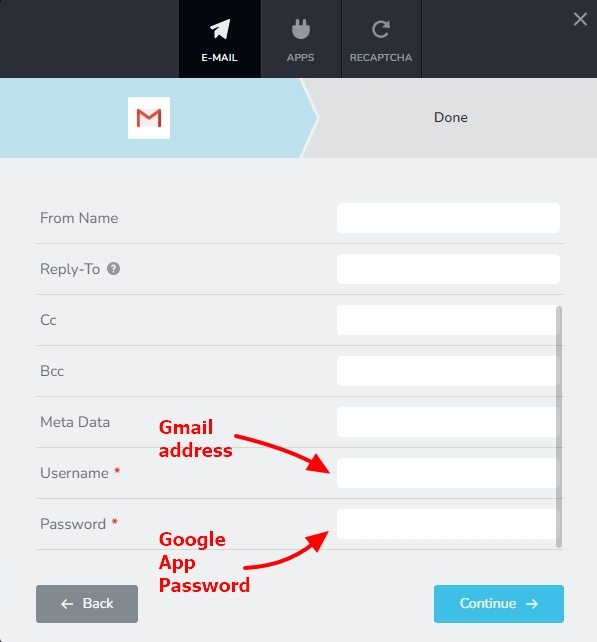
Once you've verified and updated these settings, please submit the contact form again to see if the issue is resolved.
If you're still encountering the error after updating your Gmail credentials, we'd be happy to take a closer look at your WordPress Dashboard and help troubleshoot the issue. To allow us to investigate, please create a temporary administrator account in your WordPress Dashboard and email the following details to communitysupport@brizy.io:
-
Support Forum reference: https://support.brizy.io/hc/en-us/community/posts/40731479041554
-
WordPress Admin URL:
-
Username:
-
Password:
Important: Please include a link to this support thread in your email. This will help us identify your request and associate the access details with the correct support ticket. Once you've sent the email, kindly let us know by replying to this thread so we can proceed with the investigation.
We appreciate your cooperation and will do our best to help you get your contact form working correctly.
0 -
Please sign in to leave a comment.
Comments
1 comment