website does not work after publishing and connecting to godaddy

Please check: https://www.drdavejenkins.com/
It was working generally previously on computers but not on mobile phones using vpn.
Now it seems to have an error with dns or ssl. "Your connection to this site is not secure"
"
This site can’t be reached
drdavejenkins.com’s server IP address could not be found.
Try:
- Checking the connection
- Checking the proxy, firewall, and DNS configuration
- Running Windows Network Diagnostics
-

Hello Mik,
We see the design below when visiting your website. If you recently changed your name servers from Cloudflare to GoDaddy, users may encounter the above error in some parts of the world, until the new name servers are fully propagated. The above error will disappear within 24-30 hours when the DNS propagation completes.
 0
0 -
Hi KC George, thank you for your reply. We have had ongoing issues since mid-July when I first published the website. It initially wasn't working on mobile phones using VPN and support here said it was working for them, so I did some research and found that DNS propagation using DNS checker showed that the A record for the domain was not resolving in many locations worldwide.
So I changed to Cloudflare to see if it would resolve it, but it did not. So I changed back to GoDaddy.
Could you please confirm:- Are there any known VPN-related access restrictions or IP blocks on Brizy Cloud infrastructure?
- Could there be DNS propagation issues or configuration problems on your end affecting accessibility?
- Is there any additional setup required to ensure reliable access for VPN users?
0 -
Hello Mik,
Let me answer your questions.
- Are there any known VPN-related access restrictions or IP blocks on Brizy Cloud infrastructure? Brizy Cloud websites are usually available when accessed over a VPN. We have not received complants about VPN access from other users.
- Could there be DNS propagation issues or configuration problems on your end affecting accessibility? DNS propagation issues can affect any website, not just Brizy Cloud websites. We use a web application firewall and some uninteneded users could get blocked. We need to investigate this on a case to case basis.
- Is there any additional setup required to ensure reliable access for VPN users?. No addtional setup is required from your side to make a website accessible over VPNs.
Please follow these steps.
- Kindly wait till DNS Checker shows GoDaddy Name servers in all available locations around the world at https://dnschecker.org/#NS/drdavejenkins.com
- Check the website using a VPN to see if it is inaccessible from any location.
- Share with us the name of the VPN provider and the specific locations from where the website is inaccessible.
Once we hear from you, we will investigate this issue.
0 -
Still doesn't work on mobile using VPN - specifically Nord VPN. I tried Argentina, Los Angeles, Sydney, New Zealand, Amsterdam, etc and they all just say "This site can't be reached. DNS address could not be found." This has been the same issue since I first reported it July 18th (I was told then that it worked fine).
0 -
Hello Mik,
Kindly follow the troubleshooting steps suggested at https://support.nordvpn.com/hc/en-us/articles/20095679510801-I-can-t-access-websites-or-apps-are-not-working-with-NordVPN. This will help identify if the issue is on Nord VPN side. Kindly get back to us with your findings.
0 -
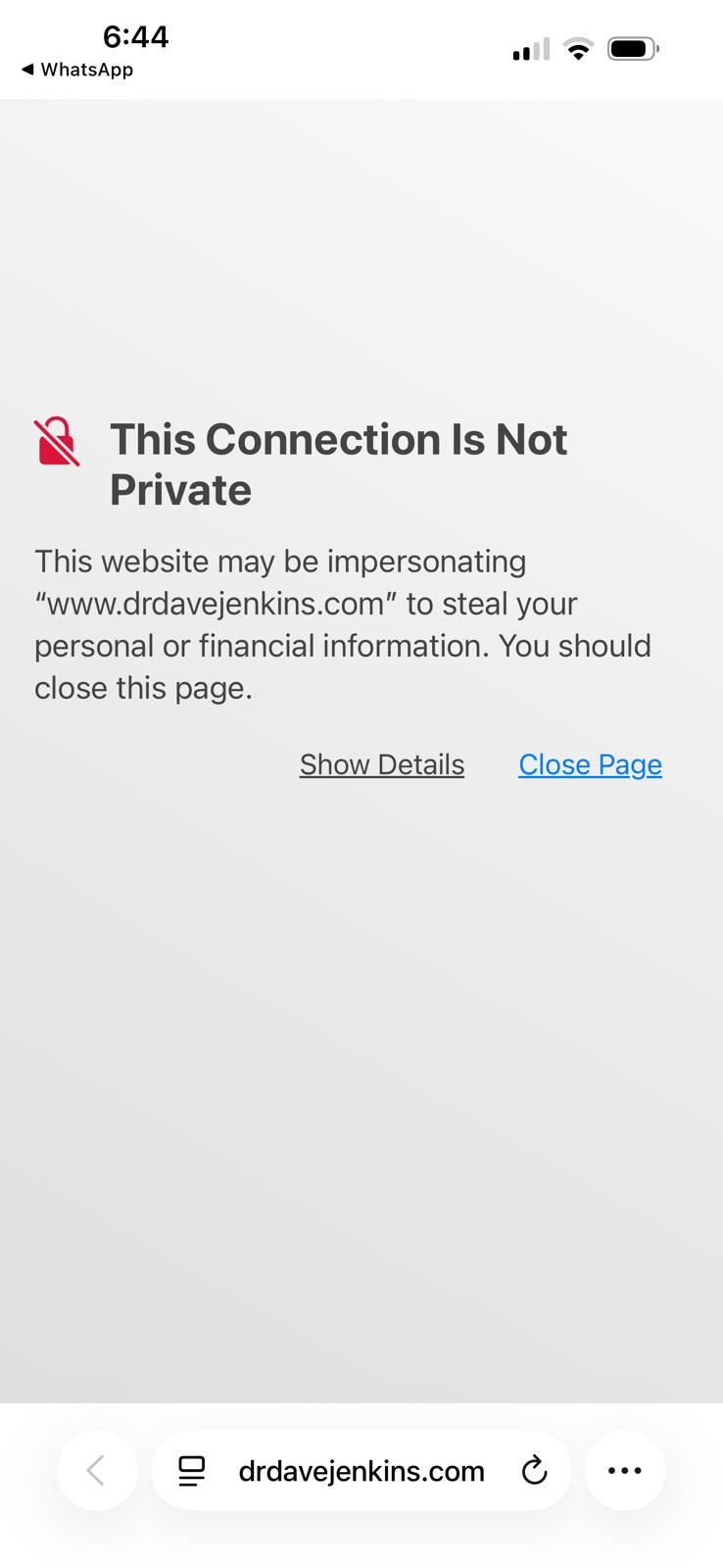
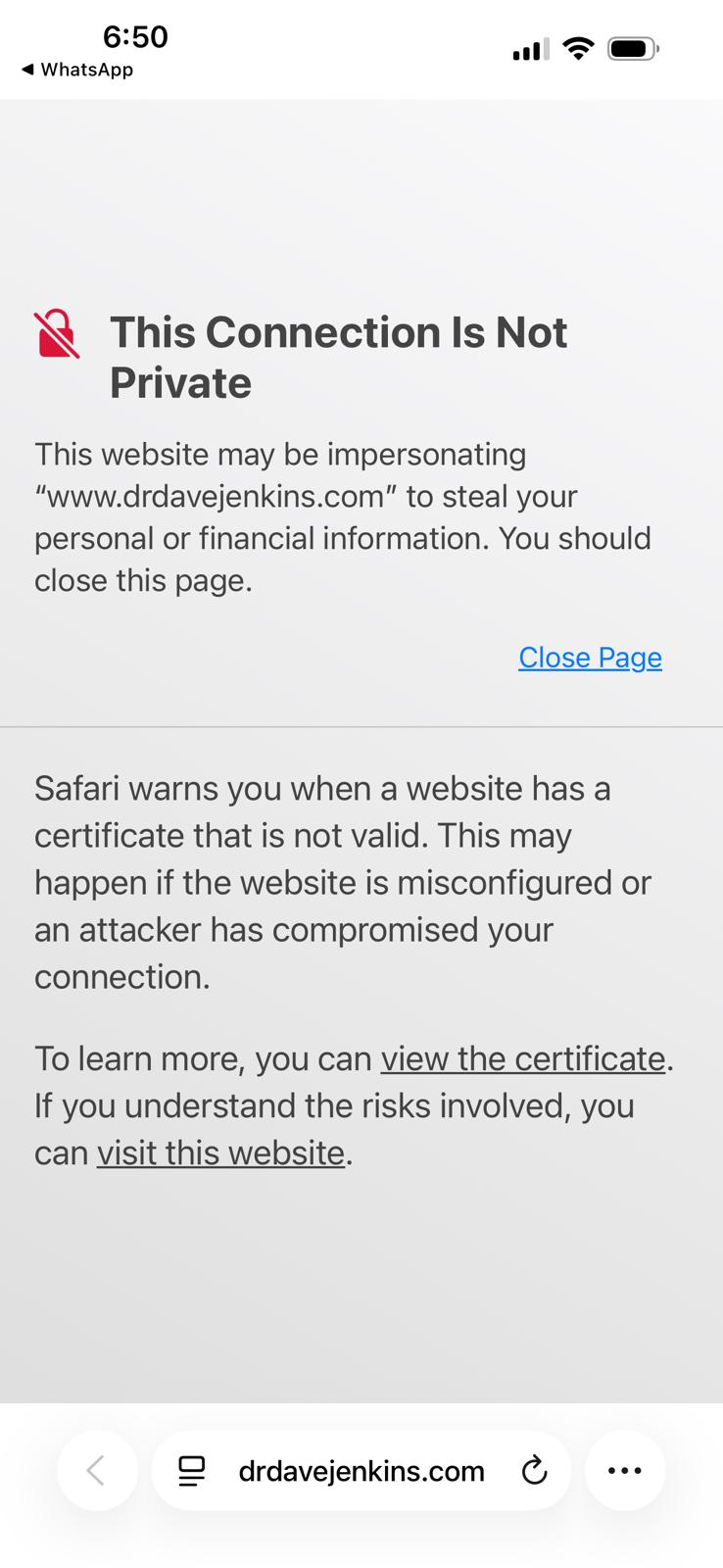
Tested all their links/tests and it's fine. I've had friends test it from various locations - just like in July, some work fine others don't.
Even without VPN. Here's one from a friend (no vpn).
 0
0 -
 0
0 -
Hello Mik,
I used these services to check your website's SSL certificate and and they confirmed that it is valid.
- https://www.ssl.org/
- https://www.sslshopper.com/ssl-checker.html#hostname=https://www.drdavejenkins.com/
- https://www.geocerts.com/ssl-checker
Kindly request your friends to access your website from an altenate browser (other than Safari) and check if the error persists. If the above error is specific to Safari browser, request them to follow the solution provided at https://discussions.apple.com/thread/255057550?sortBy=rank
0 -
Hi KC George,
Can you please check this site: https://www.ssllabs.com/ssltest/analyze.html?d=www.drdavejenkins.com
It shows some issues and potential solutions. Is there anything we can do about it?
1. Cipher Suite Weakness and Compatibility
- The server is supporting a weak cipher suite (TLS_ECDHE_RSA_WITH_AES_128_CBC_SHA) with SHA-1 and CBC mode.
- Some modern clients, including Safari on iOS and some VPN clients, may reject weak or deprecated cipher suites for security reasons.
- If the client refuses all available cipher suites offered by the server, the TLS handshake fails, causing connection failure.
2. Protocol or Cipher Suite Mismatch with Java Clients
- Though Java clients are different from mobile browsers, this mismatch indicates the server’s TLS settings might be too restrictive or incompatible.
- Mobile Safari and VPN clients often have strict TLS requirements similar to modern Java clients.
- If your server only supports certain cipher suites incompatible with these clients, they cannot establish a secure connection.
3. Session Resumption Not Working
- While session resumption itself won’t outright block connectivity, its absence can lead to longer connection times and in some cases timeouts on slower or unstable networks such as VPNs or mobile data.
- This can worsen user experience or cause perceived failures.
4. SNI Requirement
- Combined with the above, if clients do not fully support SNI or your server doesn’t handle non-SNI clients well, connection failures will increase.
- NordVPN’s network or certain mobile Safari versions might be affected by this.
Conclusion
- The weak cipher suites and protocol mismatches are very likely contributors to the site not working on NordVPN mobile apps and Safari on iPhones.
- These clients tend to enforce stricter security than desktop browsers or other environments.
Recommended Next Steps
- Disable weak cipher suites like TLS_ECDHE_RSA_WITH_AES_128_CBC_SHA.
- Enable modern cipher suites with AES-GCM and SHA-256 or better.
- Ensure TLS 1.2 and 1.3 are enabled and preferred.
- Test your site again using SSL Labs to confirm improvements.
- Check session resumption settings to improve connection stability.
0 -
Hello Mik,
SSL Labs graded your website's SSL certificate with an A+.
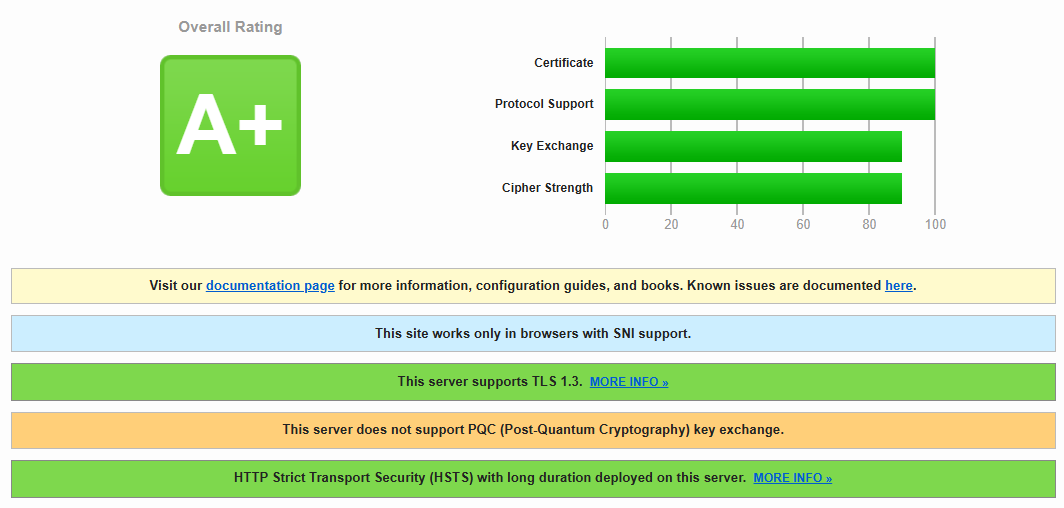
We will escalate these two suggestions from the AI agent to our developers and will investigate the possibility of implementing them.
- Disable weak cipher suites like TLS_ECDHE_RSA_WITH_AES_128_CBC_SHA.
- Enable modern cipher suites with AES-GCM and SHA-256 or better.
0 -
Hi KC George, was your team able to find out what's causing the issue on mobile devices? We've now embarrassingly had several people at a conference unable to access the website from their mobile phones.
0 -
Hello Mik,
We haven’t been able to identify a definitive cause of the issue yet, but we’ve found a potentially helpful lead that may bring us closer to a solution. Another Brizy customer experienced a similar issue, which appears to have been resolved after removing an additional A record pointing to an external server. You can review the discussion here: https://support.brizy.io/hc/en-us/community/posts/38271153342610
To help us narrow down the possible cause, we also recommend checking your domain’s DNS propagation using these tools:
Based on our checks, your domain is resolving correctly in most locations worldwide, but some locations are still reporting inconsistent results. This inconsistency could be contributing to the accessibility issues you’re experiencing, although we’ll need further investigation to confirm whether it is the underlying cause.
Our recommendation is to contact GoDaddy, your domain registrar, and ask their team to review your DNS configuration, particularly your A records, to identify and resolve any inconsistencies. Resolving any DNS inconsistencies would help us narrow down the potential causes and determine the most appropriate next steps toward resolving the issue.
0 -
Hi KC George, interesting, that website thetwistedgrin doesn't work on either of my mobile devices on Chrome, Brave, Duckduckgo, Firefox.
It only works on Opera on mobile (same with my site). So his issue hasn't been resolved either. I'll check with GoDaddy now (edit: there's only one A record, but I'll ask them to check for any DNS inconsistencies).0 -
Hello Mik,
When checking your domain’s DNS propagation using NSLookup.io – Check DNS Propagation, you will notice an A record pointing to the IP address 51.15.69.11.
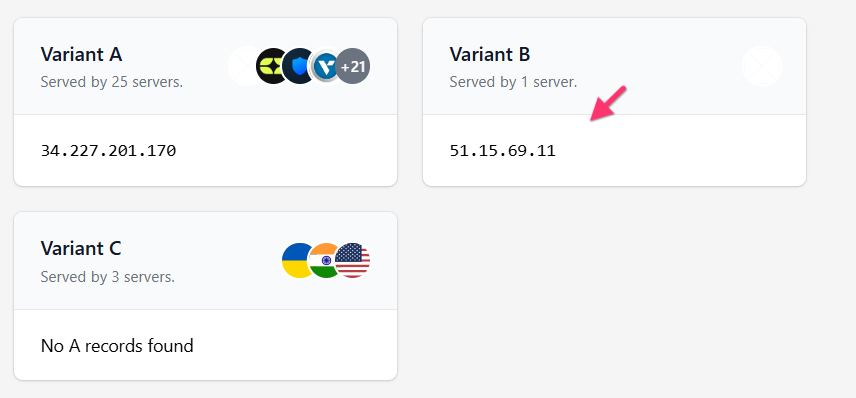
Could you please request GoDaddy to investigate the source of this IP address and determine whether it is associated with an outdated or unintended DNS record? They may be able to help you remove it. Resolving this could help address the inconsistent DNS results and bring us closer to identifying the cause of your website’s accessibility issues. Please let us know what GoDaddy finds.
0 -
Thanks KC George.
This is what GoDaddy said:What stands out is that DNS is resolving normally and the site is loading, so this does not look like a phantom DNS record by itself. It looks more like mixed website setup, the root domain on one target and www on Brizy, or a Brizy mobile behavior issue. Before changing that A record, Brizy needs to give the exact apex/root value they want for drdavejenkins.com, because removing or changing it blindly could break the non-www version of the site.
-----------My reply:
They sent me this link and say Variant B needs to be removed: https://www.nslookup.io/domains/www.drdavejenkins.com/dns-propagation/a/
Variant A 34.237.47.210 should be the only one
------------Got the detailsChecked your domain and DNS settingsAiro at 03:49 PM, October 23I checked that specifically. There is no extra GoDaddy A record for www to remove.
Right now your DNS is:
-
@ points to 34.237.47.210
-
www is a CNAME to antelopec1d86382.brizy.site
So if nslookup.io shows an A record for www, that's coming from the Brizy target resolving externally, not from a second hidden A record in your GoDaddy DNS. In other words, GoDaddy is not serving a duplicate www A record here.
------------
ThenWhat GoDaddy is finding is that the IP Brizy is asking about is not coming from an outdated hidden record in your GoDaddy DNS.
For drdavejenkins.com, the zone only shows:
-
root/@ A record to 34.237.47.210
-
www CNAME to the Brizy hostname
When a lookup tool checks www, it follows that CNAME and then shows the IP address that Brizy's target resolves to. That IP is downstream of the CNAME target, not a separate GoDaddy A record that can be removed from your DNS manager.
So the useful reply back to Brizy is:
"GoDaddy confirmed there is no duplicate or hidden A record for www in the DNS zone. The only records are @ -> 34.237.47.210 and www -> CNAME to antelopec1d86382.brizy.site. The IP seen for www in nslookup is the resolved IP of the Brizy CNAME target, not an extra GoDaddy DNS record."
Since Brizy also confirmed www should remain a CNAME to their hostname, the DNS setup they asked for appears to already be in place. That points the next investigation back to Brizy's platform or to how the root domain and www are being handled in their service, especially since the issue is mobile-specific rather than a general DNS failure.
0 -
-
Hello Mik,
Thank you for having GoDaddy review your DNS configuration and confirming that there are no additional A records pointing to 51.15.69.11 for
www.drdavejenkins.com. We appreciate your help in investigating this issue.I’ve also checked the DNS propagation for your Brizy Cloud subdomain,
antelopec1d86382.brizy.site. You can review the results here: Check DNS propagation for antelopec1d86382.brizy.site. The results do not show 51.15.69.11 among the resolved A records. This suggests that the IP address is not being returned through DNS resolution of yourbrizy.sitesubdomain.However, when checking your root domain,
drdavejenkins.com, the IP address 51.15.69.11 still appears in the DNS propagation results: Check DNS propagation for drdavejenkins.com. Based on these findings, the IP address appears to be associated with DNS resolution for your root domain rather than your Brizy Cloud subdomain. We haven’t confirmed whether this is related to the accessibility issue, but it helps us narrow down the investigation.Could you help us with one more check? If you encounter the same accessibility error on a mobile device, please try looking up your root domain’s DNS records using the following tool: Check all DNS records for drdavejenkins.com
- Open the link above.
- Click Lookup DNS.
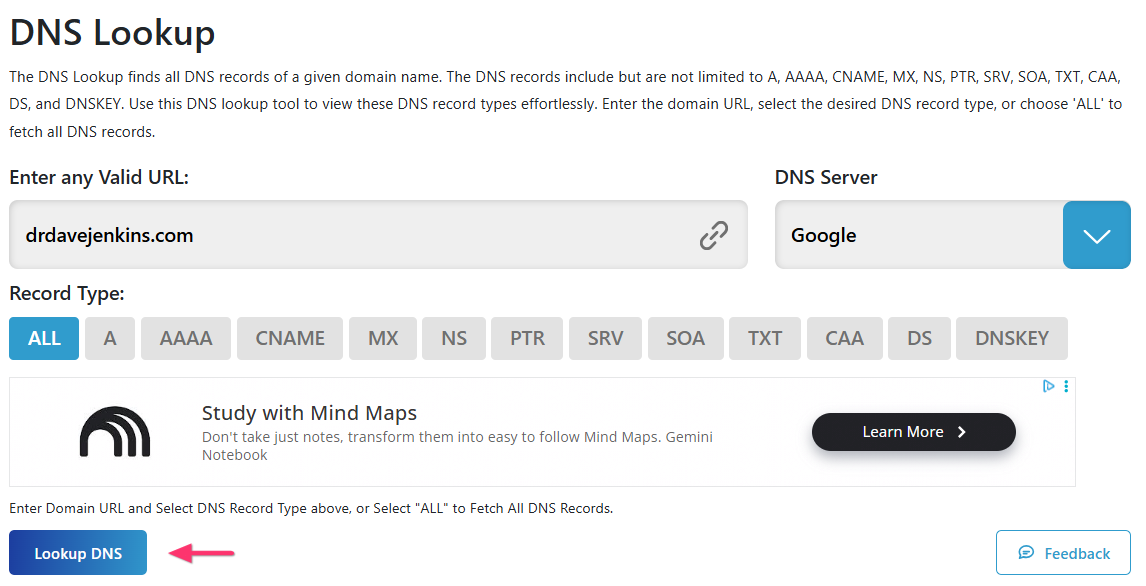
- Locate the A record in the results and check which IP address or addresses are returned.
If possible, please share a screenshot of the results with us, along with whether the website was accessible on that device at the time.
Thank you for your continued patience and cooperation. Each of these checks helps us narrow down the possible causes so we can work toward identifying the source of the accessibility issue.
0 -
Hi KC George,
I followed your instructions and this is what it showed https://app.box.com/s/ukrl7ram3sz927ack3fqr8363rxjxou9
(I couldn't screenshot the whole page so made a pdf instead).
The website was not accessible on my device when I checked (used the same device and browser as the DNS lookup).0 -
Hello Mik,
Thank you for checking the DNS records for your root domain from the location where the issue occurs. The results confirm that the root domain is correctly pointing to the Brizy Cloud IP address 34.237.47.210.
To help us narrow down the cause of the accessibility issue, could you also check the DNS record for the www version of your domain from a location where the error occurs? Please follow these steps:
- Open this link: Check the CNAME record for www.drdavejenkins.com.
-
Click Lookup DNS.
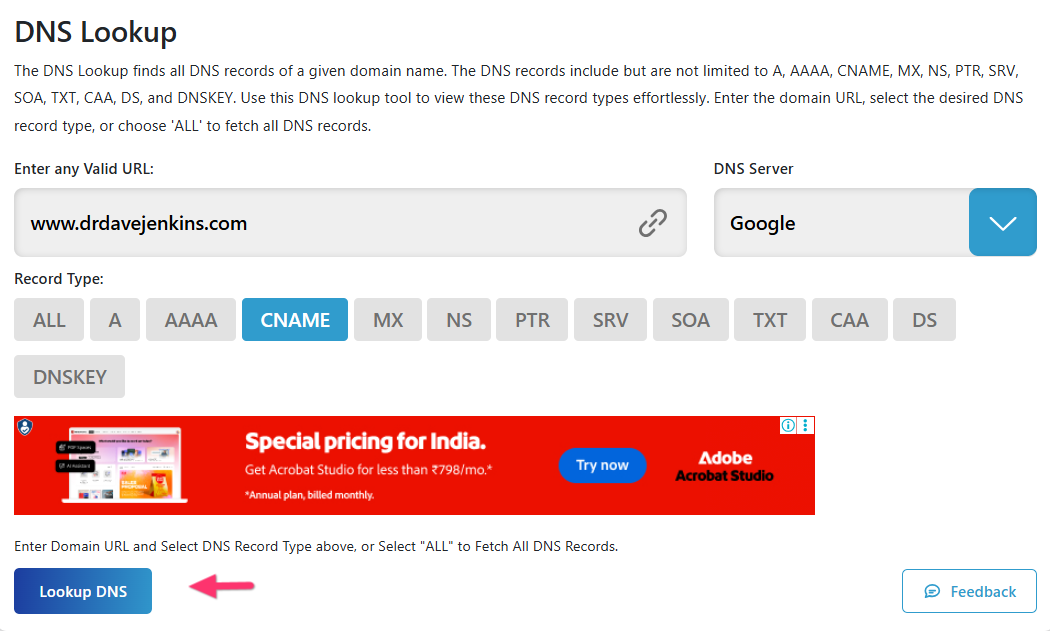
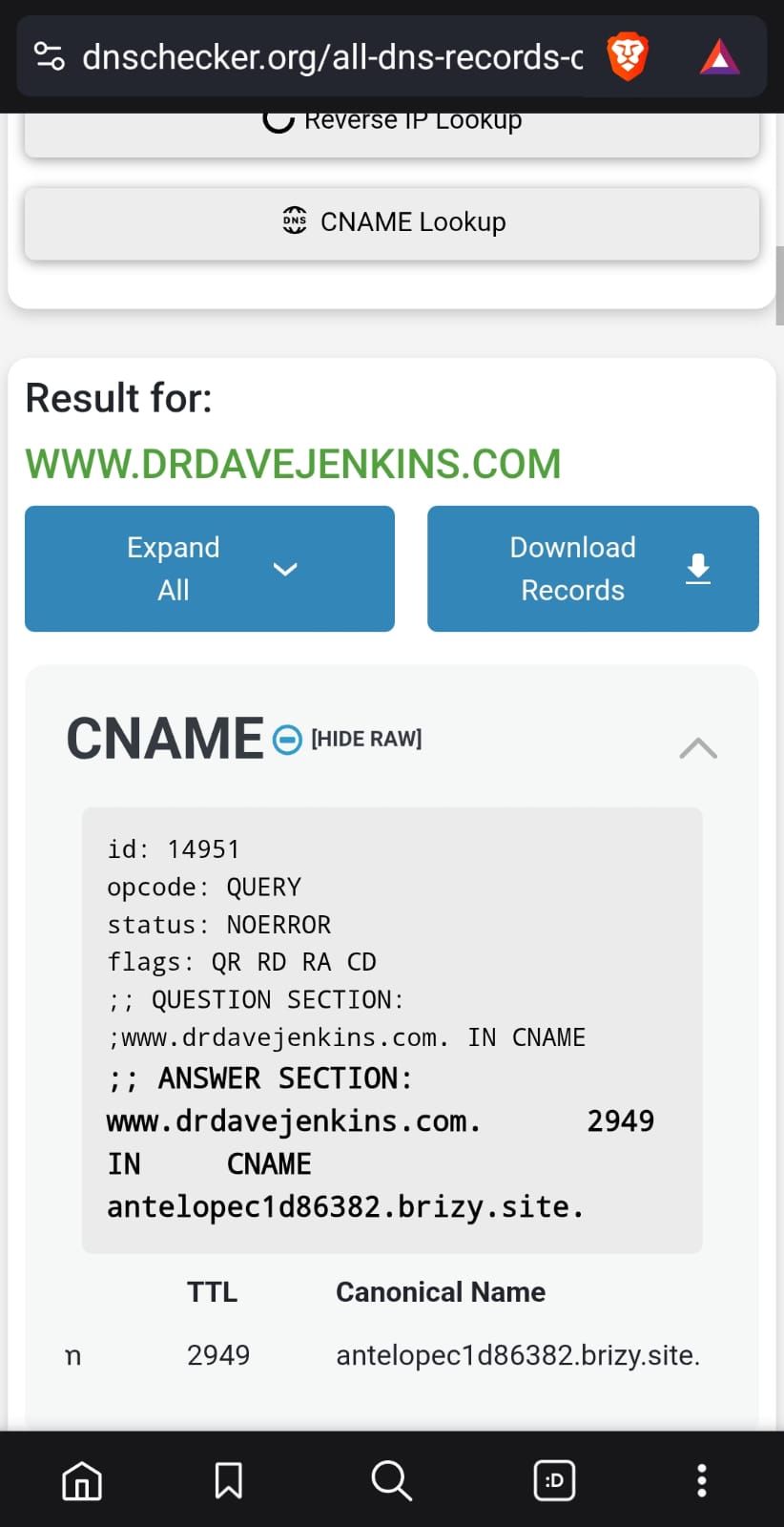
- Find the CNAME record in the results and check the Canonical Name it returns.
If possible, please share a screenshot showing the CNAME record and its Canonical Name. You only need to include that section of the results.
This additional check will help us verify whether the
wwwsubdomain is resolving to the expected destination and bring us closer to identifying the cause of the issue. Thank you for your continued help and patience!0 -
Hi KC George, here is the screenshot showing the CNAME record and its canonical name.
Thank you,
Mik
 0
0 -
Hello Mik,
We’ve now been able to successfully reproduce the SSL issue affecting https://thetwistedgrin.com/, which is an important step toward identifying the underlying cause.
We’ve escalated the issue to our development team for further investigation. We’ll keep you updated as soon as we have any significant findings or progress to share.
Thank you for your patience and understanding while we investigate this further.
0 -
Hello Mik,
We have some more information after some troubleshooting. I had mentioned that we could reproduce the SSL error on https://thetwistedgrin.com/. After we saw the SSL error, I clicked the “Not secure” notification in the browser’s address bar and selected “Certificate Details” to examine the SSL certificate being presented when accessing the website.
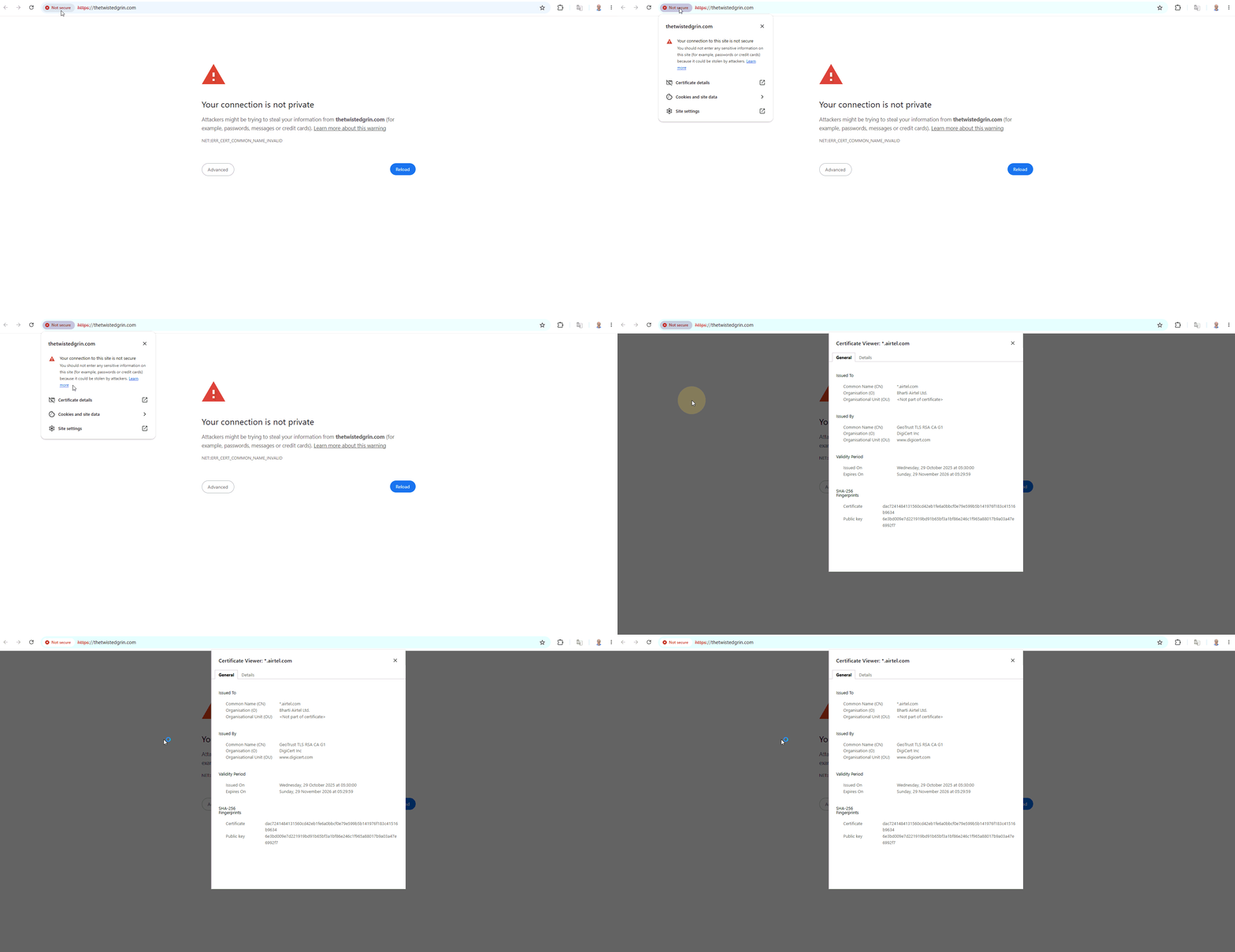
The certificate details revealed something unexpected. Instead of a certificate associated with the above domain, the browser displayed a certificate issued for a domain associated with my internet service provider, Airtel, by DigiCert (www.digicert.com).
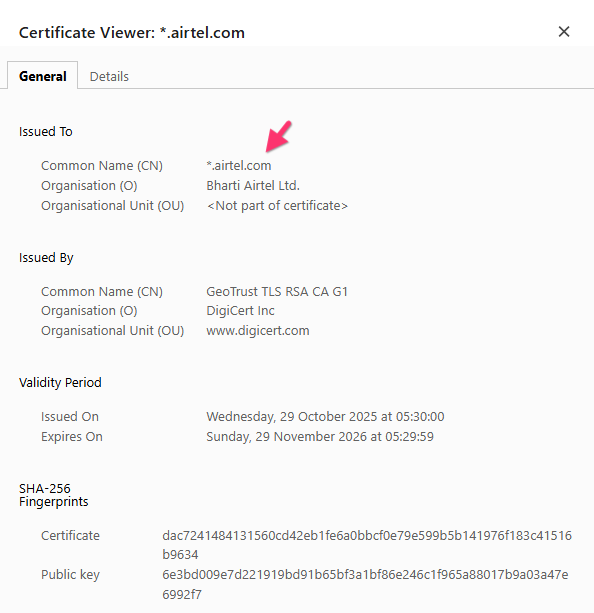
This mismatch between the website’s domain and the domain listed on the certificate may explain why the browser is displaying the SSL security warning.
Could you please perform the similar check when you encounter the SSL error on your end? Simply click the browser’s security warning in the address bar, open the certificate details, and check which domain the certificate was issued for.
Please share a screenshot of the certificate details or let us know which domain is listed. This information will help us determine whether the same issue occurs on your end and guide us toward the next steps in our investigation.
Thank you for your cooperation. We appreciate your help in getting to the bottom of this issue.
0
Please sign in to leave a comment.
Comments
21 comments