Unable to License Brizy Pro on Live & Staging server using ONE license.

Having read previous posts on here:
I was under the impression that the Brizy Pro WordPress plugin was able to function on a Live site and a staging site using ONE pro licence.
With this in mind I created a subdomain of "staging" using my live sites domain. I then mirrored the staging site on the sub domain. Initially the Brizy Pro Licence settings showed no errors.
Then in staging I updated Brizy Free And then Brizy Pro to 2.8.10 (from 2.8.9) initially I received the error "Update failed: No activation found for this installation". Checking Licence now showed a blank field. So I entered the pro licence for the staging license (as in live). No errors but just kept asking me to activate. I then de-actived and deleted Brizy Pro on the staging server. I downloaded a new Pro version from my Brizy dashboard, installed and activated it to my staging server and again entered the pro license (as used on the live site), and this time I receive the error ""Sorry, this license is already activated on another domain".
So despite previous posts to the contrary I ask once again - "Can I use ONE pro brizy license on a live server and a staging server.
The only reason I have finally setup a staging server is because 9 times out 10 my site breaks when I update Brizy, and that is no fun in live.
Please help.
Kind regards
-

Hello there
Yes; a single Brizy Pro license can be shared between a live site and a staging site. Please see the screenshot taken from my Brizy account, which shows 3 licenses being shared between live and staging URLs.
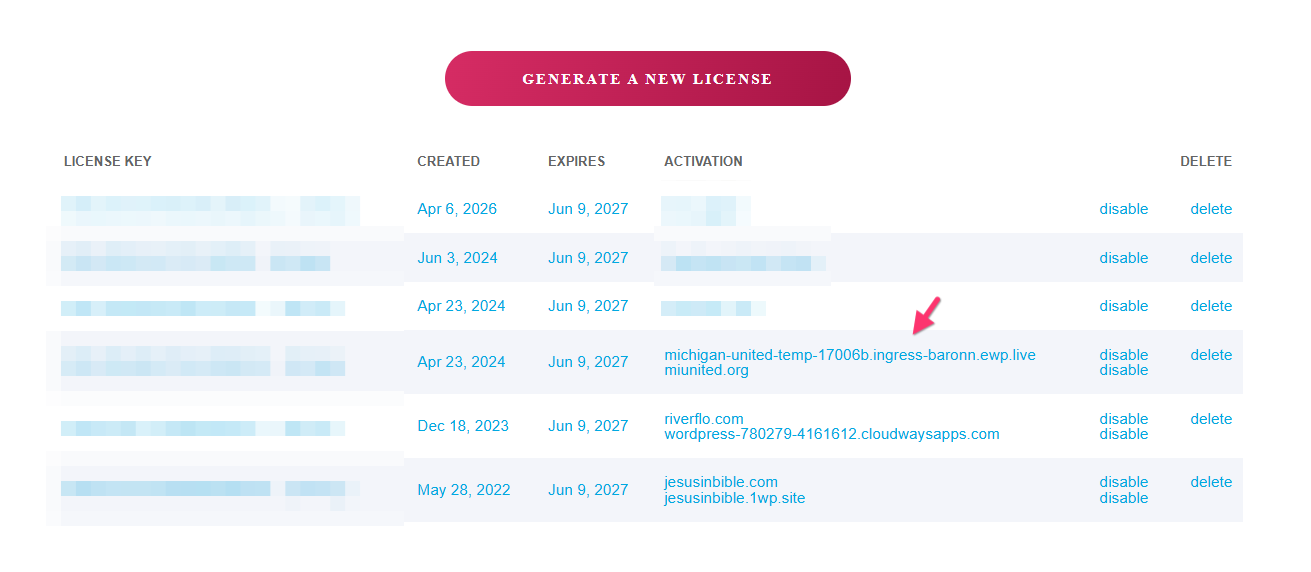
Can we look at your WordPress dashboard to fix this issue for you? Please add a new user to your WordPress Dashboard and send the following details to our email: communitysupport@brizy.io
- Support Forum reference: https://support.brizy.io/hc/en-us/community/posts/37009975127698
- WordPress Admin URL:
- Username
- Password
Your email must include a link to this thread's URL, otherwise we will be unable to locate your support ticket. Please notify us in this thread when you send us the email.
0 -

Hi Wayne,
Thank you for your patience.
We've asked our senior support team to look into this issue, and we'll get back to you as soon as we have an update.
In the meantime, could you let us know how your site broke? Could you describe how the website looked or behaved when the issue occurred? We may already have a solution that could help.
Kind regards,
Ariel H.0 -
Hi Wayne,
Apologies for our previous message stating that the license could be activated on both a live site and a staging site.
We checked your account and noticed that you're using AppSumo license keys. These licenses can only be activated on a single domain and cannot be used on a staging site.
We're sorry for the confusion. If you have any questions or need help with your setup, please let us know and we'll be glad to assist.
Kind regards,
Ariel H.0 -
Very disappointing to hear after all the work I have put in creating the staging site. Can you advise does the AppSumo license recognise a localhost or .local domains as offline development environments and not count them against my 1-site license limit?
Regards
Wayne
0 -
Hi Wayne,
I completely understand your disappointment, and I'm sorry for the inconvenience.
Regarding your question, a .local domain is still counted as an activation. With an AppSumo license, any domain used for activation—including .local or other local development domains, counts toward the single-site license limit.
Unfortunately, there isn't much we can do to change this, as it's a limitation of the AppSumo license. We understand this isn't the answer you were hoping for, and we sincerely apologize for the inconvenience.
One option you may want to consider is using a local development environment such as XAMPP or MAMP, and configuring it to use your live domain (e.g. http://mysite.com) by mapping it through your Windows or macOS hosts file.
Using the same domain locally may allow you to develop without requiring an additional activation. This setup is commonly used for local development while keeping the production site unchanged.
If you'd like to try this approach, I'd be happy to create a short step-by-step tutorial for you. Just let me know whether you're using Windows or macOS, and I'll tailor the instructions accordingly.
Kind regards,
Ariel H.0
Please sign in to leave a comment.
Comments
5 comments