Page needs to be refresh

I keep receiving the following error message in Brizy:
"This page needs a refresh. You've probably updated this page (or another page) in a different tab or browser."
The issue occurs even though I only have one browser tab open and no other editing sessions active. I've gone through all the troubleshooting steps I could find in this forum and related discussions, but nothing has resolved the problem.
To troubleshoot, I have already:
• Cleared all caches
• Logged out and back into WordPress
• Tested in different browsers and incognito mode
• Confirmed that WordFence is not installed
• Confirmed that ModSecurity is not enabled on my hosting account
• Checked for plugin conflicts
• Ensured WordPress, Brizy, and all plugins are up to date
I also added the following directives to my .htaccess file before the "# END WordPress" line, as suggested in several support threads:
Unfortunately, the error persists and continues to prevent me from editing and saving pages normally.
At this point, I would really appreciate some guidance from the support team. If there are any server settings, logs, known conflicts, or additional troubleshooting steps I should check, please let me know.
This issue is affecting a live project, and I'm currently working against a very tight deadline, so any help would be greatly appreciated.
Thank you.
-

Hi,
Thank you for contacting us.
Please share your site’s credentials so we can inspect your site. Kindly add us as an Admin user to your WordPress Dashboard and send the following details to communitysupport@brizy.io.
Community Post link: https://support.brizy.io/hc/en-us/community/posts/36522099861778
WordPress Admin URL:
Username:
Password:Looking forward to your reply.
Best regards,
Ariel H.0 -
Hi,
Thank you for your patience.
We've seen this issue quite often on websites hosted with GoDaddy. Upon checking, the browser's Developer Console is returning a 400 (Bad Request) error, which means the server is rejecting the save request sent by Brizy. Because of this, the editor is unable to save changes properly. Smaller pages can still be edited and saved successfully. However, as the page becomes larger and more complex, the issue eventually appears and you may start seeing the "This page needs a refresh" message when trying to save changes.
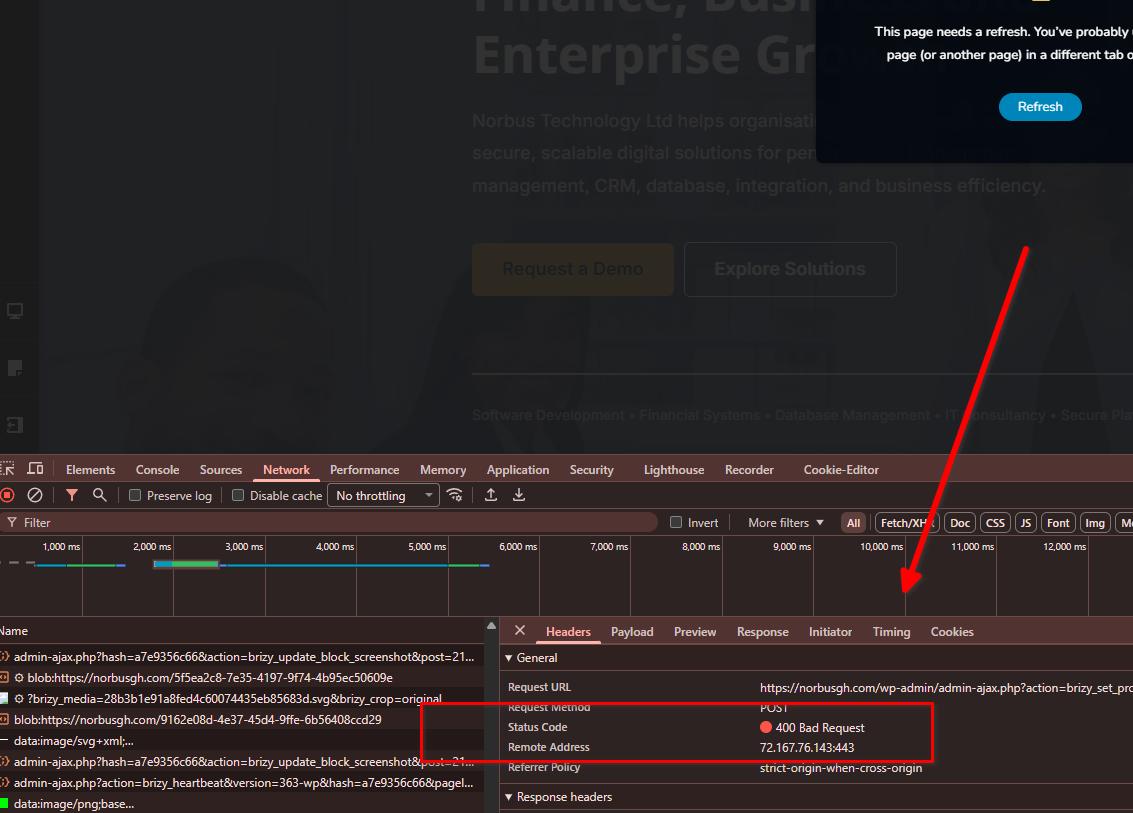
Unfortunately, this is a server-side restriction, so there isn't much we can do from our side to fix it. We recommend contacting GoDaddy support and asking them to investigate the 400 errors occurring when editing pages.
For comparison, I've created a clone of your website on our staging server:
https://staging.sitecheck.space/norbusgh/wp-admin/You can log in using your existing credentials and test the site there. If you're on a tight schedule, you're welcome to continue working on the staging site while exploring alternative hosting options. If you decide to move to another host, I'd also be happy to help migrate the site.
Kind regards,
Ariel H.0
Please sign in to leave a comment.
Comments
2 comments