Dynamic form recipient

A client website which I have taken over from a freelancer has e.g. {{E-Mail}} as the recipient for the email instead of the real email address. A copy of the email needs to go to the person who filled out the form. This works in most cases, but not on every form. Although I assume {{E-Mail}} needs to match the label of the email form field, and I have ensured that this is the case, I cannot find any documentation on this. Please could you suggest a course of action? Many thanks.
Website: confiseriesteinmann.ch
-

Hello Mark,
Shortcodes like {{E-Mail}} help you reuse form data in email notification settings. Shortcodes are generated dynamically based on the form field labels. To see a list of shortcodes available in your form, hover over the "?" icon next to the "Subject" and "Reply-To" fields.
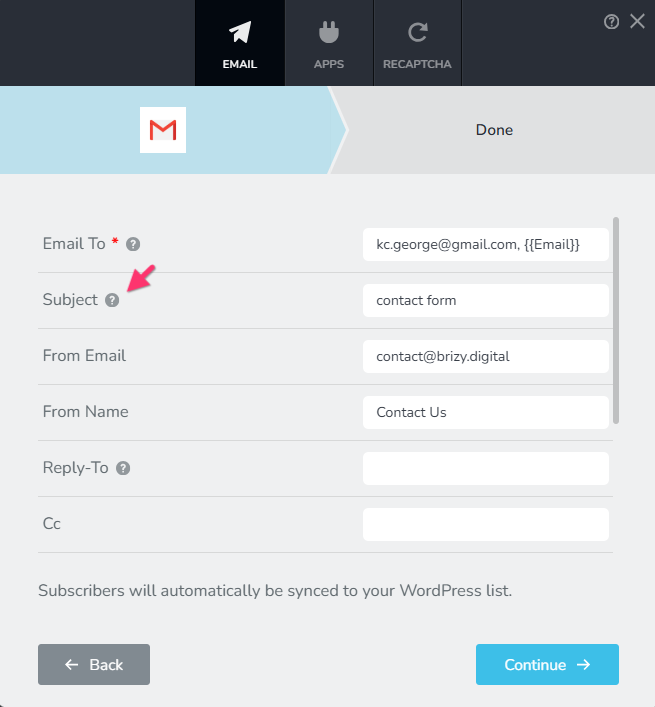
You can use the shortcodes in the "Email To" field to send a copy of the email notification to the person who filled out the form.
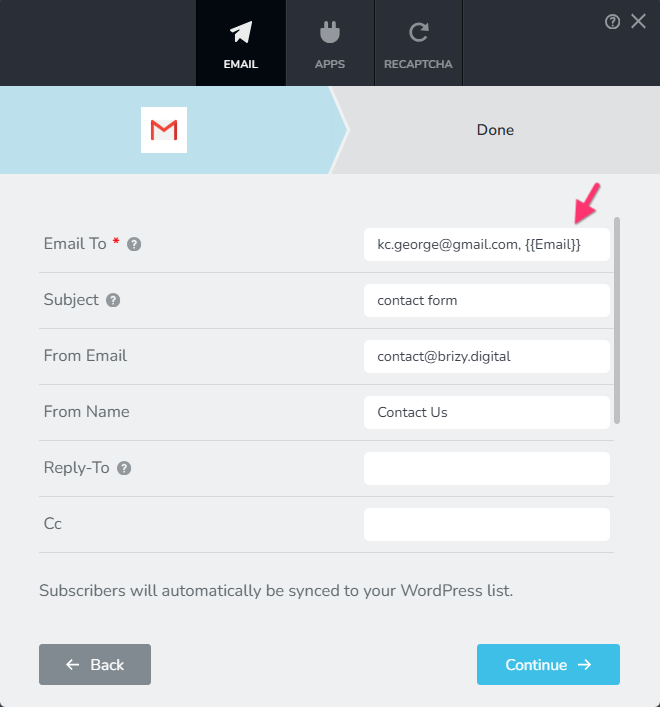
Kindly follow these best practices to increase the deliverability of email notifications
- Always fill out the "Subject" filed. Emails without a subject can be rejected by mail servers.
- Use the domain of your website in the "From Email": For example, the Contact form on the homepage of your website can have the "From Email": info@confiseriesteinmann.ch, form@confiseriesteinmann.ch or contact@confiseriesteinmann.ch
- Always fill out the "From Name" field: Do not leave the "From Name" field blank. Mail servers are likely to reject emails without a From Name.
After following the above guidelines, if you do not receive email notifications in your Inbox, kindly get back to us. We will take a look at your WordPress Dashboard to troubleshoot the issue.
0
Please sign in to leave a comment.
Comments
1 comment