Extremely large wp_brizy_logs table in database - how to empty?

Issue:
I create a new Wordpress installation. I install Brizy and Brizy Pro. Brizy creates a new table called $wpdb->prefixbrizy_logs (wp_brizy_logs). I create ONE page based on the brizy builder.
At this point, this table starts to get 100s and 100s of errors, and that's just for one page. On sites with multiple pages, revisions, and ongoing edits, this table gets HUGE, forcing the database to become almost 1 GB in size. (This is possibly the same issue https://support.brizy.io/hc/en-us/community/posts/360062875491-large-Brizy-logs-in-database).
Questions:
1) What is this table for? I do not see anywhere in Wordpress where I can access these log files.
2) Where can I delete these entries, or manage this? such as "turn off logging" or "limit logs to X number of entries" or "log entries to file."
3) Is it safe to write a script and drop the data in this table periodically? Or drop the table all together (I can't see how it's needed.)
4) if #3 is an option, then I would consider this a bug. I can't imagine how many people out there who have a database that is literally 1000x larger than it needs to be because of this table.
Sorry, but I can't give access to my environment, but I can attach and send a zip export of the db if you give me a channel to do so.
This issue is easy to reproduce, however. Setup a new wordpress environment, add the brizy plugins, edit a single page, and watch the database table grow enormously.
After a few edits, I have this single error taking up almost 1000 entries on a brand new site:
(2, 'ERROR', 'Invalid request nonce', 'a:3:{s:6:\"action\";s:15:\"brizy_heartbeat\";s:7:\"version\";s:6:\"166-wp\";s:4:\"hash\";s:10:\"f3ebd775f4\";}', '', '2021-02-16 14:19:27'),
Please advise. Thanks!
-

Hi,
To clean the database and site from logs and cache, I can suggest installing a clean cache plugin (e.g. WP Rocket) and database optimization plugin (e.g. WP Optimizer). Also, I can suggest update regularly all plugins and themes. At the moment we have the Brizy Free 2.2.8 and Brizy Pro 2.2.5.
1 - This table wp_brizy_logs store each event or action made with the Brizy plugin. This is an important table and it can't be deleted, limited or "turn off".
2 - Unfortunately, it can't be deleted but we can optimize it by using a WP-database optimization plugin.
3 - I don't recommend writing and adding a script for optimization of this table. But if you are a developer and have a great experience with WordPress plugins and the entire WordPress environment and you know what you have to do, you can try to write the script for this but in this case, we can't respond to the further error and problem that may appear in the WordPress site.
Where and in what conditions did you find this problem "(2, 'ERROR', 'Invalid request nonce', 'a:3:{s:6:\"action\";s:15:\"brizy_heartbeat\";s:7:\"version\";s:6:\"166-wp\";s:4:\"hash\";s:10:\"f3ebd775f4\";}', '', '2021-02-16 14:19:27')"? What were your previous actions?
Thanks!
Best regards,
SandraBest regards,
Sandra0 -
Sandra, sorry, but this is not a logging issue or a caching issue.
This is a significant bug.
Please see the video:https://www.awesomescreenshot.com/video/2820135?key=1bfe32f6e4cb5177038d76daf46fec2c
In the video, I start with a brand new installation of wordpress. I install brizy, and I install brizy pro. All I do is edit.
If you start the video at 8:20 you will start to see the database start to fill up with these errors.
I can confirm that this definitely happens every single time I click on "Go to dashboard" from the editor window.This also happens during other events, and I'm still trying to pinpoint where.
In the meantime, please escalate this, or have a member of the development team offer advice. After editing for several hours this table has THOUSANDS of these entries.
Sandra, I cannot have my clients' databases be larger than their websites, eating up all of their space. I need to hear from the development team if I can safely drop the data from this table periodically to save space. If I can't, I need to know specifically why, from a development perspective.
Thank you0 -
Hello. I submitted this 5 days ago and not only has it not been acknowledged, it's still pending approval.
Since submitting that, on a test site with just a few pages, I now have 12,000 entries in that database table.
Sandra, I have a Lifetime plan, and I am moving my clients over to Brizy Pro. Because Brizy Pro has a small footprint, most of the clients' actual pages will never need more than 300MB to 800MB of actual server space.
But this database issue is a serious concern. Once all of my clients' databases start to fill up, across 50 or 100 clients, this will not only eat through my server hard drive space quickly, it's going to cause my server to crash.
Please do not suggest wp optimize, wp rocket, or something similar because that has nothing to do with the problem.
This seems to be related to the logging.php file located here:
https://github.com/ThemeFuse/Brizy/blob/master/logger.php
The function "self::clean()" looks like it's intended to help with this issue, but it's never called after the initial installation.
Could you please have a Sr. developer offer advice on this.
If we can't resolve this, it means that Brizy is not a viable option for anyone until this is fixed.0 -
Hi,
I'm sorry for the late response. We investigated this issue but we want to check it from your dashboard. Could you please send us the WP and FTP credentials to this site?
I have created a private ticket for this request. You had to receive a notification regarding this by email. Could you send us in that private message the WP and FTP credentials to this site?Thanks!
Best regards,
Sandra0 -

Our website got same problem. We just realize when our backup keep taking longer and eventually timeout. Our wp_brizy_logs size is 4+ GB.
How to fix this issue?
0 -

Hi Quang,
4 GB + size for wp_brizy_logs table looks way beyond the normal database size. Total database size of a woocommerce website with 30 products, 10 blog posts and 10 pages is normally close to 30 MB. If you have 200 pages, 150 blogposts and 1000 products, the database size can go up to 800MB or even 1 GB. There is something unusual about your database table size.
Can you please do these
- Install the plugin https://wordpress.org/plugins/advanced-database-cleaner/
- Share the screenshot of the "Overview & Settings" tab https://jmp.sh/Bk07zYS
- Share the screenshot of the "Tables" tab https://jmp.sh/Jmqm8nT Try to include as many tables as possible within the screenshot
Do you use WP Reset or another similar plugin which takes snapshots of your database on a regular basis?
0 -
One year later, all of our Brizy sites continue to have this issue, and I am still waiting, more than a year, to hear from a developer like I requested in the original ticket.
Ultimately, we created a Cron job to run a custom mysql cleanup script that runs once an hour to empty this table. As a developer myself, I've studied the code and I can't see what purpose this functionality has. Indeed, emptying the table seems to have no adverse effect on how Brizy operates.
Can a developer who knows about this part of the code or, better yet, helped write it, please chime in and answer the questions in the original ticket? From a development perspective, what is the purpose of these tables, all these errors, why is self::clean() not being called to help manage it, and what negative side effects can we expect if we delete it? Our next step is to fork the Brizy code and get rid of the code that adds to the table. What would happen if we did this? Again, I cannot see a single reason why this table or these data are needed, especially cleaning it out every day for over a year has had no negative repercussions.
As I mentioned earlier, please do not suggestion wp_optimize or a 3rd party plugin to manage or clean the database. We run a hosting service and it's not possible to force each WP client to install random plugins (which is why a fork is in our future - it's a lot easier to manage this en masse)0 -
Hi Christian,
I have looked at your initial post a year ago. I have attempted to reproduce the issue you have mentioned above. You can watch me reproduce the sequence of steps here. https://jmp.sh/O7u27fB
As you can see from the video, I am unable to reproduce the issue you are facing. How can I reproduce it?
0 -
@KC George, No, I don't use WP Reset. Here're the overview & tables screenshot. Tables sorted by size you can see the log table size
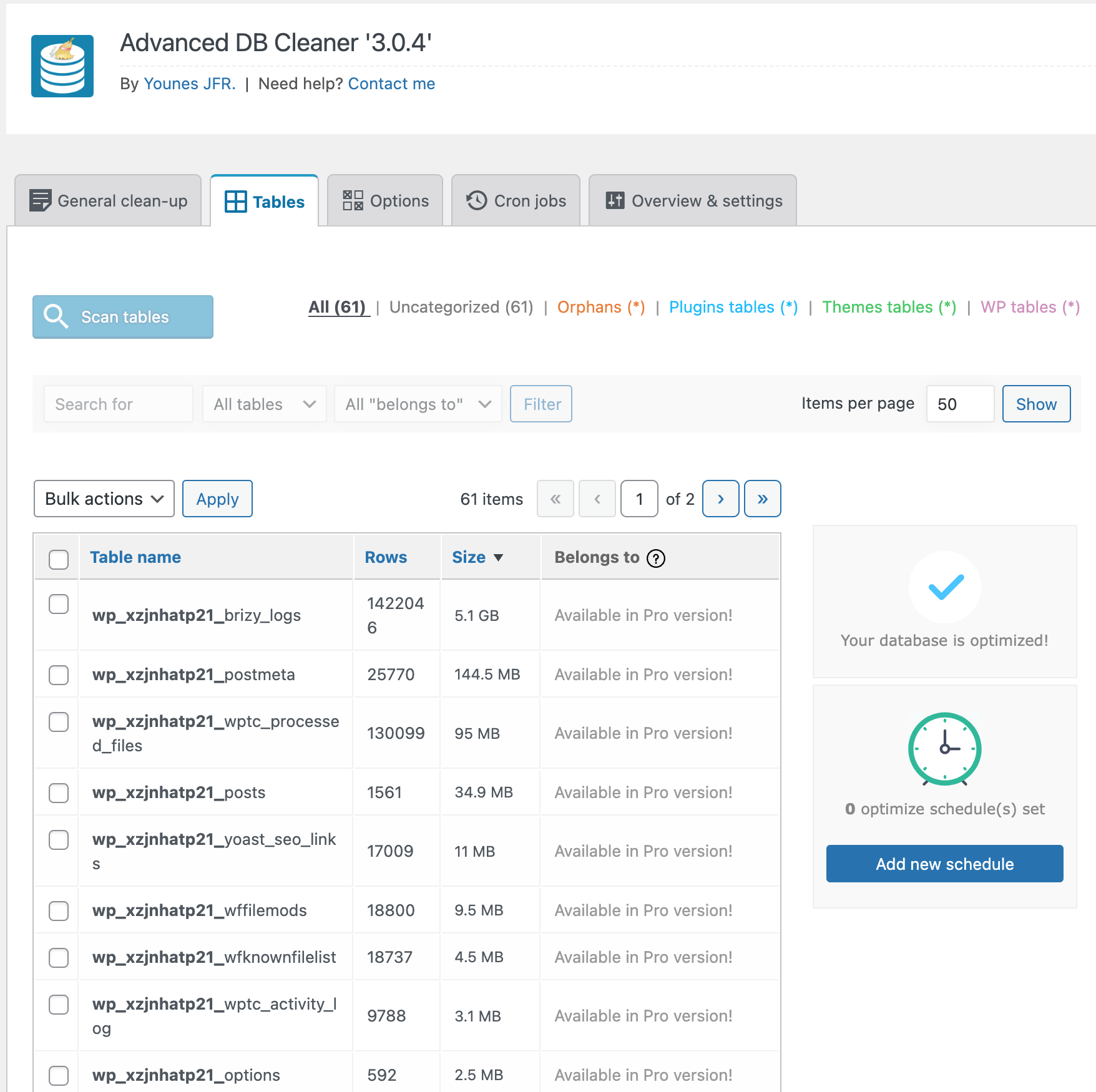
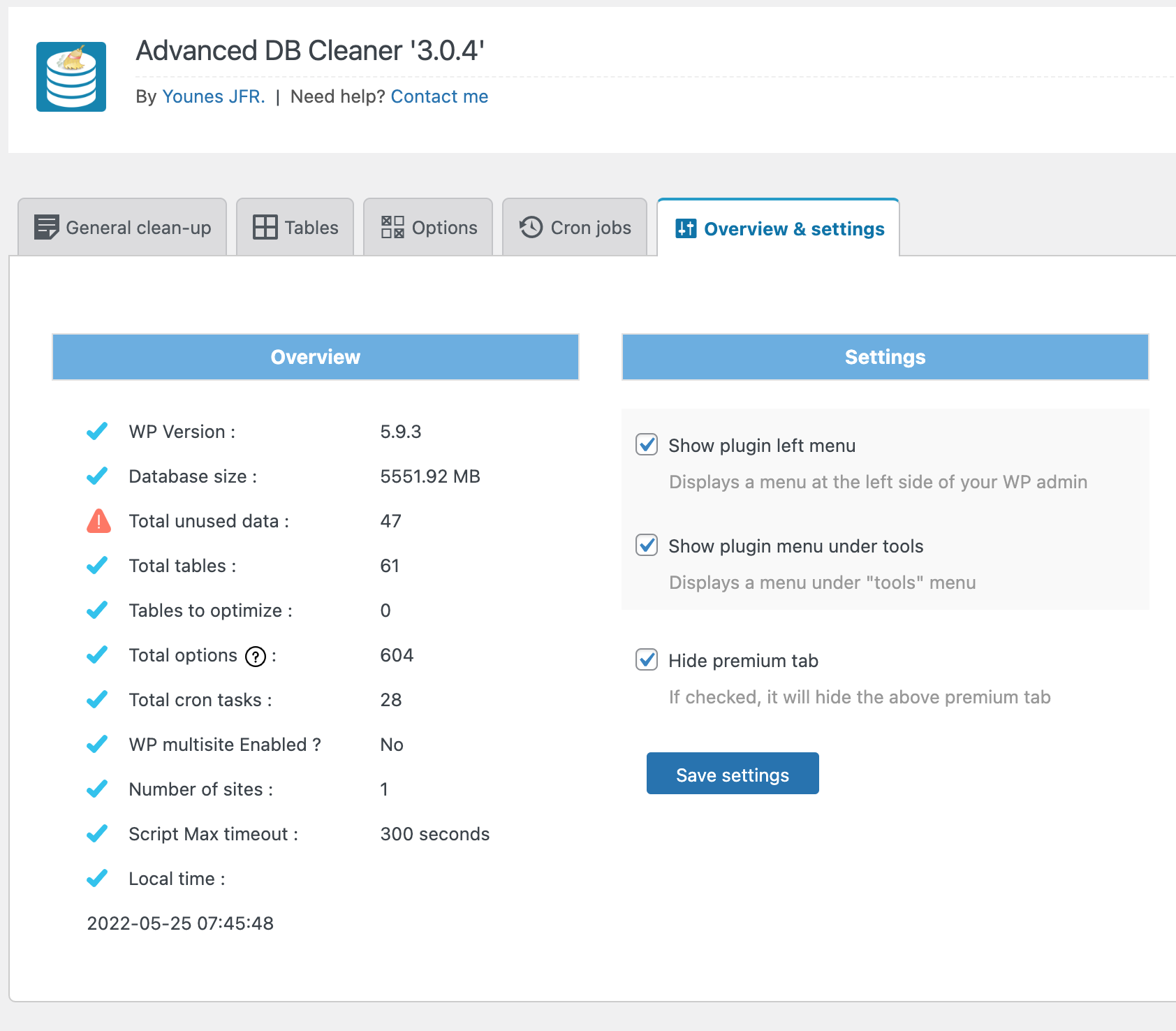 0
0 -

Hi,
We would like to check this problem from your dashboard. Could you please send us the WP credentials to this site? We have created a private ticket for this request. You will receive an email regarding this. Could you send us in that private message the WP credentials to this site?
Best regards, Nelea.
0
Please sign in to leave a comment.
Comments
10 comments