500 Internal Server Error

Oops! An Error Occurred
The server returned a "500 Internal Server Error".
-

Kc George, I've made those renamings and checked all of my pages and it seems that the issue with images is gone. It would be great if you guys made a script that automatically replace spaces to hyphens in img files' names so users won't be facing this kind of problem.
The issue with that embedded script at the bottom of every website page remains though. Again, it's working great in that demo url on brizy hosting (see here vs here, at the left half of that block), but not via server sync on main domain. Anythig can be done with that?
0 -

Hi Ruslan,
Can you try replacing the embed code with the Brizy Map element and check if that helps?
 0
0 -
Kc George, I've made a clone for that block with the Brizy Map element ... Well, it's working, but it's not what's prefered for me. It only has Google Maps API in it, and the map itself isn't that detailed for that region.
My script that's embedded is for Yandex Maps API which is prefered for the region & local companies. It's usually connected to websites by injecting this in a header section:
<script charset="utf-8" src="https://api-maps.yandex.ru/2.1/?lang=ru_RU" type="text/javascript"></script>
and then you gotta add a div in the body to create a map object and a script that defines map's settings (coordinates, zoom, polygons and points, etc.) In my case, it goes like this:
<script type="text/javascript">
document.addEventListener(`DOMContentLoaded`, () => {
if (document.querySelector('#map')) {
!function(e,t){"object"==typeof exports&&"object"==typeof module?module.exports=t():"function"==typeof define&&define.amd?define([],t):"object"==typeof exports?exports.ymapsTouchScroll=t():e.ymapsTouchScroll=t()}(window,(function(){return function(e){const t={};function o(n){if(t[n])return t[n].exports;const r=t[n]={i:n,l:!1,exports:{}};return e[n].call(r.exports,r,r.exports,o),r.l=!0,r.exports}return o.m=e,o.c=t,o.d=function(e,t,n){o.o(e,t)||Object.defineProperty(e,t,{enumerable:!0,get:n})},o.r=function(e){"undefined"!=typeof Symbol&&Symbol.toStringTag&&Object.defineProperty(e,Symbol.toStringTag,{value:"Module"}),Object.defineProperty(e,"__esModule",{value:!0})},o.t=function(e,t){if(1&t&&(e=o(e)),8&t)return e;if(4&t&&"object"==typeof e&&e&&e.__esModule)return e;const n=Object.create(null);if(o.r(n),Object.defineProperty(n,"default",{enumerable:!0,value:e}),2&t&&"string"!=typeof e)for(const t in e)o.d(n,t,function(t){return e[t]}.bind(null,t));return n},o.n=function(e){const t=e&&e.__esModule?function(){return e.default}:function(){return e};return o.d(t,"a",t),t},o.o=function(e,t){return Object.prototype.hasOwnProperty.call(e,t)},o.p="",o(o.s=0)}([function(e,t,o){function n(e){return(n="function"==typeof Symbol&&"symbol"==typeof Symbol.iterator?function(e){return typeof e}:function(e){return e&&"function"==typeof Symbol&&e.constructor===Symbol&&e!==Symbol.prototype?"symbol":typeof e})(e)}o.r(t),t.default=function(e){const t=arguments.length>1&&void 0!==arguments[1]?arguments[1]:{},o=t.preventScroll,r=void 0===o||o,c=t.preventTouch,i=void 0===c||c,u=t.textScroll,s=void 0===u?"Чтобы изменить масштаб, прокручивайте карту, удерживая клавишу Ctrl":u,l=t.textTouch,a=void 0===l?"Чтобы переместить карту проведите по ней двумя пальцами":l;if("undefined"!=typeof window&&"object"===n(e)&&(r||i)&&"string"==typeof s&&"string"==typeof a){const t=/Mobi/i.test(navigator.userAgent)||/Android/i.test(navigator.userAgent),o=e.panes.get("events"),n=o.getElement(),c=t?a:s,u=(document.documentElement.clientWidth,{alignItems:"center",boxSizing:"border-box",color:"#fff",display:"flex",justifyContent:"center",padding:"40px",textAlign:"center",transition:"background .2s",touchAction:"auto"});Object.keys(u).forEach((function(e){n.style[e]=u[e]}));const l=function(e){n.style.background="rgba(0, 0, 0, ".concat(e?".6":"0",")"),n.textContent=e?c:""};if(i&&t&&(e.behaviors.disable("drag"),ymaps.domEvent.manager.add(n,"touchmove",(function(e){l(1===e.get("touches").length)})),ymaps.domEvent.manager.add(n,"touchend",(function(){l(!1)}))),r&&!t){let t=function(t){t?e.behaviors.enable("scrollZoom"):e.behaviors.disable("scrollZoom")},n=!1,r=!1;t(!1),o.events.add("wheel",(function(){n&&(t(r),l(!r))})),o.events.add("mousedown",(function(){l(!1)})),o.events.add("mouseenter",(function(){n=!0})),o.events.add("mouseleave",(function(){n=!1,l(!1)})),document.addEventListener("keydown",(function(e){(r=e.ctrlKey)&&l(!1)})),document.addEventListener("keyup",(function(){r=!1}))}}}}]).default}));

ymaps.ready(init);
function init() {
var wid = document.body.clientWidth;

var mapx;
var mapy;
if (wid < 768) {
mapx = 44.219413;
mapy = 42.046100;
}
else {
mapx = 44.219413;
mapy = 42.046100;
}
myMap = new ymaps.Map("map", {
center: [mapx, mapy],
zoom: 18,
controls: ["smallMapDefaultSet"]
});

myMap.controls.remove("fullscreenControl", "rulerControl", "searchControl", "typeSelector", "zoomControl");
// Создаем геообъект с типом геометрии "Точка".

myGeoObject = new ymaps.GeoObject({
// Описание геометрии.
geometry: {
type: "Point",
coordinates: [44.219413, 42.046100]
},
// Свойства.
properties: {
// Контент метки.
balloonContent: '<strong>"КомпАс"</strong> - cервисный центр по ремонту телефонов и компьютерной техники<br /><strong>Адрес:</strong> г. Черкесск, пер. Одесский, 9<br /><strong>Телефон, Whatsapp:</strong> <a href="https://api.whatsapp.com/send?phone=79280037009">+7 (928) 003-7-009</a><br /><strong>E-mail:</strong> <a href="mailto:9280037009@mail.ru">9280037009@mail.ru</a>',
iconCaption: 'КомпАс'
}
}, {
// Опции.
// Иконка метки будет растягиваться под размер ее содержимого.
preset: 'islands#redRepairShopIcon'
});
ymapsTouchScroll(myMap);
myMap.geoObjects

.add(myGeoObject)
}
}
})
</script>
<div id="map" style="height: 665px; width: 100%;"></div>
So, if it's working here... is it possible to make it work with the server sync option?
0 -
Hi Ruslan,
Kindly add the Yandex API Key following the format specified at https://yandex.com/dev/jsapi-v2-1/doc/en/v2-1/dg/concepts/load to the code added at the page header and check if the map would display well. You can find the API key at https://developer.tech.yandex.ru/
<script src="https://api-maps.yandex.ru/2.1/?apikey=Your API key&lang=en_RU" type="text/javascript"></script>
0 -
Hi Ruslan,
Kindly remove the earlier embed code and paste this code and check if the map displays well in Server Sync.
<script type="text/javascript" charset="utf-8" async src="https://api-maps.yandex.ru/services/constructor/1.0/js/?um=constructor%3A811aec18c61d5578c095e6a1a7637802a576f93a763d0d2233796cfa741a6941&width=998&height=694&lang=en_FR&scroll=true"></script>
If the above code works in the Server Sync, you can regenerate a similar code by following these steps- Visit https://yandex.com/map-constructor
- Type the map location address
- Click on the "Save and Continue" button
- Select the embeddable area in the map
- Click on 'Get Map Code' and copy the embed code
- Paste it into the Brizy Embed element
You can also have a look at this screen recording for the procedure to generate the embed code https://jmp.sh/PkRpG4Vx
0 -
Hi Ruslan,
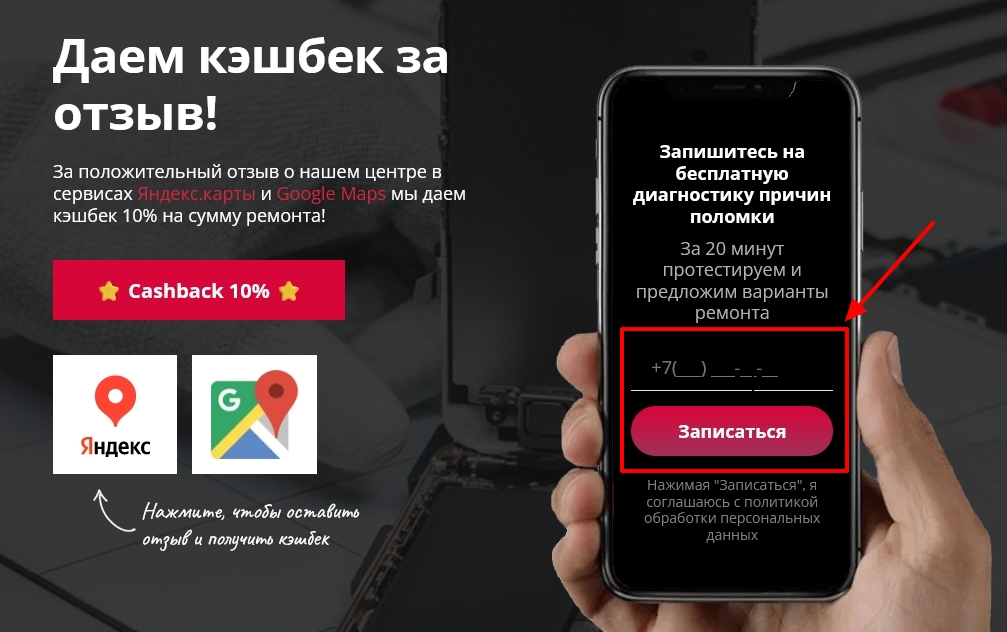
The Brizy Form you have added to the third block appears to have a code conflict with the Yandex map Embed code. When both the Yandex map and the Brizy form are present on the same page, the page produces the error "Uncaught TypeError: Cannot read properties of undefined (reading 'includes')"
Kindly try these tests
- Check to see if the map shows up well on the frontend after temporarily deleting the Brizy form in the 3rd block. See the attached image. Before proceeding, please save the block to the Saved Blocks library so that you can restore the design later.
- Place the Brizy form block beneath the Yandex Map block and see if that fixes the issue. Kindly drag the third block to the bottom of the page, just before the footer, using the Brizy Reorder Blocks function.
 0
0
Please sign in to leave a comment.
Comments
38 comments