Domain Transfer

I am not understanding what I did wrong, but my Domain is not pointing the Brizy site. I followed the instructions for the CNAME & A record.
I did the switch on Friday, and I check the mobile & Desktop, and it tells me there is no domain.
Can I get some help?
-

Hi Philip,
did you add your domain in Brizy cloud to the "custom domain"? Do you have the green color on both records? This is an indicator that the configuration was done correctly.
0 -
The CNAME Current Data the letters are green, but the second record A it is saying the current data Not Found and that is highlighted Red.
I inputed the record the same way it is listed.
Record - A - Host - philipconner.com
Should I change the TTL it is set to Custom - Seconds 600?
0 -
I figured the problem out.
Record A - Host name I was putting philipconner.com, instead I put @, and refreshed the publish domain screen it worked. The site is up.
Thank you,
0 -
Hi,
I'm glad yo hear that.
Let us know if you need anything else.
0 -

If I change my domain name do i need to change anything to be able to use my Brizy pro?
0 -
Hi Josh,
Is your question about Brizy Cloud? This post is added to Brizy Cloud but your question sounds more like for Brizy WordPress. When you say Brizy PRO do you mean the Brizy PRO WordPress plugin or the PRO features in the Brizy Cloud?
0 -

I transferred my domain from SquateSpace to Brizy two days and I do not see any update here. Can anybody help me to see what is the status?
0 -

Hi Alessandra,
Your CNAME record is still pointing to Squarespace. Kindly update your CNAME record.
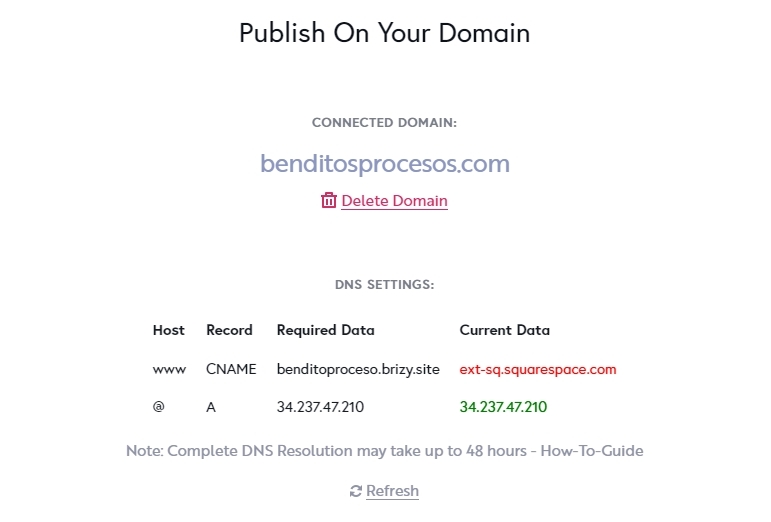
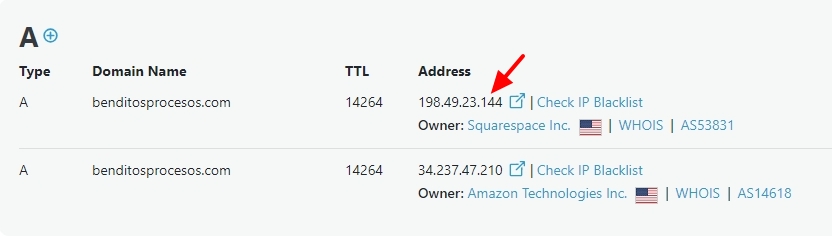
Apart from the A Record you have added Brizy Cloud, your domain also has an A Record from Squarespace. Kindly delete the A Record with the IP 198.49.23.144 from your domain
 0
0 -
Hello, I am trying to do it but it does not let me even click or tab to edit or remove any of those fields. Please help
0 -

Hi Alessandra,
Thank you for the update.
To update your DNS records, please follow the steps outlined in this link:
https://support.squarespace.com/hc/en-us/articles/360002101888-Adding-custom-DNS-records-to-your-Squarespace-managed-domain You may need to "Remove Squarespace defaults" to remove the A record and the CNAME record added by Squarespace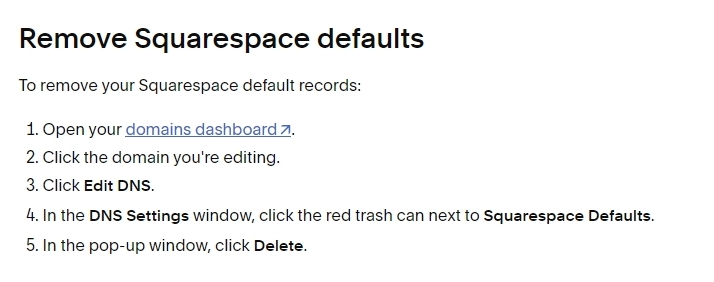
Alternatively, please contact Squarespace support so they can assist you in updating your DNS records. You may also share this support article with them for reference:
https://support.brizy.io/hc/en-us/articles/360041764052-Custom-domain-A-Record-Redirect
The DNS records necessary to point your domain to Brizy Cloud can be found in Step 5.If needed, you can provide us temporary access to your SquareSpace DNS manager for us to set this up on your behalf.
Best regards,
Ariel H.0
Please sign in to leave a comment.
Comments
10 comments