Brizy product page not displaying

Hello, i have been trying to edit my product page with Brizy. When i input the product category element, it displays well on the backend but shows on this "[product_categories number="8" orderby="name" order="ASC" columns="4" hide_empty="0" ]" on the front end
Please any help?
-

Hi,
Could you please check if you have the latest Brizy Free 2.2.13, Brizy Pro 2.2.9 and WooCommerce 5.2.2? Is the WooCommerce plugin activated? Could you please temporary deactivate all external plugins (except Brizy Free, Brizy Pro and WooCommerce) and activate the Twenty Nineteen default theme? Do you receive the same problem?
Best regards,
Sandra0 -

I still have this problem. Brizy template is selected. Brizy product pages will not apply the product template. I switched to Blocksy. Still have the issue. Why doesn't anything work?
0 -

Hello Armand,
Kindly try these and see if the issue with your product template gets resolved.
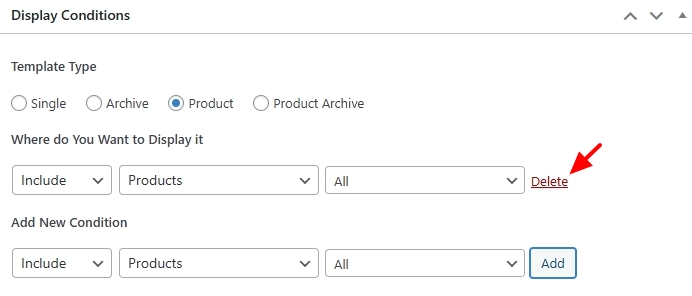
- Does your Display Condition look like this? Do you see a "Delete" option next to your Display Condition? In case you see an "Add" button, click on it to add the Display Condition
- Purge server cache and any plugin cache before checking the product page.
If these do not help, we are happy to take a look at your WordPress Dashboard to troubleshoot this issue for you. Please add a new user to your WordPress Dashboard and send the following details to our email: communitysupport@brizy.io
- Support Forum link: https://support.brizy.io/hc/en-us/community/posts/360015174497
- WordPress Admin URL:
- Username
- Password
Please let us know in this forum when you send us the email.
0 - Does your Display Condition look like this? Do you see a "Delete" option next to your Display Condition? In case you see an "Add" button, click on it to add the Display Condition
-
Yeah KC George it's really great when you refer me to the solutions to other people's problems. I know how to use the app. The app does not work as advertised is the issue and you seem to have zero expertise. Thanks!
0
Please sign in to leave a comment.
Comments
4 comments