Website Not Displaying Properly

Hello my website isn't displaying properly. I have the most recent version of Brizy and Brizy Pro. I'm also having trouble saving and syncing.
-

Hi Christopher,
Thank you for reaching out, and I apologize for the inconvenience.
Please try making small adjustments to the affected blocks, such as temporarily adding a bit of padding or changing the width of each block from top to bottom, and then hitting Update. This forces the affected blocks to recompile and can help restore the layout.
Here’s a short screencast from another customer demonstrating the process:
https://youtu.be/k6KW04mBaYUIf the issue persists, please provide temporary WP Admin access so we can further investigate it on our side.
Kindly send the following details to communitysupport@brizy.io:Community post link: https://support.brizy.io/hc/en-us/community/posts/35942039545234
WordPress Admin URL:
Username:
Password:We’ll be glad to assist as soon as we have access.
Best regards,
Ariel H.0 -
This is the error I get when I attempt the adjustments and go to update:
This page needs a refresh. You’ve probably updated this page (or another page) in a different tab or browser.
Just emailed you the login creds.
0 -
Hi Christopher,
Thank you for your patience.
I checked the site on our end and it now appears to be working properly after purging the SG Cache.

Could you please try clearing your browser cache, opening the site in an incognito/private window, or using a different browser to see if that helps resolve the issue on your side?
Additionally, we noticed that your WordPress Home URL and Site URL are still using HTTP instead of HTTPS. Please update both URLs to use HTTPS, as this should help fix the error when editing your pages.
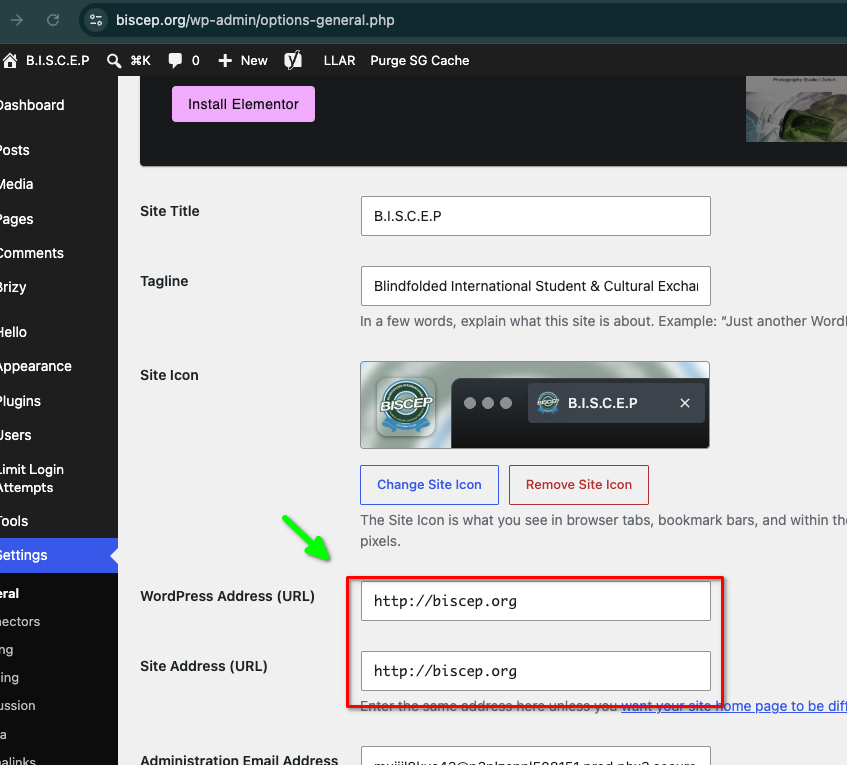
You can update this under:
WordPress Dashboard > Settings > General- WordPress Address (URL)
- Site Address (URL)Please make sure both are using:
https://Please let us know how it goes.
Kind regards,
Ariel H.0 -
Thank you for the quick response.
I can confirm now that the website is displaying properly. I also was able to update the URL to https://
However I'm still not able to make edits to any of the pages I still get the error still after clearing cache and browser history and on Incognito. (This page needs a refresh. You’ve probably updated this page (or another page) in a different tab or browser.)
Are you able to confirm on your end that edits can be published in the Brizy editor?
0 -
Hi Christopher,
Thank you for the update.
I checked on our side and confirmed that smaller pages are saving properly, while larger pages like the homepage trigger the error when publishing changes.
I also noticed that the admin-ajax.php request is returning a 404 error during the save process. This usually means the server is blocking or unable to process the save request properly, often due to server limits, firewall/security rules, or hosting restrictions.
Since only larger pages are affected, this suggests a server limitation issue. We found a similar case where another customer resolved it by updating their server settings:
https://support.brizy.io/hc/en-us/community/posts/27240442687378Please review this with your hosting provider, as it may help resolve the issue.
Best regards,
Ariel H.0 -
The issue is resolved. If I can take a stab at it I'd say that me going into the php options settings in cPanel and updating Post Max Size, Memory Limit, and Upload Limit could've possibly helped? Or creating a new page and adding a block worked. Lastly, I just went to the last page I created before the problem happened I changed the status to draft then back to Published.
It could've been multiple solutions haha I hope this helps someone else at least narrow down their issue.
Thank you so much for your quick response in helping me solve this.
0 -
Hi Christopher,
Thank you for the update, and I’m glad to hear the issue is resolved.
Yes, the changes you made could have helped. Increasing the PHP limits can help, especially when working with larger pages, while re-publishing the page could have rebuilt the page data and cleared the issue.
We also appreciate you sharing what worked on your end, as this may help others experiencing something similar.
Best regards,
Ariel H.0
Please sign in to leave a comment.
Comments
7 comments