Duplicate global blocks for years now...

So, this problem is years old... There are probably tens of posts about this problem. I just fixed a page having this issue, then I fixed another two, then when I got back to the first the problem resurfaced... Instead of managing the websites, make changes and all the needed maintenance, every few Brizy updates we have to fix what Brizy broke... it's a blackhole in terms of maintenance, worst of the worst...
https://suceavabluesfestival.ro/
... a disaster...
-

Hi Daniel,
My apologies about the ongoing frustration this issue has caused.
To help us investigate this properly, could you please send over the WP Admin login details for the affected/broken websites so we can check the issue directly from our end?
Kindly send the following details to communitysupport@brizy.io:
Community post link: https://support.brizy.io/hc/en-us/community/posts/35681973961362
Staging Site WordPress Admin URL:
Username:
Password:Looking forward to your reply.
Best regards,
Ariel H.0 -
Hi Daniel,
Just following up on my previous email to check if you had a chance to review it. Please let us know when you’re ready to share the details so we can proceed and help you fix the issue.
Kind regards,
Ariel H.0 -
Hi Daniel,
The issue was caused by the display conditions set for the global header. We've updated the conditions and the header is now working correctly.
For reference, this is demonstrated in this screencast:
https://youtu.be/wjQWa2fyttwKind regards,
Ariel H.0 -
Yes, ok, it's about the display conditions... but WHY that happens? Because it just happened, it's not like I edited the templates and put two headers and two footers... It happened because of the brizy plugin itself.
Also, would be nice if you tell me why the blog page doesn't display titles anymore on the archive page... It display just brizy_dc_post_title and brizy_dc_post_excerpt.
Basically I ask what you guys are doing back there that broke the sites every update now and then...
0 -
Hi Daniel,
We've now fixed the blog archive page.
Upon checking, we found that the template was using the "#" symbol to pull dynamic content. While this method worked previously, it is no longer the recommended approach. Instead, we recommend using the Title element to display the post title and a Text element for the excerpt, then using the Dynamic Content option to pull the post excerpt into the Text element. This is demonstrated on this screencast - https://youtu.be/Dje5W6rb8XE
Regarding the duplicated global headers and footers, this is likely caused by overlapping display conditions. To help prevent this in the future, please ensure that display conditions do not stack when creating new templates or pages. If you want a header or footer to be used site-wide, make sure its display condition is set to apply to all pages and that there are no other pages or templates with conflicting conditions targeting the same content.
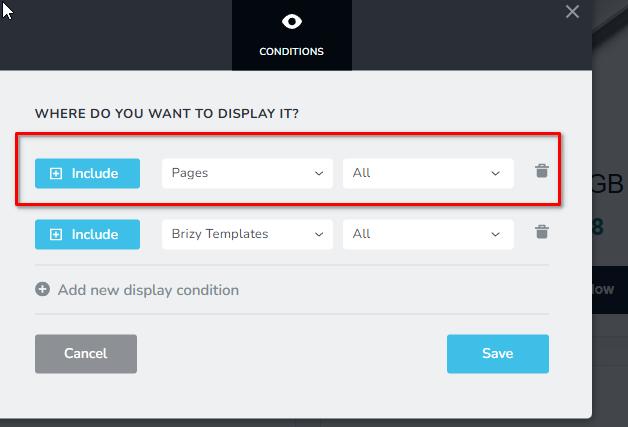
Please let us know if you notice anything else that needs attention.
Best regards,
Ariel H.0
Please sign in to leave a comment.
Comments
5 comments