Some of pages are not working properly

Some of pages are not working properly
The page is already set up for the brizy template.
Other pages are working fine.
While editing it looks fine but get broken at the end.
Here is the link.
-

Hello Bomi,
To fix the above issue, kindly upload these files to the respective folders using an FTP client like FileZilla or using the File Manager plugin
- Download the CSS file from https://jmp.sh/XSTZzOUo and uplod it to the folder /wp-content/plugins/brizy/public/editor-build/prod/editor/CSS/
- Download the CSS files from https://jmp.sh/EdTFEooB and upload it to the folder /wp-content/plugins/brizy-pro/public/editor-build/prod/CSS/
If you need help with uploading these files, kindly give us access to your WordPress dashboard. Please add a new user to your WordPress Dashboard and send the following details to our email: communitysupport@brizy.io
- Support Forum reference: https://support.brizy.io/hc/en-us/community/posts/34727661449746
- WordPress Admin URL:
- Username
- Password
Your email must include a link to this thread's URL, otherwise we will be unable to reference your support ticket. Please notify us in this thread when you send us the email.
0 -
Hi, I uploaded it, and it still look broken :(
0 -

Hi Bomi,
Thank you for the update.
Could you please send over your website credentials by following the steps outlined in our previous email? This will allow us to take a closer look at your site and properly investigate the issue.
Looking forward to your update.
Kind regards,
Ariel H.0 -
Hi Bomi,
We’ve resolved the issue by clearing both your website cache and CDN cache.
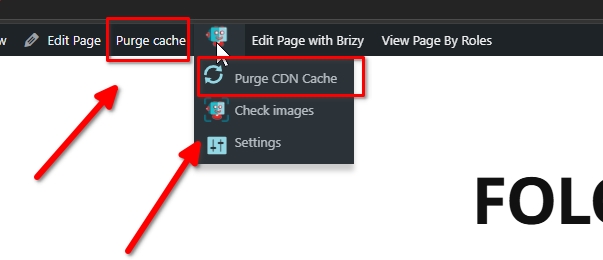
Could you please check on your end and let us know if everything is working as expected?

Thank you!
0
Please sign in to leave a comment.
Comments
4 comments