CSS files failing to load (404) affecting website layout

Hello support team,
I am experiencing a critical issue on a website that appears to be related to the page builder. The layout is being affected due to the failure to load essential CSS files.
https://mmdj.com.br/
After inspecting the browser console, I identified the following recurring errors:
preview.pro.min.css:1 Failed to load resource: the server responded with a status of 404 ()
preview.min.css:1 Failed to load resource: the server responded with a status of 404 ()
These errors indicate that the CSS files are not being found (404 status), which is directly impacting the correct rendering of the website.
I would like support to resolve this issue.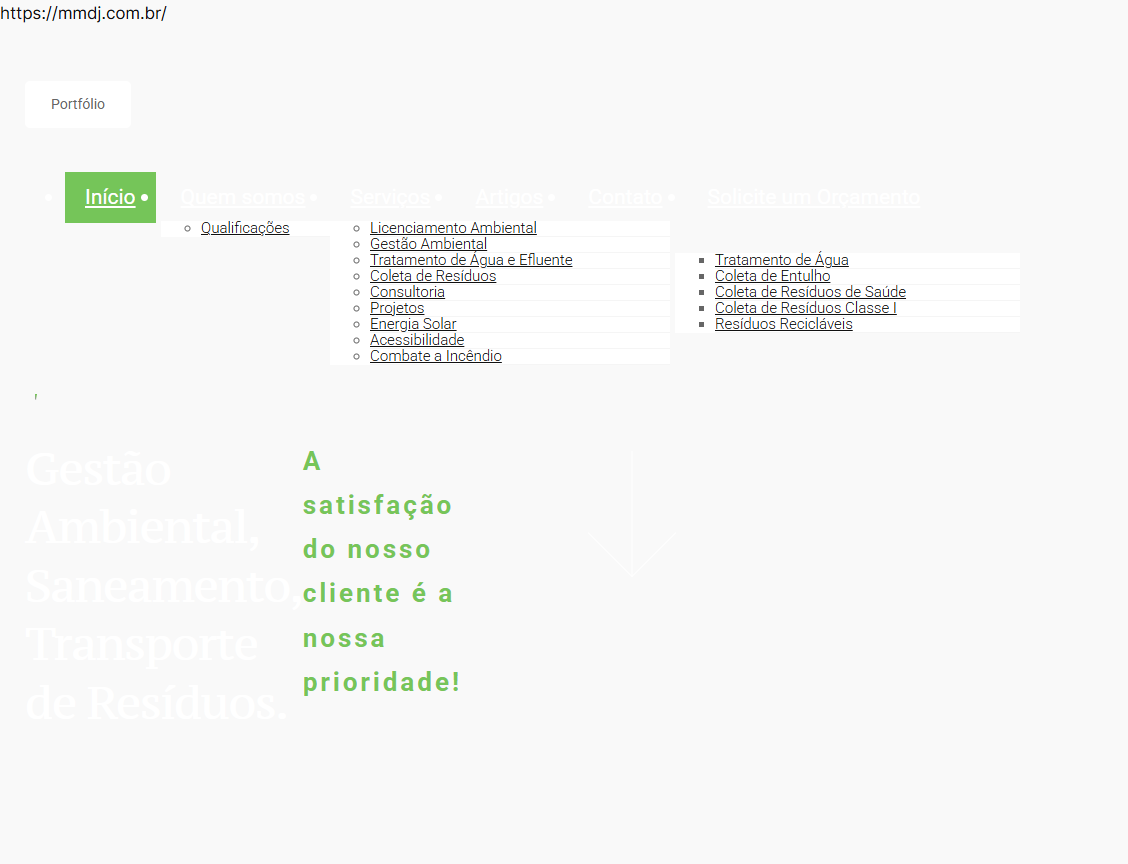
-

Hello Bruno,
To fix the above issue, kindly upload these files to the respective folders using an FTP client like FileZilla or using the File Manager plugin
- Download the CSS file from https://jmp.sh/XSTZzOUo and uplod it to the folder /wp-content/plugins/brizy/public/editor-build/prod/editor
- Download the CSS files from https://jmp.sh/EdTFEooB and upload it to the folder /wp-content/plugins/brizy-pro/public/editor-build/prod
If you need help with uploading these files, kindly give us access to your WordPress dashboard. Please add a new user to your WordPress Dashboard and send the following details to our email: communitysupport@brizy.io
- Support Forum link: https://support.brizy.io/hc/en-us/community/posts/34707035870226
- WordPress Admin URL:
- Username
- Password
Your email must include a link to this thread's URL, otherwise we will be unable to locate your support ticket. Please notify us in this thread when you send us the email.
0 -
Hello Bruno,
We have uploaded the missing CSS files. The homepage now displays well without the layout issues. However, the submenus do not appear correctly; this could be due to a code conflict with some custom code. If you are using a custom code, please deactivate it and check if the sub menus display properly.
0 -

Hello George,
I am having the same issue.
After the update of Brizy to 2.8.12 and Brizy Pro to 2.8.6 my site ( https://connecticore.com ) was completely broken.
After restoring those 2 files provided the page layouts have been brought to normal however there is now the issue with the submenus that you mention above and I have no custom code.
Given that this is a production corporate site I need to bring it up to its normal state as soon as possible. Can you please provide previous working versions of Brizy and Brizy pro so that we may go on while you are preparing the fix in the next versions?
Thank you for your consideration.
Best regards,
Thanasis
0 -

Hi Thanasis,
Thank you for reaching out.
Could you please provide temporary access to your WordPress dashboard so we can inspect the submenu? If we’re unable to resolve it directly, we can also assist you in rolling back to a previous working version of Brizy and Brizy Pro.
To proceed, please provide temporary administrator access to your WordPress dashboard. Kindly send the following details to communitysupport@brizy.io:
- Community post link: https://support.brizy.io/hc/en-us/community/posts/34707035870226
- WordPress Admin URL:
- Username:
- Password:
We’ll be glad to assist as soon as we have access.
Best regards,
Ariel H.0 -
Thank you Ariel.
I have forwarded the requested user credentials.
Best regards,
Thanasis
0 -
Hi Brizy team,
I’m having the same issue on another website. Could you help me with this, please?
Thanks!
0 -
Hello Thanasis,
While working on resolving the above issue, another issue has come up, and your website's homepage frontend is corrupted, due to a problem specific to the WordPress Multisite environment. We'll need FTP access to your website to fix your homepage. Kindly provide your FTP credentials at the same email address.
0 -
Hello Bruno,
Please send us the credentials for https://forte.tec.br/ following the format mentioned in my earlier comment and we will work on fixing it as well.
0 -
Hello George,
I have updated the front page and I notice that the issue has been fixed. We are good now!
Thank you very much for your swift response.
Out of curiosity, I noticed that you have added 2 trial pages but I could not locate any additional CSS so can you share how you did it for future reference?
Best regards,
Thanasis
0 -
Hi Bruno,
We’ve now fixed the broken pages on your site.

Could you please check on your end and confirm that everything is working as expected? If you notice anything unusual, feel free to let us know.
Best regards,
Ariel H.0 -
Hello Thanasis,
To resolve the issue with the sub menus, we needed to recompile all global blocks (particularly those that aren't used on all pages). I created a test page, added all global blocks, and saved it to force a recompilation of global blocks. This resolved the issue with the submenus. I also recreated the homepage to see if that would help. Feel free to delete both the test page and the new homepage I added.
In the multi-site environment when users other than super admins edits a page, it breaks the page due to another bug. We requested for FTP access to fix this issue. This bug does not affect Super Admins and hence you could fix the homepage by updating it.
0 -
Once again thank you very much George for your help and resolution of the issue!
Best regards,
Thanasis
0
Please sign in to leave a comment.
Comments
12 comments