two different brizy sites broken from one day to another

I have multiple sites running brizy on different hosting accounts. Two of my sites broke and I cant figure out how to fix them. The pages looks fine in the brizy editor and completely broken in the live view.
https://spaggis.com/
https://raceon66.com/
-

Hello Raymond,
To fix the above issue, kindly upload these files to the respective folders using an FTP client like FileZilla or using the File Manager plugin
- Download the CSS file at https://jmp.sh/XSTZzOUo and uplod it to the folder /wp-content/plugins/brizy/public/editor-build/prod/editor
- Download the two CSS files at https://jmp.sh/ufDJvmM6 and upload it to the folder /wp-content/plugins/brizy-pro/public/editor-build/prod
If you need help with uploading these files, kindly give us access to your WordPress dashboard. Please add a new user to your WordPress Dashboard and send the following details to our email: communitysupport@brizy.io
- Support Forum link: https://support.brizy.io/hc/en-us/community/posts/34527077882002
- WordPress Admin URL:
- Username
- Password
Your email must include a link to this thread's URL, otherwise we will be unable to locate your support ticket. Please notify us in this thread when you send us the email.
0 -

Hi Raymond,Thank you for your cooperation.
We’ve now fixed the broken pages on your site. Everything should be working properly again.


Please feel free to check on your end, and let us know if you notice anything that still needs attention.
Best regards,
Ariel H.0 -
The websites seem to be working fine now, but the spaggi's website is not sending email notifications from the customer intake forms. It keeps a record of the email in the brizy > leads but no email notifications
0 -
Hi Ron,
Thank you for reaching out.
To help us investigate this further, could you please provide temporary access to your WordPress admin dashboard? This will allow us to take a closer look at your setup and identify the cause of the issue.
Kindly send the following details to communitysupport@brizy.io:
Community Post: https://support.brizy.io/hc/en-us/community/posts/34527077882002
WordPress Admin URL:
Username:
Password:
Also include the URL of the intake form.We’ll review it as soon as we receive the access.
Best regards,
Ariel H.0 -
Hi Ron
Just following up on my previous email to check if you had a chance to review it. Please let us know when you’re ready to share the details so we can proceed and help you fix the issue.
Kind regards,
Ariel H.0 -
I provided the log-in information and havent heard back
0 -
Hi Ray,
My apologies for the delay and confusion on our side.
The form data are being captured in Brizy -> Leads, which indicates that the form itself is working correctly. The issue appears to happen during the email delivery.
It is likely that PHP Mail is being blocked on the server side. Kindly check this with your hosting provider to confirm whether the PHP mail function is restricted or disabled on the server.
Otherwise, the quickest solution would be to configure the form to use Gmail for sending emails, especially since your domain is already using Google Workspace for email services.
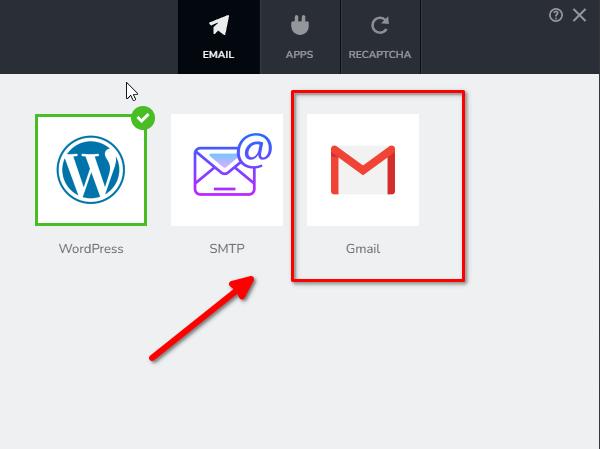
For more details, please refer to this guide:
https://support.brizy.io/hc/en-us/articles/360044216151-Email-notification-via-GmailKind regards,
Ariel H.0
Please sign in to leave a comment.
Comments
7 comments