Problem with the top menu

I created a top menu with a white background.
Since the latest updates, the white background has become transparent, and the submenus are overlapping the main menu.
I can't seem to find a solution.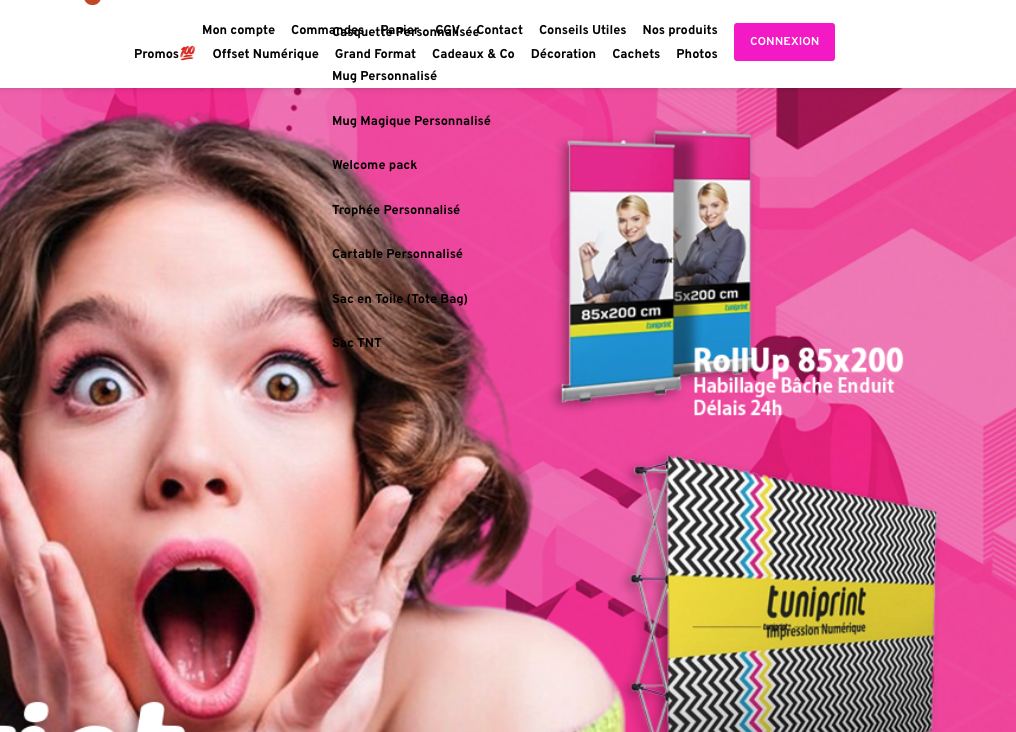
-
I opened the page to make some changes.
When i put the mouse over the menu and try to change the color background all the page disappears.
below the page i have à captcha icon tha appairs.I have to re-open the page
0 -
this is what i have in the html:
<body class="brz brz-ed" style="margin: 0;">
<script> const userAgent = navigator.userAgent; const browserRegex = /(opera|chrome|safari|firefox|msie|trident(?=\/))\/?\s*(\d+)/i; const browserTypes = userAgent.match(browserRegex) || []; const browser = browserTypes[1]?.toLowerCase(); if (browser && browser === "safari") { const regexPattern = /version\/(\d+\.\d+)/i; const matches = userAgent.match(regexPattern); const version = matches ? matches[1] : null; if (version && Number(version) <= 16.3) { alert("Please update Safari browser to the latest version"); } } </script>
<div class="brz-ed-page-curtain">
<div class="brz-ed-page-spinner"></div>
<div class="brz-ed-load-error"> <p>Sorry, Brizy could not load</p> <p>Your theme must use the <code>the_content</code> filter in order for Brizy to work</p> </div> </div> <iframe id="brz-ed-iframe" class="brz-iframe brz-ed-iframe--desktop" style="border: 0; width: 100%; min-height: 100vh; margin: 0 auto;" src="https://www.tuniprint.pro/?is-editor-iframe=1773765353&post=20274"></iframe> </body>0 -

Hello Hedi,
Please upgrade Brizy plugins to these versions if you haven't already, and check whether the problem persists.
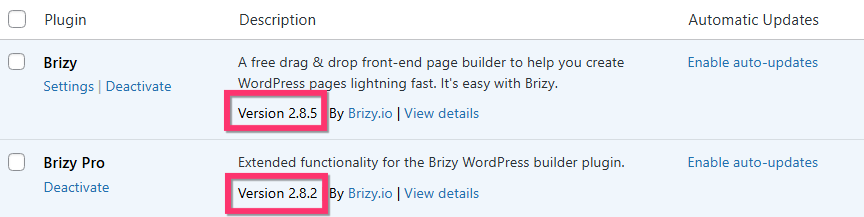
If this does not help, we would like to take a look at your WordPress dashboard to help resolve this issue. Please add a new user to your WordPress Dashboard and send the following details to our email: communitysupport@brizy.io
- Support Forum link: https://support.brizy.io/hc/en-us/community/posts/34105278799250
- WordPress Admin URL:
- Username
- Password
Your email should include a link to this thread's URL, otherwise we will be unable to locate your support ticket. Please notify us in this thread when you send us the email.
0 -
I all ready updated the 2 plugins.
What kind of accoutn do you need?0 -

Hi Hedi,
To further investigate the issue, we’ll need temporary access to your WordPress Admin panel.
You can create an account for us by following these steps:
1. Go to Users → Add New in your WordPress dashboard
2. Enter a username and email (you can use communitysupport@brizy.io)
3. Set the role to Administrator
4. Click Add New UserOnce done, kindly send the following details to communitysupport@brizy.io:
Community post link: https://support.brizy.io/hc/en-us/community/posts/34067707927058
WordPress Admin URL:
Username:
Password:We’ll be glad to assist as soon as we have access.
Best regards,
Ariel H.0 -
Hi,
Email sent0 -
Hi Hedi,
Upon checking, the menu issue is caused by Jetpack Boost. Disabling this plugin resolves the problem.
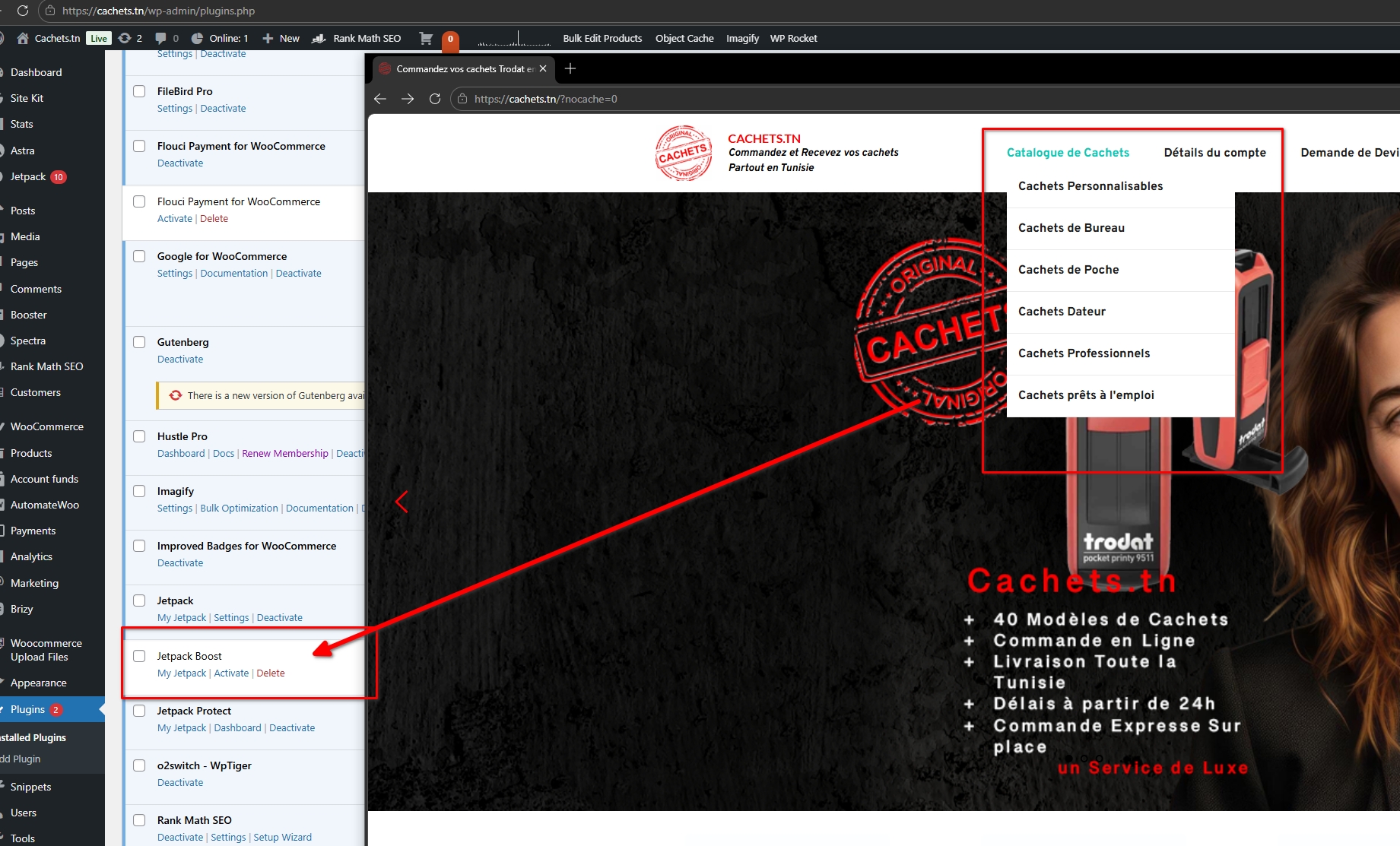
About the page (https://cachets.tn/wp-admin/post.php?post=1640&action=edit), we’re unfortunately unable to edit it. While testing from another website, we encountered a similar issue where another user is attempting to change the background color, and the entire page turns white. This behavior is caused by Jetpack Protect.
Could you please check if you’re able to make changes to the page when Jetpack Protect is disabled?
At the moment, troubleshooting further is a bit complex since there are 37 active plugins. Proper isolation would require disabling all plugins and testing one by one. Performing this from our end may risk breaking the site, so it would be best handled carefully on your side.
Please let us know how it goes or if you have any further questions.
Best regards,
Ariel H.0 -
Hi Ariel.As i told you i have the same issue in 2 different web site.In cachet.tn, the top menu works fine. but i am unable to open the page.I deactivated all the jetpack plugin,... nothing changes
I also cleared the cache of the browser,I have a black page with an animation
This is the html code:<!DOCTYPE html> <html lang="fr_FR" dir="ltr"> <head> <title>Commandez vos cachets Trodat en ligne et recevez votre commande partout en Tunisie</title> <meta charset="utf-8"> <meta name="viewport" content="width=device-width, initial-scale=1"> <link rel="stylesheet" href="https://cachets.tn/wp-
content/plugins/brizy/public/ "> <link rel="stylesheet" href="https://cachets.tn/wp-editor-build/prod/editor/css/ main.base.min.css?ver=354-wp content/plugins/brizy/public/ editor-build/prod/editor/css/ main.editor.min.css?ver=354-wp "> <link rel="stylesheet" href="https://cachets.tn/wp-content/plugins/brizy-pro/ "> <link rel="stylesheet" href="https://cachets.tn/wp-public/editor-build/prod/css/ main.base.pro.min.css?ver=354- wp content/plugins/brizy-pro/ "> <link rel="icon" href="https://cachets.tn/wp-public/editor-build/prod/css/ main.editor.pro.min.css?ver= 354-wp content/uploads/2022/11/ " sizes="32x32" /> <link rel="icon" href="https://cachets.tn/wp-cropped-logo_cachets_tn- 100x100.png content/uploads/2022/11/ " sizes="192x192" /> <link rel="apple-touch-icon" href="https://cachets.tn/wp-cropped-logo_cachets_tn- 300x300.png content/uploads/2022/11/ " /> <meta name="msapplication-TileImage" content="https://cachets.tn/cropped-logo_cachets_tn- 300x300.png wp-content/uploads/2022/11/ " /> <style id="brz-ed-page-curtain-style"cropped-logo_cachets_tn- 300x300.png >@keyframes spin{100%{transform:rotate( </head> <body class="brz brz-ed" style="margin: 0;"> <script> const userAgent = navigator.userAgent; const browserRegex = /(opera|chrome|safari|firefox|360deg)}}.brz-ed-page-curtain{ position:fixed;left:0;right:0; top:0;bottom:0;background- color:#141923;z-index:1000}. brz-ed-page-spinner,.brz-ed- page-spinner:after,.brz-ed- page-spinner:before{content:"" ;position:absolute;top:50%; left:50%;border:3px solid transparent;border-radius:50%; animation:spin 1s linear infinite}.brz-ed-page-spinner{ width:100px;height:100px; margin:-50px 0 0 -50px;border-top-color:# 22b0da;animation-duration:2. 5s}.brz-ed-page-spinner:after{ width:80px;height:80px;margin: -40px 0 0 -40px;border-right-color:# ed2164;animation-duration:2s}. brz-ed-page-spinner:before{ width:60px;height:60px;margin: -30px 0 0 -30px;border-bottom-color:# fff}.brz-ed-load-error{ display:none;width:70%; position:absolute;top:50%; left:50%;transform:translate(- 50%,-50%);color:#fff;text- align:center}.brz-ed-load- error p:first-child{font-size:30px; margin-bottom:20px}.brz-ed- load-error p:last-child{font-size:18px}. brz-ed-load-error code{background-color:gray; padding:1px;font-size:15px}. brz-ed-page-curtain.has-load- error .brz-ed-page-spinner{display: none}.brz-ed-page-curtain.has- load-error .brz-ed-load-error{display: block}</style> msie|trident(?=\/))\/?\s*(\d+) const browserTypes = userAgent.match(browserRegex) || []; const browser = browserTypes[1]?.toLowerCase()/i; ; if (browser && browser === "safari") { const regexPattern = /version\/(\d+\.\d+)/i; const matches = userAgent.match(regexPattern); const version = matches ? matches[1] : null; if (version && Number(version) <= 16.3) { alert("Please update Safari browser to the latest version"); } } </script> <div class="brz-ed-page-curtain"> <div class="brz-ed-page-spinner"></div> <div class="brz-ed-load-error"> <p>Sorry, Brizy could not load</p> <p>Your theme must use the <code>the_content</code> filter in order for Brizy to work</p> </div> </div> <iframe id="brz-ed-iframe" class="brz-iframe brz-ed-iframe--desktop" style="border: 0; width: 100%; min-height: 100vh; margin: 0 auto;" src="https://cachets.tn/?is-editor-iframe=1773831368&post= "></iframe> </body> </html>1640 0 -
Hi Hedi,
Thank you for the update. Could you please disable all plugins except Brizy and Brizy Pro, and let us know once it’s done so we can take a closer look?
Also, if possible, please create a full backup of your site as a precaution.
0 -
I found the plugin that was causing the bug. It was the Gutenberg editor.
I disabled it, and everything is back to normal.
Do you have any other editors besides Gutenberg that you would recommend?0 -
Hi Hedi, thank you for the update.
At the moment, the only available alternative to the Gutenberg editor in WordPress is the Classic Editor plugin.
Best regards,
Ariel H.0
Please sign in to leave a comment.
Comments
11 comments