The menu is broken after the update.

After updating both Brizy and Pro to the latest versions, the menu appears like this.
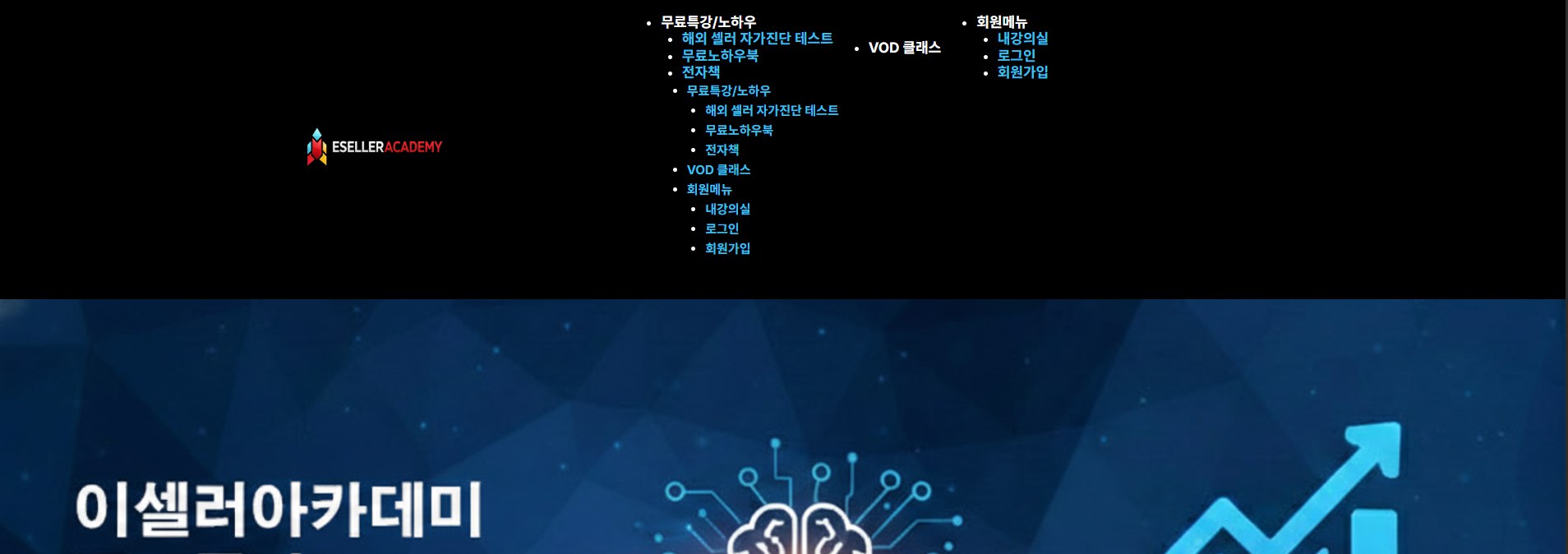
Also, the hamburger menu does not appear on mobile.

-

Hi In Ryeok Kim,
My apologies for the inconvenience.
Could you please share temporary WP Admin access so we can take a closer look at the issue? You can add us as an Admin user in your WordPress dashboard and send the details to communitysupport@brizy.io:
Community post link: https://support.brizy.io/hc/en-us/community/posts/33996498979218
WordPress Admin URL:
Username:
Password:Best regards,
Ariel H.0 -

Hi,
I have the same issue (site https://central-solutions.nl/).
The menu is formatted wrong and should only be displayed when selected:

Brizy Version: 2.8.2
Brizy Pro Version: 2.7.11
Theme used: Neve, but it also occurs in the Blocksy
With best regards, Berry Grooten0 -
Hi In Ryeok Kim,
I just wanted to follow up regarding the temporary WordPress Admin access we requested so we can check the issue mentioned in your community post. Please let us know once you’ve added us as an Admin user and sent the details to communitysupport@brizy.io.
Best regards,
Ariel H.0 -
Hi Berry,
My apologies for the inconvenience.
Could you please follow the steps provided in the support thread to send us your site credentials? This will allow us to access the site and fix the issue for you.
Best regards,
Ariel H.0 -
Hi Berry,
We’ve reverted Brizy and Brizy Pro to v2.8.0 for now. Please note that there may still be some issues affecting certain pages on the website.
We’ve also escalated this matter to our developers so they can further investigate the issue. We’ll keep you informed as soon as we have any updates.
Best regards,
Ariel H.0 -
After updating Brizy to 2.8.3, the desktop menu appears normally, but the hamburger menu does not appear on mobile.
0 -
Hi In Ryeok Kim,
Thank you for your message.
For the time being, please continue using Brizy and Brizy Pro version 2.8.0 until we have a fix available for this issue.
Best regards,
Ariel H.0 -
Hi In Ryeok Kim,
We’ve recently released Brizy v2.8.5 and Brizy Pro v2.8.2. If you haven’t had a chance to update yet, please do so and let us know if the issue still persists.
Best regards,
Ariel H.0 -
Hi In Ryeok Kim,
Thank you for your cooperation.
Upon checking, the issue appears to be coming from the LiteSpeed Cache plugin. For now, we’ve temporarily disabled it to prevent the menu from breaking.

We recommend reviewing the plugin’s optimization settings. You may need to disable CSS/JS minification and test which optimizations work best on your site without causing conflicts.
Please let us know if you need any further assistance.
Best regards,
Ariel H.0
Please sign in to leave a comment.
Comments
9 comments