TSM website preview not working

I have a website called TSM (Tech Stack Mastery) Im testing some of the features as its been a while since I worked on it. When I select the preview button for the home page I gel all HTML and not the nice looking page. How do I fix this. My other platform went rogue so need to move the domain over to this one ASAP. Thanks for helping me fix this.
-

Hello Ed,
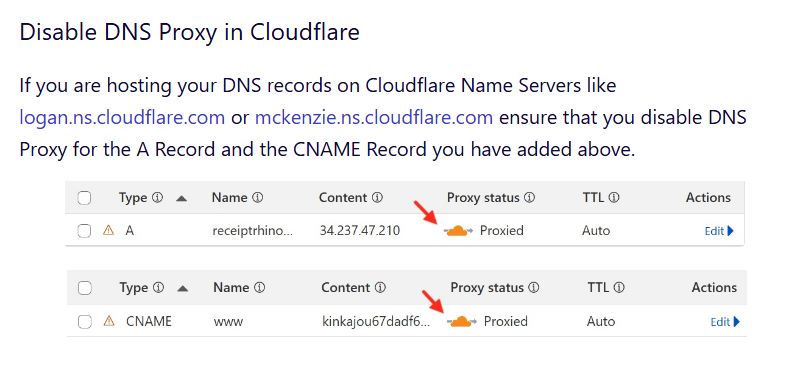
If you are hosting your DNS records with Cloudflare, kindly confirm "DNS Proxy" is disabled for both the A Record and the CNAME Record. Once you confirm this, we will add SSL certificate to your domain

 0
0 -
i believe those are turned off now. Would be nice if you’d place a comment in the initial directions to turn off proxy status so we don’t have to go through this every time.
0 -
Also include the SSL on my other site dancingdurango.com Thank you!
0 -
Hello Ed,
Techstackmastery.com is now working fine. Instructions for disabling Cloudflare Proxy is included as part of the knowledgebase article at https://support.brizy.io/hc/en-us/articles/360041764052-Add-A-Custom-Domain
While you have added the A Record and CNAME record to the domain dancingdurango.com, you have added a different domain durangodancing.com (instead of dancingdurango.com) to your Brizy Cloud project. Kindly delete the domain durangodancing.com from your project and add dancingdurango.com to it.
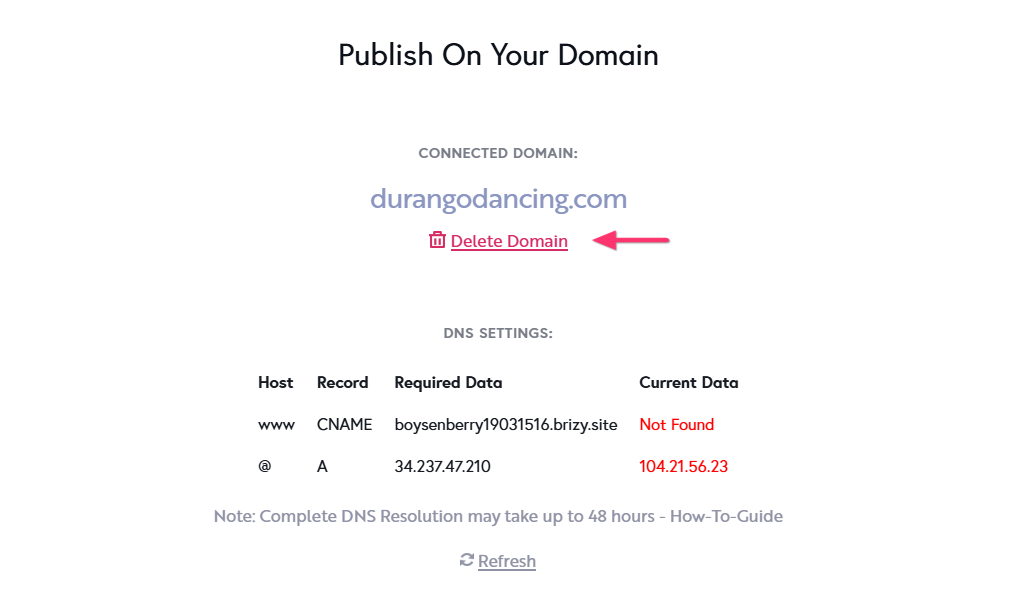
Please disable DNS Proxy for the A Record and the CNAME record in Cloudflare for this domain as well and get back to us. We will install SSL certificate for the domain.
0 -
Curious, why don't you allow me to use Cloudflare SSL?
0 -
Hello Ed,
One must enable the DNS proxy for the A Record and CNAME record in order to use Cloudflare SSL for websites hosted with Brizy Cloud. Using Cloudflare SSL is not feasible because Brizy Cloud does not support Cloudflare's DNS Proxy.
0
Please sign in to leave a comment.
Comments
6 comments