WP Multisite: cannot activate Brizy Pro License on wp website install and suggested solution

Hi,
When I'm in my WP Multisite network overview environment: the admin page for all sites in the WP Multisite setup: I try to add the license key for Brizy Pro.
When I do: I get a red error message at the top: "Brizy Pro does not support multisite anymore" with a link to the article: How are the PRO licenses & white label options working in a WordPress multisite network – Brizy Help Center
Here it states:
Important: If you currently use Brizy in a WordPress multisite network that uses a Brizy PRO license that propagates automatically to all the sites in the network, you will have to add a PRO license to each site in the network manually. Login into your Brizy account, generate licenses for all your sites in the network and then login into each site and activate a PRO license.
The problem:
- Now I go to the WP individual site admin environment.
- I can't add the license here to Brizy. It just not opening the field to enter the key.
The solution:
- I already White Labeled the name in my Multisite Admin overview.
- When I changed the name of the plugin back to Brizy, I was able to enter the key in the individual site admin overview in WP.
Suggestion: fix this bug. It's very confusing and will cause more people submitting questions in the future.
-

Hi Brian,
Thank you for contacting us.
We’ve recently received a similar report regarding this issue, and it has already been raised to our developers for review. The problem should be addressed in one of the upcoming future updates.
In the meantime, you can go to your Multisite Admin settings and enable the 'Show license tab' option. This will make the license tab visible in your subsites so you can enter the license key there.
We apologize for the inconvenience this has caused.
Best regards,
Ariel H.0 -
Thank you, two more questions:
1.
For the element: information (in dutch: informatie), why can't you change the logo icons? They look very outdated, see image below. I cannot match the style of my website.. what is the solution, or will you update this element?

2. If I try to change the hover color of the element 'button' (the text color), it does not allow me to see the changes, also not after removing cache or updating page/post/website/publication. The text hover color stays blue.... is this a known error, how to solve this?
0 -
Hi Brian,
Thank you for the update.
Regarding your first question, unfortunately, the icons can’t be changed at the moment. However, you’re welcome to submit this as a feature request on our Ideas & Roadmap page (https://www.brizy.io/ideas-and-roadmap) so our developers can consider it for future updates.
As for the second issue, we were unable to replicate the behavior you described, as shown in this screencast: https://youtu.be/Y9DN3GOC69g.
Could you please try switching to another theme and see if that makes any difference? If the issue persists, please share your page URL — we might be able to suggest a CSS snippet to help fix it.
Best regards,
Ariel H.0 -
Hi Ariel,
1) I added the suggestion to the page you pointed to.
2) I have Blocksy, but also tried again with Twenty twenty-five theme. Problem with buttons is still there. Please visit: Top 5 kinderhorloges voor peuters en kleuters in 2025: speels, leerzaam en gemaakt voor kleine polsen - KindTech.nl - 1. Flik Flak Pre-School (diverse modellen) 3.5
Here you see a red button under the title, hover color text should be green, but it stays blue.
3 (new question): Is there a way in Brizy to maintain the original image size and proportions on my homepage and single post pages, so that the image automatically fits the available area without being cropped or cut off, and adjusts its shape to the correct format?
Thanks.
0 -
Hi Brian,
There’s an option in Brizy that allows you to display images in their original size and proportions, as shown in the screenshot below.
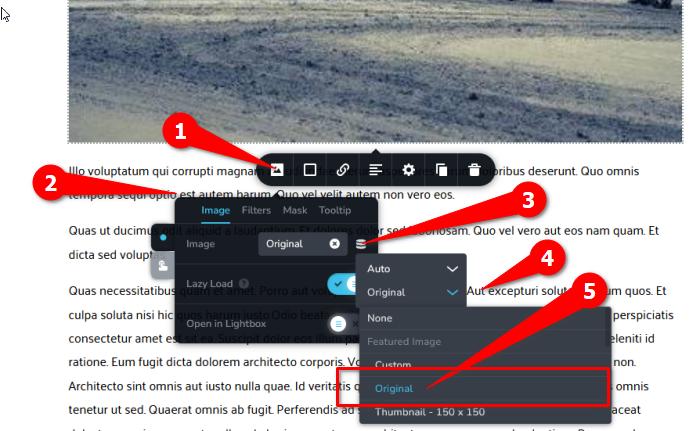
Also, it seems that the link you provided isn’t working, could you please double-check it and share the correct one so we can take a closer look at the button issue?
Kind regards,
Ariel H.0 -
Hi,
For the image size: in the menu you show I have the image linked to an ACF field where I upload specific images for Top 3 or Top 5 products that I discuss. In brizy templates I created a template where I set the image size. So I cannot use the way you described to put it on 'original'.
Is there another way? You cannot pick 'original' and point the same image to an ACF field... you can't pick 2
0 -
Hi Brian,
It’s possible that the button might not be set up correctly. Could you please try downloading the button I created on my test site from this link: https://tinyurl.com/yhvnnvv5, and import it to your page to see if that makes a difference?
Regarding your second concern, this appears to be a limitation for dynamic images. You’ll need to manually set the width to 100% and adjust the height so the image isn’t cropped, as shown in the example below.
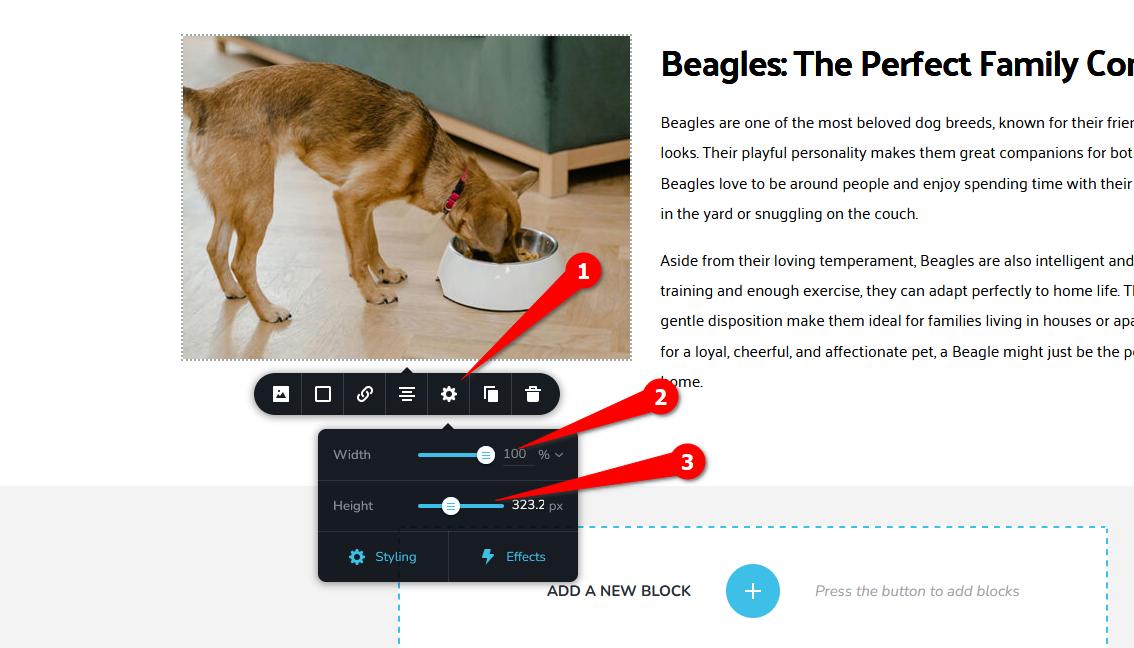
Kind regards,
Ariel H.0 -
'Failed to import saved blocks' when i try to import zip file or unzipped file as a new block into saved blocks...
0 -
Hi Brian,
Thank you for the update.
Please provide us with temporary access to your WP Admin page so we can check the button. Kindly add us as an Admin user to your WordPress Dashboard and send the following details to communitysupport@brizy.io.
Community Post link: https://support.brizy.io/hc/en-us/community/posts/30593555335186
WordPress Admin URL:
Username:
Password:Looking forward to your response.
Best regards,
Ariel H.0 -
Hi Brian,
Thank you for your cooperation.
Could you please confirm if you recently updated to the latest versions of Brizy and Brizy Pro? It appears that the update may have broken the single post template.
If that’s the case, could you please revert to the previous version?
Best regards,
Ariel H.0 -
Hi Ryan,
There was an issue with the previous update of Brizy and Brizy Pro that may have caused some functionality problems. To resolve this, please update to Brizy Version 2.7.17 and Brizy Pro Version 2.7.9, which include fixes for the issues found in the earlier release.
We currently don’t have super admin access to your website, so we’re unable to update or install plugins on your behalf. Please perform the update from your end and let us know once it’s done so we can verify that everything is working correctly.
Kind regards,
Ariel H.0 -
Hi,
I now installed brizy pro version 2.7.9, I already had the latest version of standard Brizy. Now the whole page is broken...
Example: Top 3 tech-speelgoed voor baby’s tot 1 jaar in 2025
0 -
So hopefully you can fix the above... you still have the login.. also.. can you support with installing a child theme?
0 -
Hi Brian,
My apologies for the inconvenience.
To properly investigate the issue and assist you, we will need super admin access to your website. Once we have that, we can look into why the page is broken.
Best regards,
Ariel H.0 -
I don't know how to do that,
I''ll give you my login details:
0 -
Hi Brian, we're still looking into this issue, please give us some more time to check it.
0 -
Hi Ariel,
Is the issue with the button and the issue with the update to latest version and broken site fixed? Something wrong with the special field mapping of ACF plugin?
0 -
Hi Brian,
Yes, the issue with the broken site has been fixed with the latest update.
Regarding the ACF issue, could you please provide a few more details about what’s happening with the special field mapping? This will help us better understand the problem and look into it further.
Best regards,
Ariel H.0 -
Hi,
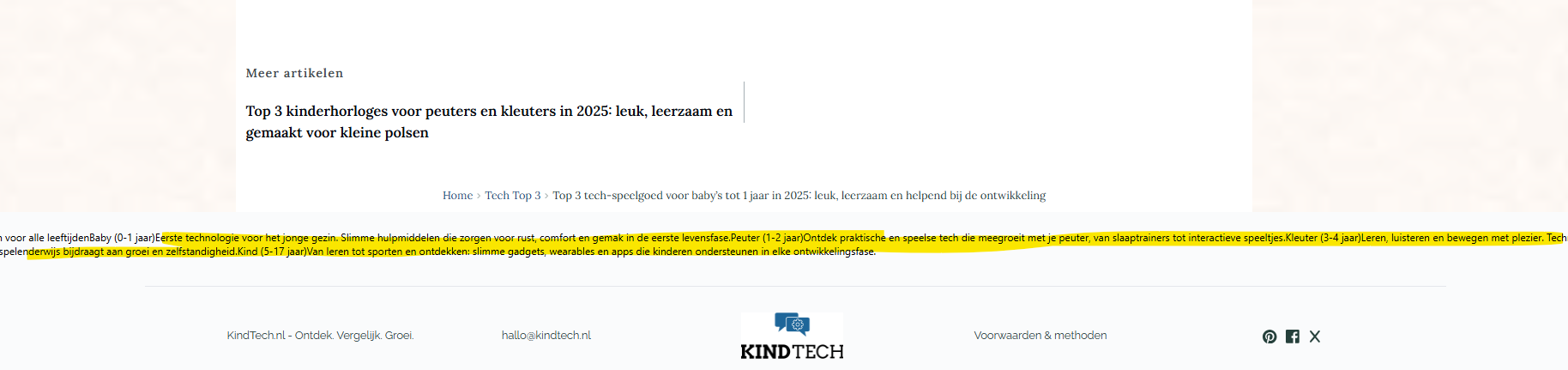
There is still a block at the bottom that is not showing correctly, see below.
Also: is the issue with the coloring of hover text solved, see button on page: Top 3 tech-speelgoed voor baby’s tot 1 jaar in 2025 it does not look solved/still blue?
 0
0 -
I fix the bottom issue , so only the button left... the problem it started with, see explanation above.
0 -
Hi Brian,
I am glad that you were able to fix the issue. Regarding the button, it appears to be a small glitch — we weren’t able to replicate it on our testing site, but we’ve asked one of our colleagues to take a closer look at the bug. We’ll let you know as soon as we have an update on this.
Best regards,
Ariel H.0 -
Ok, please let me know.
Can you help me with a child theme? I don't want the site to be full with errors with every (plugin/wp) update or when we add code
0 -
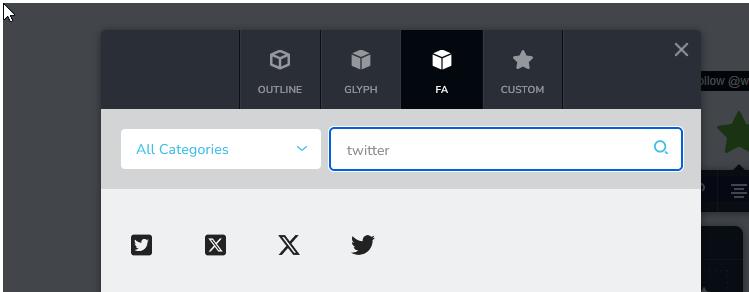
Why is the social element still Twitter and not X? This should be basic updates right? Not something that needs to be requested?
0 -
Hi Brian,
Just to clarify, when you mentioned using a child theme, did you perhaps mean a staging site? A child theme wouldn’t usually resolve issues caused by plugin updates, while a staging site is typically used for testing updates safely before applying them to your live site.
Regarding the social icons, the icon displays as Twitter, but when you click the “Follow” or “Mention” button, it behaves differently. You should still see the correct icon.
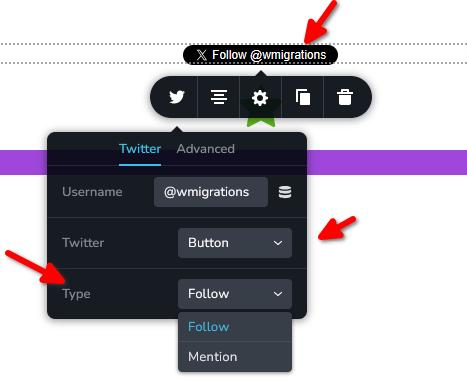
You can also use the Twitter or X icon from the Brizy icon library and link it directly to your X account.
Best regards,
Ariel H.0
Please sign in to leave a comment.
Comments
24 comments