Error message when clicking the Update button

Hello,
I am trying to make some changes to pages on my website that were created with Brizy, but every time I click "Update/Save," an error window pops up saying: "This page needs a refresh. You've probably updated this page (or another page) in a different tab or browser." To solve the problem, I have tried the following:
1. I went to my cPanel and disabled Mod Security for all my websites.
2. I logged out and refreshed the website several times.
3. I disabled a plugin (LightStart), which was supposed to display a "website under construction" message, in case that was the problem.
4. I tested it on other pages and got the same message.
5. I updated/saved the permalinks, just in case.
Since I can't resolve the issue, I'm asking if you could help me.
This is the page I am trying to make changes to: https://montesdesignshop.com/pablos-collection/
Thank you.
-

Hi Pablo,
Thanks for reaching out.
Could you please try using another browser and see if that makes any difference? If the issue persists, kindly disable all other plugins except Brizy and Brizy Pro to check if one of them might be causing a conflict.
If it still doesn’t resolve the problem, please provide us with temporary access to your WordPress Admin so we can investigate further. Kindly add us as an Administrator user and send the following details to communitysupport@brizy.io.
Community Post link: https://support.brizy.io/hc/en-us/community/posts/30480948988818
WordPress Admin URL:
Username:
Password:Looking forward to your reply.
Best regards,
Ariel H.0 -
Thank you for responding. I ran the tests you suggested and found that disabling the Wordfence Security plugin allows Brizy to work properly.
Is this a recurring problem for other Brizy users, and if so, what solution do you suggest to ensure the security provided by this plugin without affecting Brizy's performance?0 -
Hi Pablo,
Thank you for the update.
Please switch Wordfence to Learning Mode for a couple of days so it can recognize Brizy’s actions. This should resolve the issue.
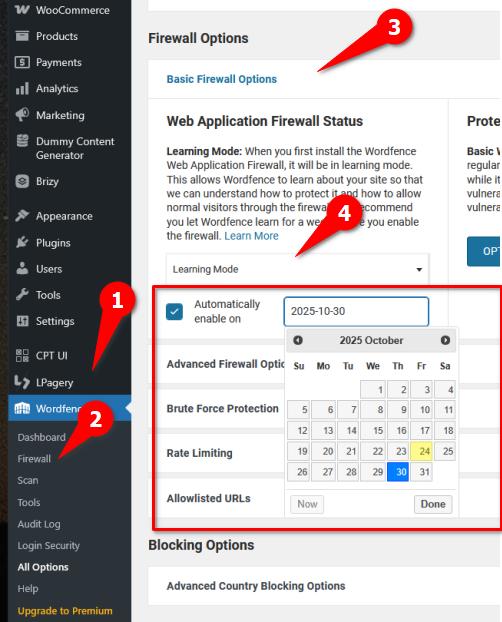
Best regards,
Ariel H.0 -
I appreciate all your help in solving the problem. Thank you very much.
0
Please sign in to leave a comment.
Comments
4 comments