Users published Brizy pages corrupted.

Hi There Brizisphere!
I have an issue (its a WPMU install - don't know if thats part of the problem) whereby I as 'super admin' can publish a Brizy page and everything looks good.
However, if another user (set as editor, or admin, doesnt matter) attempts to publish a brizy page, the output formatting is mostly stripped and corrupted.
Can anyone help?
Many thanks
-

Hi Robert,
Thank you for contacting us.
This is a known issue that can occur on WordPress Multisite. Until we release a fix for this, please try adding the following code snippet to your theme’s functions.php file:
<?php
function my_allow_unfiltered_html_multisite( $caps, $cap, $user_id ) {
    if ( $cap === 'unfiltered_html' ) {
        $allowed_users = [ 2, 5 ]; // User IDs you trust
        if ( in_array( $user_id, $allowed_users, true ) ) {
            $caps = [ 'unfiltered_html' ]; // grant it
        }
    }
    return $caps;
}
add_filter( 'map_meta_cap', 'my_allow_unfiltered_html_multisite', 10, 3 );
This should allow other users, such as editors or admins, to publish Brizy pages without the formatting being stripped.
We apologize for the inconvenience.
Best regards,
Ariel H.0 -
Thanks Ariel.
I'm not much of a coder...where do I add it (theme: page builder framework) - do I just copy / paste at the end?
0 -
Just following up - I tried twice and it took the whole site down (critical error) and then I added it at the top after the already existing '<?php' and removing the '<?php' in the provided text above...I don't get a critical error...but the issue is not resolved..
Much appreciate a little bit of guidance - many thanks.
0 -
Hi Robert,
Thank you for the update.
The easiest way to use the code snippet without directly adding it to your functions.php file is by using the WPCode plugin. It allows you to safely add custom PHP snippets across your site or network without editing theme files.
Here’s how you can set it up in your WordPress Multisite:
1. Log in to your Network Admin Dashboard.
2. Go to Plugins → Add New.
3. Search for WPCode
4. Click Install Now, then Network Activate the plugin.
5. Once activated, go to any subsite where you want to use the snippet and navigate to Code Snippets → + Add Snippet.
6. Choose “Add Your Custom Code (New Snippet)”, then select PHP Snippet.
7. Paste the PHP code snippet into the editor, give it a name, and click Save Changes and Activate.
This is demonstrated on this screencast - https://youtu.be/Mx8SVpxGQkwAfther this, the code will now run just like it would in your functions.php file, but in a much safer and easier way to manage across your multisite setup.
Best regards,
Ariel H.0 -
Thanks Ariel - I've been able to follow that process successfully but unfortunately it hasn't fixed the original issue. Any other suggestions?
0 -
Hi Robert,
Please provide us with temporary access to your WP Admin page so we can take a look. Kindly add us as an Admin user to your WordPress Dashboard and send the following details to communitysupport@brizy.io.
Community Post link: https://support.brizy.io/hc/en-us/community/posts/30038405925266
WordPress Admin URL:
Super Admin Username:
Password:Subsites Admin URL:
Subsite Username:
Password:Looking forward to your reply.
Best regards,
Ariel H.0 -
I have sent that info now.
Note - I have tried all the 'usual' fault finding such as disabling security and page caching plug-ins and also trying a different theme. None of these have helps.
0 -
Hi Rob,
Thank you for the update.
I had some trouble accessing your site, but I was able to replicate the issue on my testing site instead.
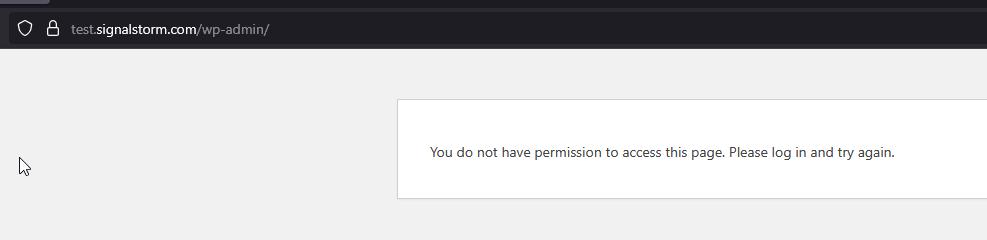
After adding the custom code in WPCode, there’s one additional step needed, make a minor change on the subsite, such as temporarily reducing the width of a block or adding some padding. Then save the page, check if the front-end issue is resolved, and revert the changes afterward. This is demonstrated on this screencast - https://youtu.be/Hmlhx5CqJT0
Please try this and let me know how it goes.
Best regards,
Ariel H.0 -
Hi Ariel,
Thanks for the update - but I had already done a quick 're-edit' as I'm aware that often pages need to be republished to overwrite any glitches.
I've done you a little video back - showing I've got the code snippet in place and activated, and still same issue on the front end following an 'other user' publish:
0 -
Hi Rob,
Thank you for the update.
Please try network deactivating the Brizy Pro, then activate it directly on the specific subsite instead. After that, add your Brizy license key in the subsite’s settings and follow the steps previously provided to address the issue.
Please try this and let me know how it goes.
Best regards,
Ariel H.0 -
Upon trying that I get: Brizy Pro: On a multisite installation the plugin must be network activated!
(I should also add, I do already have 1 individual license generated per subsite)
0 -
One more addition Ariel - if you wanted to try and log into my actual site - if you review the email I sent with the details on, you'll see that the wordpress login is not the default /'wp-admin' address - (its a custom address for security.) I think this is why you were unable to access the site.
0 -
Hi Rob, sorry about that. I've asked a member of our team to look into this issue. I will get back to you as soon as I have an update.
0 -
Ah - weridly it seems to have fixed itself!
I cant be sure - but I spotted two sites were sharing one license (within the Brizy license key area) once I reissued a new licence and separated them it seemed to resolve
0 -
Hi Rob,
My colleague made some changes to fix it. Instead of using the WPCODE plugin, he added the script as a Must Use plugin so that it applies to all subsites by default.
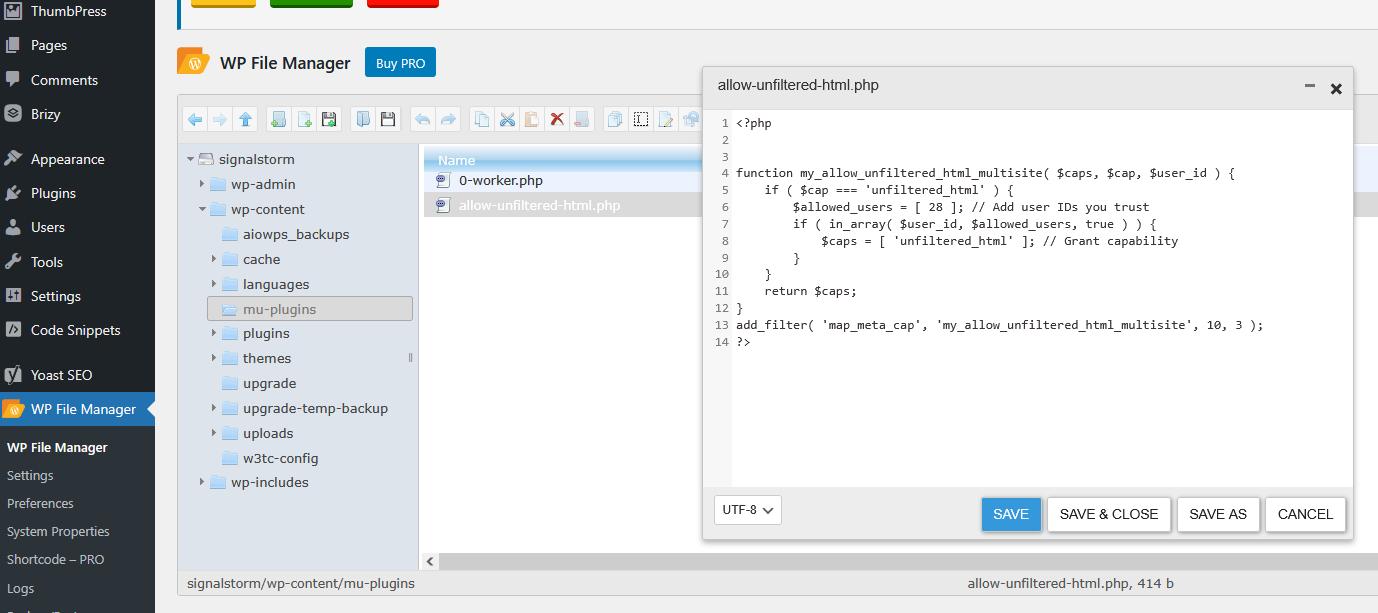
Please deactivate and delete the WP Code plugin as it is no longer needed.
Best regards,
Ariel H.0 -
ah ok brillant thanks Ariel - it must have been coincidence with the license issue I spotted.
Unfortunately, I'm not quite out of the woods yet. It seems to have resolved the issue for the test subsite - but not the other subsites.
I notice in the code there is the line: "$allowed_users = [ 28 ]; // Add user IDs you trust"
Do I have to add the ID number for every user with edit capabilities there?
0 -
Update on the above - it appears I do have to add additional trusted users here.
One question. Can I instead leave it blank to allow all users?
0 -
Hi Rob,
It is technically possible to allow all users to use "unfiltered_html", but it is not recommend as this can create security risks.
Instead, it’s best to only grant this permission to trusted users. Here’s how you can find their User IDs and add them to the code:
1. Go to your WordPress Dashboard
2. Navigate to Users → All Users
3. Hover over a username, and look at the browser’s status bar or URL — you’ll see something like this: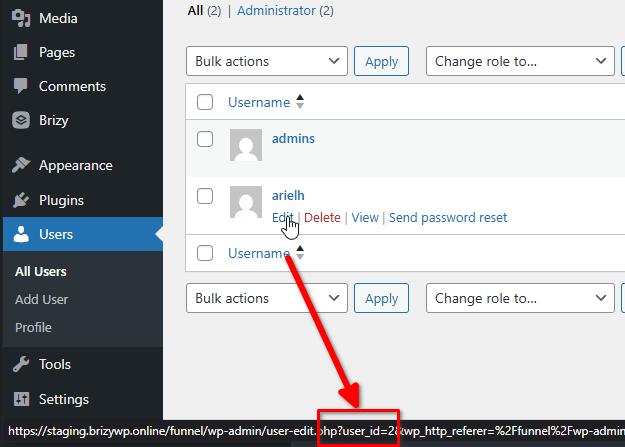
In this example, 2 is the user’s ID.
4. Once you have the IDs for all users who need access, edit your code snippet and replace the existing IDs like this:
$allowed_users = [ 2, 35, 41 ]; // Add all trusted user IDs here comma separated
5. Save your changes to the code snippet so those specific users will now have permission to publish Brizy pages without issues.
This approach keeps your network secure and giving the right users they need to edit and publish Brizy pages. Sorry that this can be a bit complex but if you need any further assistance, feel free to reply.
Best regards,
Ariel H.0
Please sign in to leave a comment.
Comments
18 comments