can't place header

Hi,
I can't seem to get my header to work. I created my header, then clicked on Make it Global. I then chose Include, Posts, and All. And then click on Save. And nothing happens except the content in my header behind the Conditions popup disappears.
No idea what I'm doing wrong. I tried disabling all my plugins but it didn't help.
Thanks,
Ed
-

Hi Ed,
Thank you for contacting us.
You’ll need to create a dynamic template for posts as shown in this tutorial: https://www.youtube.com/watch?v=lkiSk6IE7tA
It looks like your header isn’t showing because it’s not linked to a dynamic post template. Once you set that up and assign the header through the template conditions, it should display correctly.
Please try this and let me know how it goes.
Best regards,
Ariel H.0 -
Thanks for that information, Ariel. But I have the same problem when I try to place the header on a page. So I think there must be some other problem or maybe I'm doing something completely wrong. Is there a tutorial for creating and placing a header?
0 -
Hi Ed,
You can find detailed tutorials for creating and placing headers in our Help section:
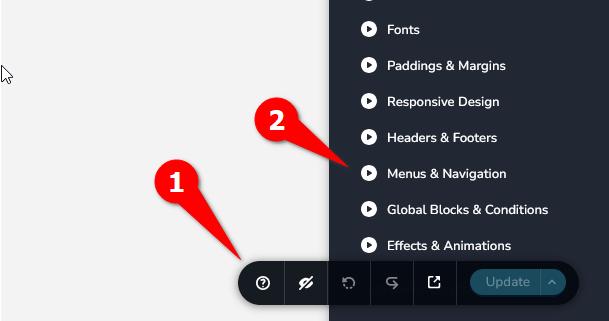
If you still experience the same issue after that, please provide us with temporary access to your WP Admin page so we can take a look. Kindly add us as an Admin user to your WordPress Dashboard and send the following details to communitysupport@brizy.io.
Community Post link: https://support.brizy.io/hc/en-us/community/posts/29957870607890
WordPress Admin URL:
Username:
Password:Looking forward to your reply.
Best regards,
Ariel H.0 -
Thanks, that's what I needed! Got it all figured out.
0
Please sign in to leave a comment.
Comments
4 comments