Mega menu displaying in incorrect position since last Brizy Pro update

Hi, since the last update, the Mega Menu is now not loading in the correct position, if the width is wider than 100% this no longer works, and the position of the mega menu is now displaying to high which is on top of the actual menu items now.
how it should look: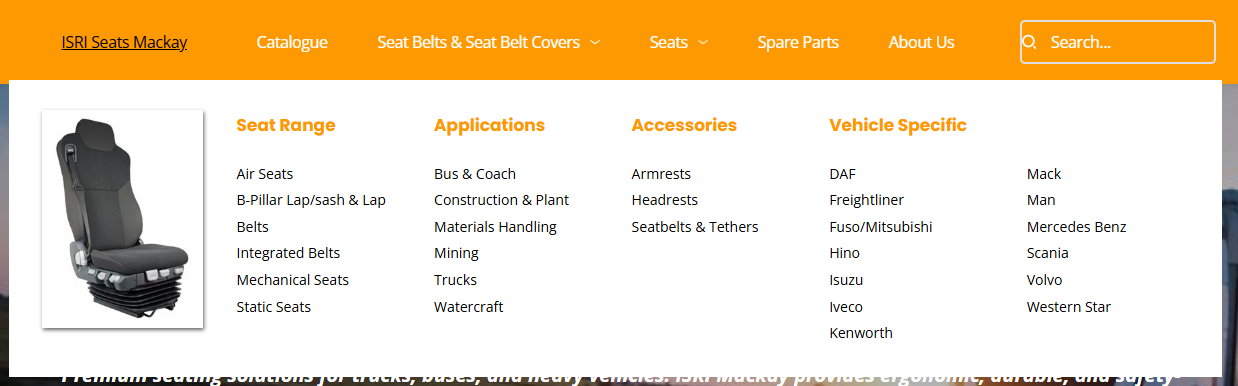
vs how it looks when in view mode: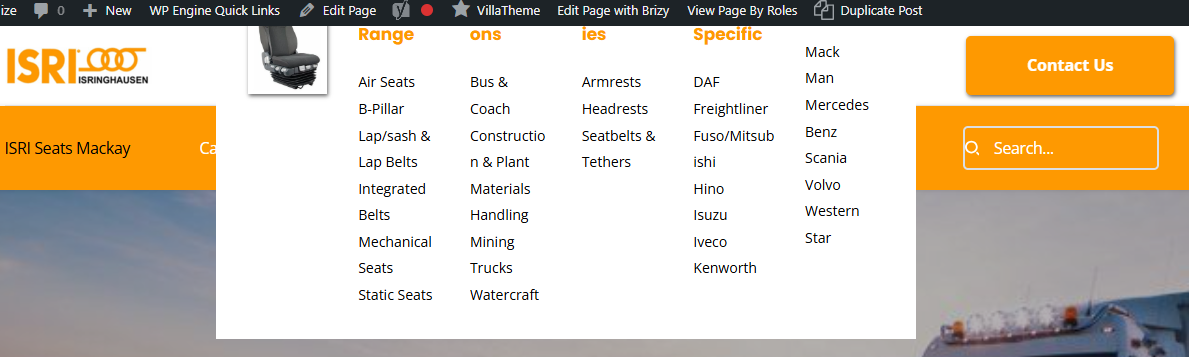
-

Hi Dennis,
My apologies for the inconvenience.
Please try fixing it by temporarily changing the width of any block on your site to 90%, save it, and then switch it back to 100%. Alternatively, you can also add a 1px padding, save, and then revert your changes. This process will force Brizy to recompile the page (or any affected page), which should fix the broken layout.
If the issue continues, please share your WordPress admin login details so we can take a closer look. Please add us as an Admin user to your WordPress Dashboard and send the following details to communitysupport@brizy.io.
Community Post link: https://support.brizy.io/hc/en-us/community/posts/29654280272402
WordPress Admin URL:
Username:
Password:Looking forward to your reply.
Best regards,
Ariel H.0 -
Hi Ariel,
Normally this is my go to fix, but this doesn’t work in this case. I have tried resizing or adding space on all blocks on this page to affect the mega menu, including within the mega menu itself but the fix doesn’t seem to work for this case.
I even tried to build a brand new menu and mega menu within but the issue is on this new header as well.
WPAdmin URL: https :// isr*****y.com.au/wp-admin
Username: communitysupport@brizy.io
Password:
Plaese check email for invite0 -
Hi Dennis,
Thank you for sending the invite. We received it; however, the user account currently does not have administrative access. Could you please update the account to have administrator rights so we can proceed?
Best regards,
Ariel H.0 -
ok I have upgraded the new user to Admin.
0 -
Hi Dennis,
Thank you for the update. At the moment, we don’t have access to the plugins area on the site. Could you please confirm if you have Brizy version 2.7.14 and Brizy Pro version 2.7.6 installed?
Best regards,
Ariel H.0 -
Ok apologies again, i have just given you Super Admin privilege for the Network.
Yes, Brizy 2.7.14 & but no it looks like i only had Pro v2.6.8!
I have just gone in and updated this now, apologies, with the WordPress Network admin it had obfuscated that there was a newer version available which did not display for some reason.
And the problem is fixed! So really this was just me not being able to see that there was an update available when using WordPress Networks.
0 -
I am fully licensed for Brizy Pro, too, by the way - I had even replaced the license to ensure it was being seen correctly.
0 -
Great! Please monitor it on your end and let us know if you experience any further issues.
Cheers,
Ariel H.0
Please sign in to leave a comment.
Comments
8 comments