issue with builder

my site https://hemlockcontractingco.com/ all of a sudden is not looking how I designed it. I had this site for a while and never had an issue like this. I logged in updated the plugins and then looked at the site to make sure nothing was broken. but it does not look like I designed it, it seems like it reverted to some default theme. also it was strange that I had to add the license for the brizy again fro the pro version. so I thought maybe it was an issue with the updates I asked for the hosting company to look at everything and see if they can revert it to a previous version. which they did it didn't help, and then to even earlier version when I know for sure it was working. but it didnt help. also it is strange that if I click refresh on the window it shows how the site is suppose to look for a second and then it goes back to not what it needs to be.
-

Hi Tatsiana,
Please share your WordPress admin login details with us so we can take a closer look. Please add us as an Admin user to your WordPress Dashboard and send the following details to communitysupport@brizy.io.
Community Post link: https://support.brizy.io/hc/en-us/community/posts/29488169875218
WordPress Admin URL:
Username:
Password:Looking forward to your reply.
Best regards,
Ariel H.0 -
Hi Tatsiana,
Thank you for your cooperation.
We’ve updated Brizy, Brizy Pro, and the other plugins on your site. Could you please check again and let us know if everything is now working as expected?
Looking forward to your reply.
Best regards,
Ariel H.0 -
I have tried replying via email but I dont think you are seeing it. it hasn't worked. the colors are still all wrong. I want to make sure I know why this happened so I can prevent it from happening on other sites.
0 -
Hi Tatsiana,
Thank you for your message.
I’ve created a screencast https://www.youtube.com/watch?v=FHJFUBCrtNE to show you how the site looks from my end. As you’ll see, the front-end of your site matches the layout in the Brizy editor.
Could you please create a screenshot of how the site appears on your side?
Best regards,
Ariel H.0 -
I responded to the email again and I dont think you are getting that. This is exactly what I am seeing as well but it is not what it should be. This jsut happened all of a sudden without me doing anything. I am attaching a snapshot from the way back machine that can pull site from a while ago, it doesn’t have the images showing but you can see the colors that it is suppose be.
I even tried restoring it from a month ago but it didnt work.And I did absolutely nothing to see these changes in colors.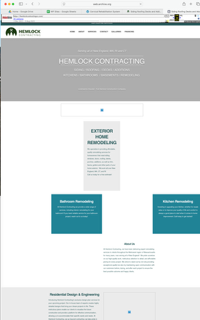 0
0 -
Hi Tatsiana,
Thank you for sharing the details and the snapshot. It looks like the Global Style was reverted to Overpass instead of Overpass-qYiG, which may have happened during the last update.
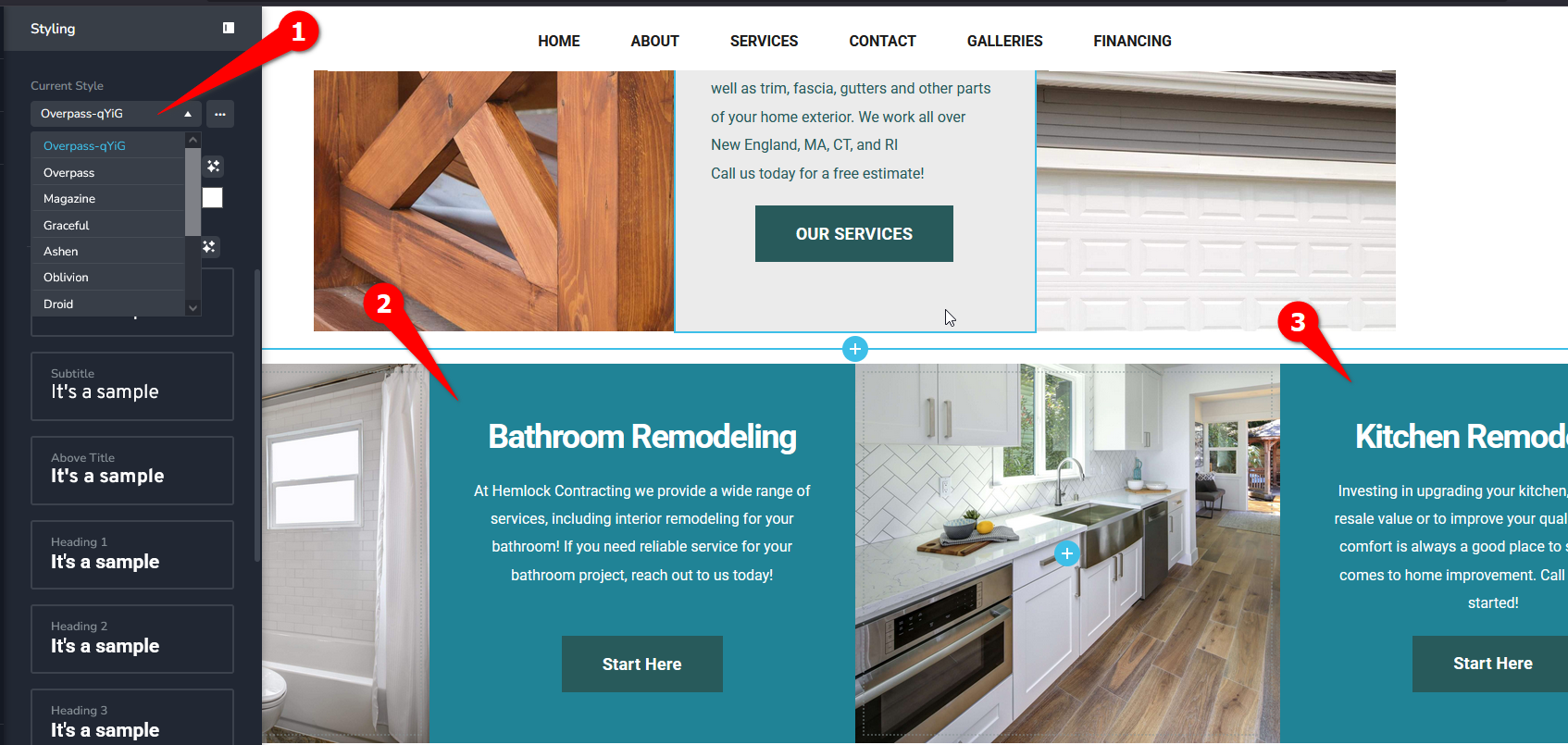
We’ve updated the Global Style settings, and your site should now be displaying the right colors.
Please have a look on your end and let me know if everything looks as expected.
Best regards,
Ariel H.0 -
I would like to know why this happened and is this going happen again? and is this going o happen when I go and update the sites I have?
0 -
Hi Tatsiana,
I completely understand your concern. I don’t know exactly what caused this issue yet, but I’ll be working on replicating it in my test environment and will report it to our senior support team for further review. Hopefully, this will help us pinpoint the cause and prevent it from happening again.
I sincerely apologize for the inconvenience this has caused, and I’ll keep you updated as soon as I have more information.
Best regards,
Ariel H.0
Please sign in to leave a comment.
Comments
8 comments