Issue with Brevo <-> Brizy Integration Setup from Button in Protected Page

Hello,
we are experiencing issues while setting up the “Request Catalogs” button currently placed inside the “Protected Page.”
Below are the steps and context:
-
Open the editor of the System Page “Protected Page”
-
Inside the “Protected Page,” click the connector icon on the “Request Catalogs” button
-
The related popup opens → select the “Apps” tab
-
From the screen, select Brevo
-
At this point, the list of configured and active APIs appears (we currently have more than one because, in trying to troubleshoot the issue, we created and activated 2 additional ones)
-
Select one of the APIs → click Continue
-
Navigate to the “Folders” tab → most of the time, the folders do not load, even though they exist and are correctly set up in Brevo
-
In the rare cases when folders are displayed, select the relevant one and move to the “Lists” tab
-
In the “Lists” tab, sometimes all Lists are visible, other times they are not
-
If Lists are visible, select the relevant one and continue to the “Fields” tab
-
Here, even after selecting the desired field, clicking “Continue” keeps the screen stuck on Loading, and the configuration process cannot be completed
Important notes:
-
The Brevo API is correctly configured and working
-
In Brevo, the API is active and displayed correctly
-
The reference to the API also appears properly inside Brizy
Attached below is the error message related to the failure in loading and displaying the data as described above:
fetch("https://admin.brizy.io/api/forms/tnH5MSAL6UQO/integrations/22362462", {
  "headers": {
    "accept": "*/*",
    "accept-language": "en,it;q=0.9,it-IT;q=0.8,en-US;q=0.7,fr;q=0.6",
    "cache-control": "no-cache",
    "content-type": "application/json; charset=utf-8",
    "pragma": "no-cache",
    "sec-ch-ua": "\"Not;A=Brand\";v=\"99\", \"Google Chrome\";v=\"139\", \"Chromium\";v=\"139\"",
    "sec-ch-ua-mobile": "?0",
    "sec-ch-ua-platform": "\"Windows\"",
    "sec-fetch-dest": "empty",
    "sec-fetch-mode": "cors",
    "sec-fetch-site": "same-origin",
    "x-editor-version": "329-cloud",
    "cookie": "_brzau=b74ef90c-cdb4-40a2-aa6c-802505acbc62; cookieyes-consent=consentid:ZzhGNDRsa1JmUGF5bDFIY2tNU1NMY3ZYdmduWjhLYTc,consent:yes,action:yes,necessary:yes,functional:yes,analytics:yes,performance:yes,advertisement:yes,other:yes; ajs_anonymous_id=b74ef90c-cdb4-40a2-aa6c-802505acbc62; _ga=GA1.1.937653681.1756112483; ajs_user_id=2974693; lantern=79bb2a94-7dec-4c28-aed9-e6013c6c156d; SSC_7S-ttcnorthamericacom=1%G1%Ghttps%3A%2F%2Fadmin.brizy.io%2Fprojects%2F21346048%2Feditor%2Fpage%2F5953458&FHR=https%3A%2F%2Fadmin.brizy.io%2Fcollaboration-tool%3FprojectId%3D21346048%26itemId%3D%2Fcollection_items%2F5953458%26device%3Ddesktop%G1756477454000%G%G%G1%G1756477454000%G%3FprojectId%3D21346048%26itemId%3D%2Fcollection_items%2F5953458%26device%3Ddesktop%G; SN_7S-ttcnorthamericacom=7%Ghttps%3A%2F%2Fadmin.brizy.io%2Fapi%2Fprojects%2F21346048%2Fpages%2Fhtml%3Fpage%3D%2Fcollection_items%2F5953458%G1%G1756477454000%G1756477454000%G; PHPSESSID=kd1ia6qnsjghso3tv6melanqsb; _clck=13qwxmg%5E2%5Efyy%5E1%5E2063; _gcl_au=1.1.507888554.1756112483.1619334468.1756710434.1756710434; amember_nr=6962adf721aef4e9a682e798ca0c5ed6; CLOUDSESSUID=7be059e4368be50499f2ef4edbd6dabf; CLOUDREMEMBERME=QXBwQnVuZGxlXEVudGl0eVxVc2VyOlpHRnNYMnhoWjI5MGRHTnVZUT09OjE3NjE4OTQ0NDI6OWFlNDhmNThmMThhNmQ3NDU2OGQyNTA5M2FlMzYxMTU1NDAwYmMwYWVhODViZGY3M2IyZTIyOGQ3YTQ1NTBhYQ%3D%3D; _ga_ZTMP7Z7KN6=GS2.1.s1756710431$o5$g1$t1756710469$j22$l0$h0; _clsk=10keig7%5E1756710470583%5E7%5E1%5Ee.clarity.ms%2Fcollect",
    "Referer": "https://admin.brizy.io/projects/21346048/editor/single/5953464"
  },
  "body": "{\"type\":\"sendinblue\",\"completed\":true,\"confirmationNeeded\":null,\"usedAccount\":22807550,\"usedList\":\"54\",\"usedFolder\":\"1\",\"fieldsMap\":\"[{\\\"sourceId\\\":\\\"zIEDw5oRBT1d\\\",\\\"sourceTitle\\\":\\\"Company\\\",\\\"target\\\":\\\"_auto_generate\\\"},{\\\"sourceId\\\":\\\"qIUxX6cdbqQy\\\",\\\"sourceTitle\\\":\\\"Email\\\",\\\"target\\\":\\\"email\\\"}]\",\"container\":\"21345810\"}",
  "method": "PUT"
});

HTTP/1.1 400 Bad Request
Server: openresty
Date: Mon, 01 Sep 2025 07:27:25 GMT
Content-Type: application/json
Transfer-Encoding: chunked
Connection: keep-alive
Cache-Control: max-age=0, must-revalidate, private
Access-Control-Allow-Origin: https://admin.brizy.io
Access-Control-Allow-Credentials: true
Access-Control-Expose-Headers: *
Content-Security-Policy: upgrade-insecure-requests
Strict-Transport-Security: max-age=31536000; includeSubdomains; preload
X-Content-Type-Options: nosniff
X-Frame-Options: SAMEORIGIN
X-XSS-Protection: 1; mode=block
Referrer-Policy: no-referrer-when-downgrade
-

Hello Dal,
The issue could be due to blocking of unknown IP addresses by Brevo. You can read more about it at https://help.brevo.com/hc/en-us/articles/5740111683858
Brizy Cloud gives out dynamic IPs when making API calls. Hence IP based whitelisting does not work for Brizy Cloud. To make Brizy-Brevo integration work, kindly deactivate blocking of unknown IPs in your Brevo profile under Settings > Security > Authorized IPs
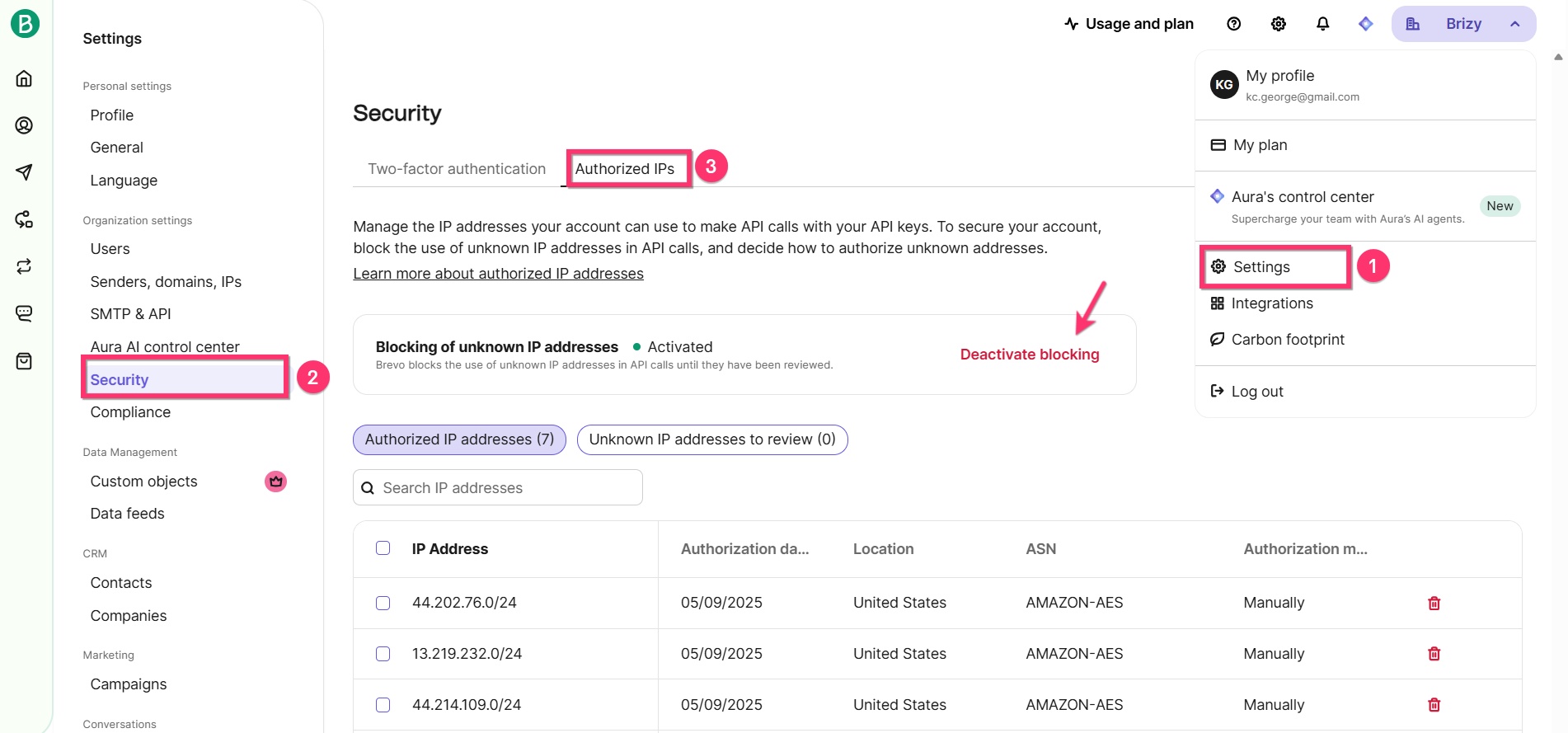
Once you deactivate blocking of unknown IP addresses, please try the Brizy-Brevo integration again. The procedure is provided at https://support.brizy.io/hc/en-us/articles/360043865331-Brevo
0 -
Hi George,
thanks for your support.
We deactivated the blocking of unknown IP addresses in Brevo, but it seems it doesn't work; we still have the issue.
What would you suggest?
Thanks a lot.0 -
Hello Dal,
Once you add the API key, the next steps is to select a Brevo Folder. Check if you have organized your Brevo Lists under Folders. Sign into your Brevo account. On the left sidebar select CRM > Lists and click on the Folder dropdown list.
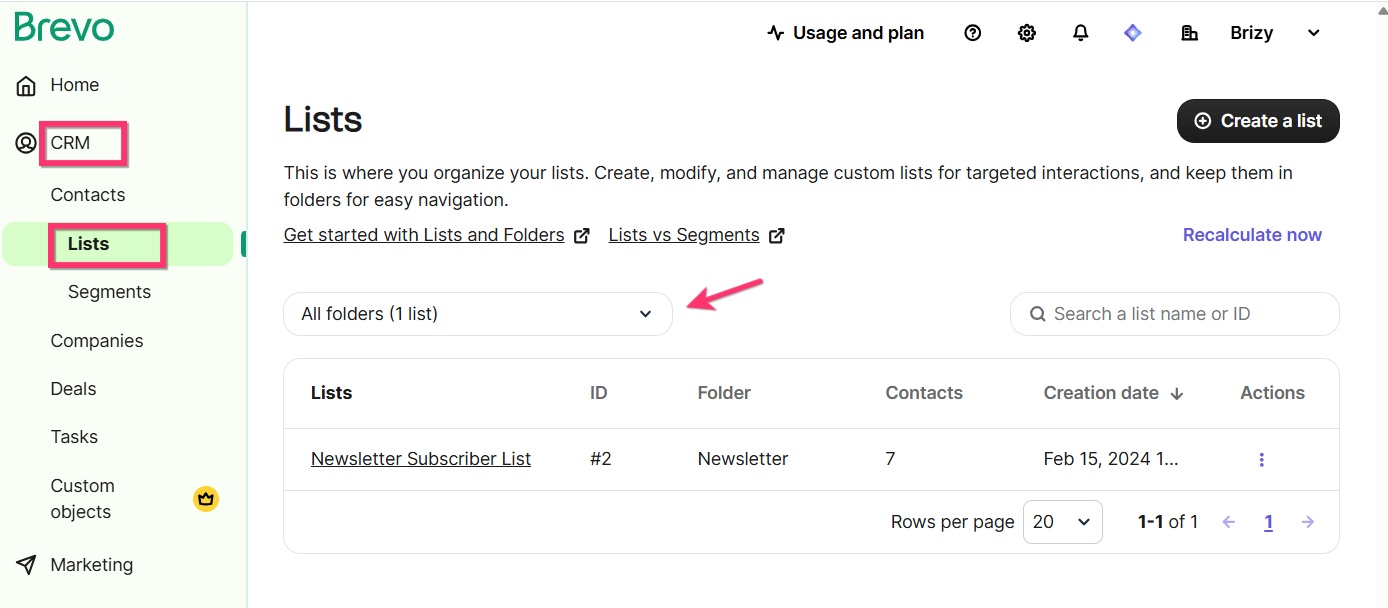
If you do not see any folders, create a new one here.
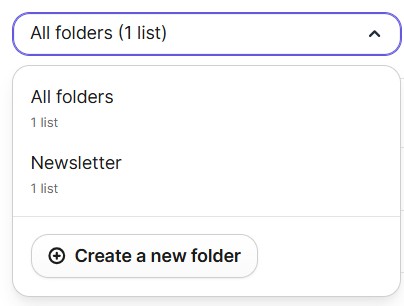
Follow instructions at https://help.brevo.com/hc/en-us/articles/5526943347858-Create-folders-and-lists-to-organize-your-contacts to organize your contacts under Folders > Lists and then try the integration again.
0
Please sign in to leave a comment.
Comments
3 comments