Error with menu

Hi,
Since a short time, without editing ourselves, the menu dissapeard on the live website. On the editor I can still see the menu but on all pages on the site the menu has dissapeard. Can you please help ?
Thank you in advance!
Kind regards,
Thye Stevens
-

Hi Thye,
Thank you for contacting us.
Please try temporarily changing the width of the menu block to 90%, save it, and then switch it back to 100%. Alternatively, you can add a 1px padding, save, and then revert the change. This process will force Brizy to recompile the any affected page, which should resolve the issue.
Please give this a try and let me know how it goes.
Best regards,
Ariel H.0 -
Hi,
I tried working with your solution however the update button keeps on loading without changing anything.
Please advice as our company is this week full in promotion and a lot of people are going to the site. However they are now visting without a menu.
 0
0 -
Hi Thye,
Thank you for the update.
The issue may be caused by a conflict with another plugin. Could you please try temporarily disabling all other plugins except Brizy and Brizy Pro to see if that resolves the problem?
If the issue persists, please provide us with temporary access to your WordPress Admin dashboard (with administrator rights), and send the following details to communitysupport@brizy.io)?
Community Post link: https://support.brizy.io/hc/en-us/community/posts/29195229841042
WordPress Admin URL:
Username:
Password:Looking forward to your reply.
Best regards,
Ariel H.0 -
Thanks for your help Ariel!
I just sent a mail with the required info
0 -

Hello Thye,
We have fixed the issue with your menu. Please check.
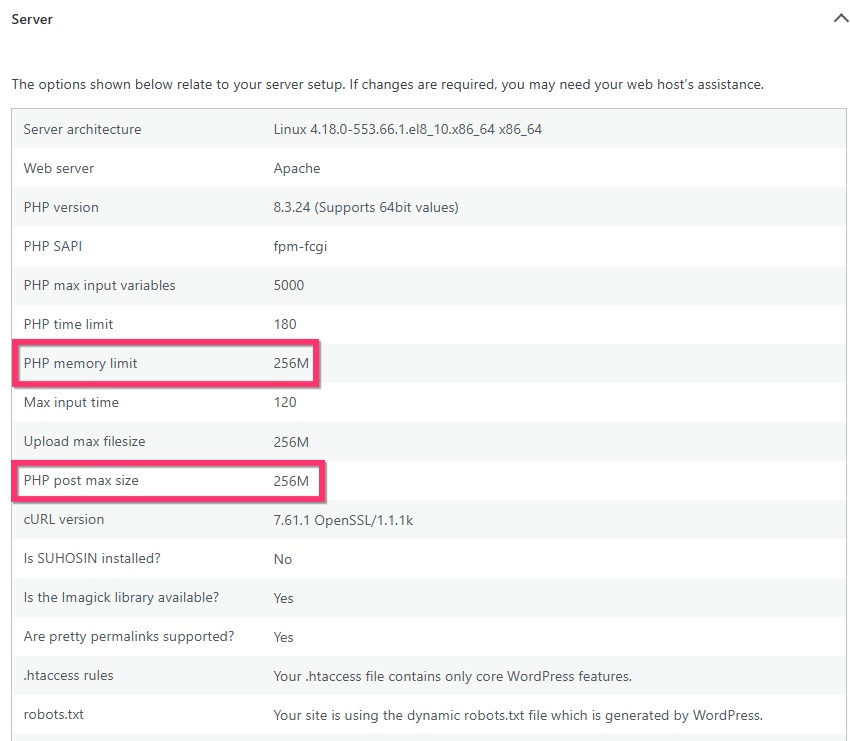
Shorter pages are getting saved; longer pages are not. This could be due to PHP settings in your webserver. Kindly request your hosting provider to increase the PHP post max size to 512M and PHP memory limit to 512M and check if the issue resolves after this change.
 0
0 -
Hi!
Thank you for helping solve the issue.
One last question: I see the menu re appeard. However the footer is also missing I noticed. Can you solve this as well ?
I will contact the hosting company to solve the issue completly.
Thank you for your help!
0 -
Hello Thye,
We have fixed the issue with the footer as well. Please check.
0
Please sign in to leave a comment.
Comments
7 comments