Webiste has critical error after updating to 2.7.4

Hello,
My website www.yappanippon.com has been getting critical error across most pages after I upgraded to Brizy 2.7.4 and Brizy Pro 2.7.2.
My WordPress version is 6.8.2. I checked by deactivating both Brizy plugins and the website is running fine.
Please provide a fix.
-

Hi Nobuhiro,
We’ve released an update today. Could you please install it and see if this helps fix the issue?

Best regards,
Ariel H.0 -
Hello Ariel,
I got the update but 2.7.7 as compared to 2.7.5 you mentioned.
This doesn't fix the issue.

After deactivating both the plugins, the website works but broken ofcourse.

Please HELP!
0 -
Hi Nobuhiro,
Thank you for the update.
To help isolate the issue, please try the following steps:
1. Temporarily disable all other plugins except Brizy and Brizy Pro.
2. Switch to a default WordPress theme (like Twenty Twenty-One).These steps will help determine if the issue is being caused by a conflict with another plugin or your current theme.
If the issue persists, please send us your site credentials so we can take a closer look. Kindly add us as an Admin user to your WordPress Dashboard and send the following details to communitysupport@brizy.io.
Community Post link: https://support.brizy.io/hc/en-us/community/posts/28654559743762
WordPress Admin URL:
Username:
Password:We will also need access to cPanel
cPanel login URL:
Username:
Password:Looking forward to your reply.
Best regards,
Ariel H.0 -
Hello Ariel,
I did what you asked me to do.
Rest of the plugins are FINE, no issues there.I tried doing what you suggested with the current theme (CORE Child) and move to Twenty-Twenty-Five, although some pages work when I disable the main theme, some pages still don't work (ex: Schools List). This is when both brizy and brizy Pro are ACTIVE and the theme is Twenty-Twenty-Five. Also, none of the translations work at all.When I deactivate both the plugins, all pages work fine across both themes - Core Child and Twenty-Twenty-Five, including translations.I have shared the details of the website as you asked on your email.Best,Nobu0 -
Hi Nobu,
Thank you for your cooperation.
Updating the PHP Memory Limit, Max Execution Time, and Post Max Size has resolved the issue.

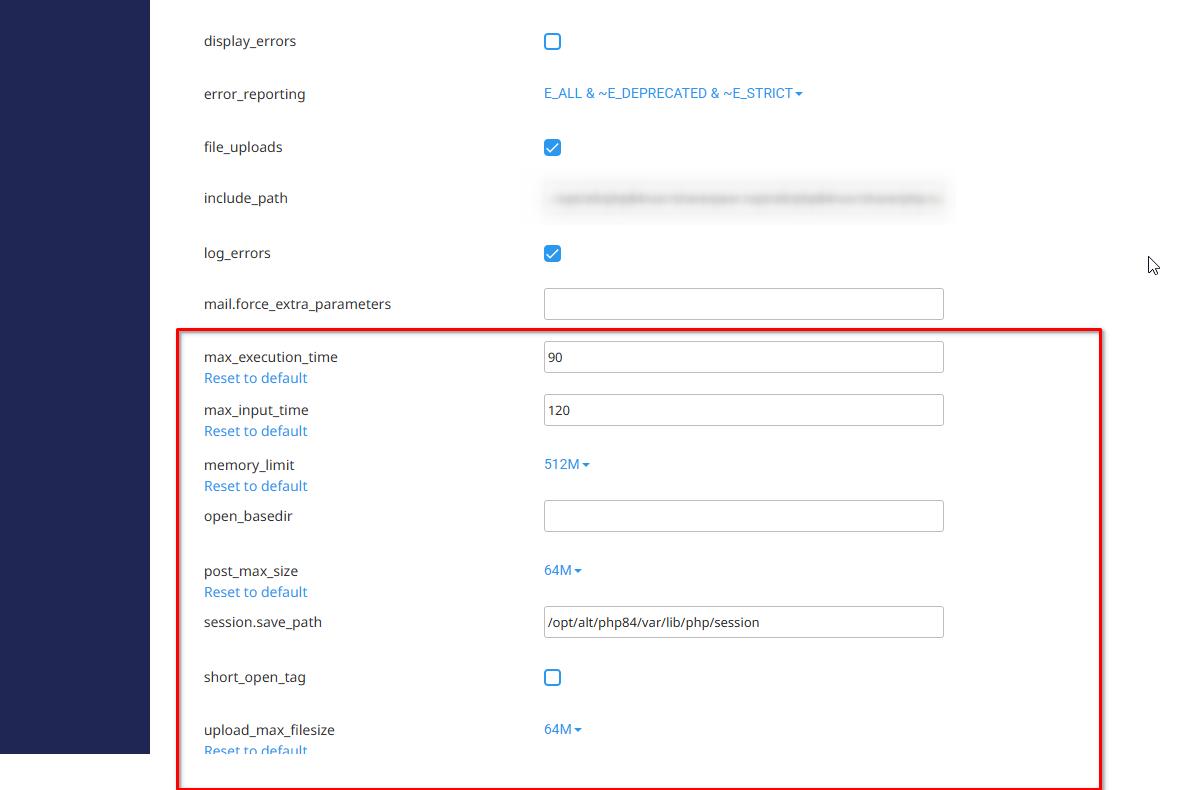
Best regards,
Ariel H.0
Please sign in to leave a comment.
Comments
5 comments