Menu all messed up

Automatic updates on brizy and brizy pro meant that the css for the menu on my site got messed up. I saw another user get help and I went to https://supportfiles.brizy.site/ and downloaded the previous versions. I uploaded them and everything was fine yesterday. I had disabled auto updates but somehow the new versions were back today! I have pro installed but the plugin no longer shows my license info.
As per another user's support answer I have changed the padding and resaved pages to recompile. No change.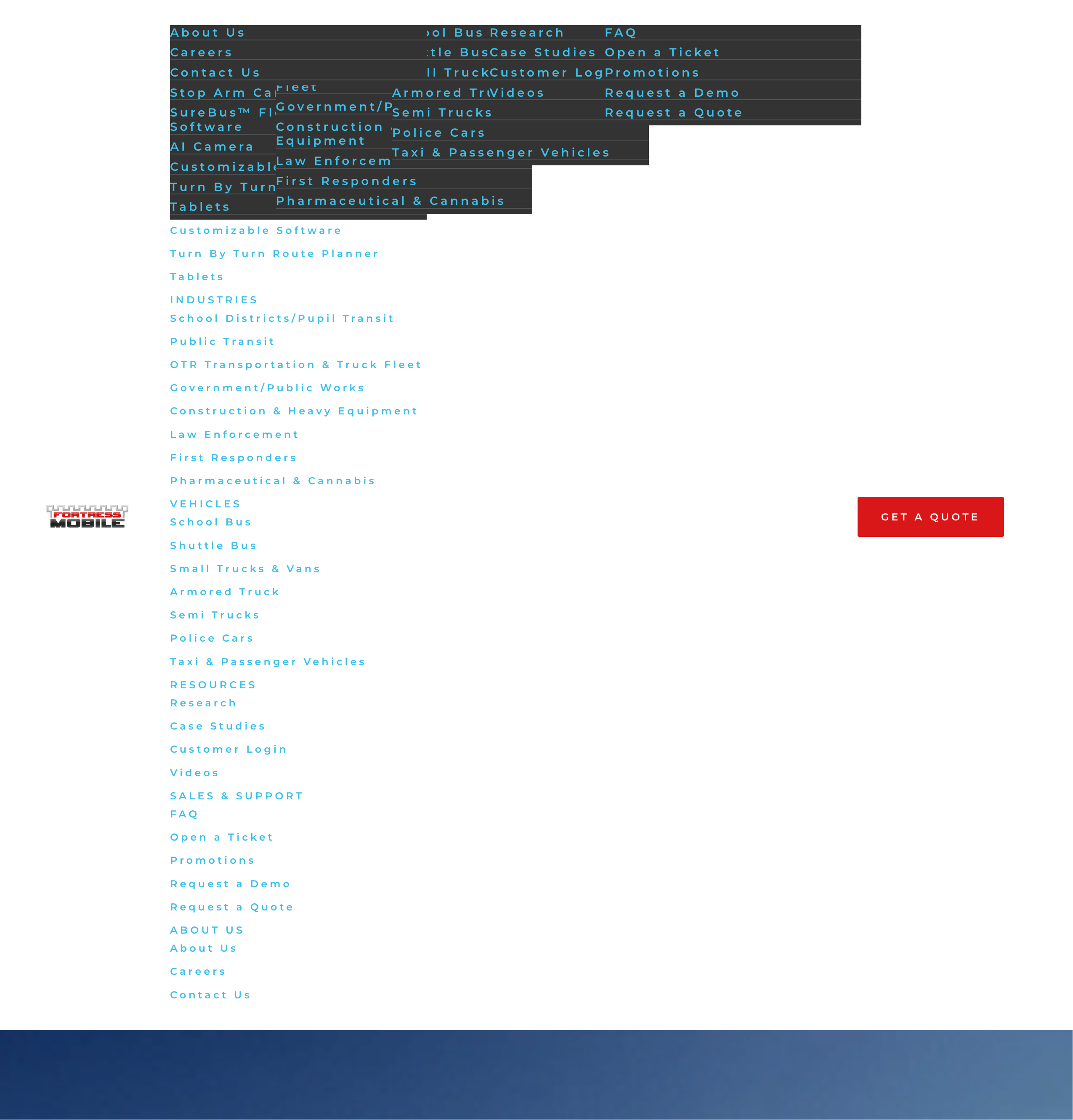
-

Hi Fran,
Thank you for contacting us, and we apologize for the inconvenience.
Please provide us with temporary access to your WP Admin page so we can take a look. Kindly add us as an Admin user to your WordPress Dashboard and send the following details to communitysupport@brizy.io.
Community Post link: https://support.brizy.io/hc/en-us/community/posts/28592859108754
WordPress Admin URL:
Username:
Password:Looking forward to your reply.
Best regards,
Ariel H.0 -
Thanks.
Also, when I updated brizy plugin it mentioned brizy and brizy.io as the plugin developer, it was not white labeled like it usually is. I downgraded the plugin to v.2.510 so that it still said:
A drag & drop front-end page builder to help you create WordPress pages lightning fast.
Version 2.510 | By mobimaxwhere mobimax is my white label name0 -
Hi Fran, could you please try this link - https://www.fortressmobile.com/?nocache=1
0 -
OK, that looks back to normal :)
0 -
Hi Fran,
If the /nocache=1 parameter is not present, the navigation menu issue can occur again. The only permanent fix is to gain access to the root directory and remove all files added by your caching plugins.
The fastest workaround is to change your site’s Permalinks to use https://fortressmobile.com/ (without the www). This should still work even if someone types or visits the www version of the site, as it will automatically redirect to the non-www version. Essentially, the browser will always resolve to the canonical version you set in your WordPress and hosting settings, which helps avoid cache conflicts.
If you have any further questions, please let us know.
Best regards,
Ariel H.0 -
Hi Fran,
The version issue you’re seeing only occurs on sites hosted with SiteGround and a few other hosting providers due to their internal caching, which can sometimes pull an older plugin version from their cache instead of the latest one. We’ve now updated Brizy and Brizy Pro to their latest versions.

Best regards,
Ariel H.0 -
Hi Ariel,
Thank you. It looks like support changed the url would be without the www.
As I am building a new site I hope that the issue is fixed for a few weeks, if not I'll go into the root directory.Or should I just delete the caching plugin?
Fran.0 -
Hi Fran,
We’ve switched it back to www, but you may need to clear your browser cache or try viewing the site in incognito mode to see the change.
Best regards,
Ariel H.0 -
Hi Ariel,
Based on what you wrote earlier doesn't the www have to stay off the url in Wordpress, or is the change triggering caching?
0 -
Hi Fran,
Yes, the www can sometimes trigger caching issues. If you're still experiencing issues with it, you can update the URL by going to Dashboard → Settings → General and adjusting the WordPress Address (URL) and Site Address (URL) fields.
Best regards,
Ariel H.0 -
Thank you for the clarification, Ariel. And for the support help.
0 -
I just noticed that the footer has disappeared. I have another ticket in about another site where the same things has occurred.
0 -
Hi Fran,
Thanks for your patience.
You can fix the missing footer block by making a small edit to it—like adding a bit of padding or temporarily reducing the width of the block. After saving the changes, you can then set the width back to 100%. This action forces Brizy to recompile the page and often resolves the issue. Here’s a quick screencast that demonstrates the steps: https://youtu.be/4X5TVyfIegA.
However, please note that there appears to be a hard caching issue on your server. To view your updated page, you might need to add extra parameters to the URL, such as '/?nocache=2' or any other random value, as shown in the video. You may also want to check with your hosting provider to see if there’s an option in your hosting panel to purge the cache more effectively.
Let me know how it goes.
Best regards,
Ariel H.0 -
Hi Ariel,
OK, so yesterday you mentioned the siteground hosting can cause caching issues so I'll look into that. However, the global footer shows up on some pages and not others so what causes that problem to start and then get caught up in the caching issue? The footer was there yesterday.
Thanks,Fran.
0 -
Hi Fran,
Yes, this is likely a caching issue.
0
Please sign in to leave a comment.
Comments
15 comments