Scrolling not working

Hi,
Suddenly, scrolling on cbsbilledkunst.dk has stopped working across all pages. Users can only scroll briefly upon entering a page before it ceases. This issue has been observed on my MacBook (Chrome), iPhone 16 (Safari), and a Windows computer (browser unknown) by a colleague who had not previously visited the site.
Here you can see a video of the problem, where I try to scroll on the site: https://share.cleanshot.com/2yhH9Gk7
-

Hi Mads,
Thank you for contacting us.
The issue you're encountering appears to be similar to the one discussed in the following support thread:
https://support.brizy.io/hc/en-us/community/posts/21281497557394It’s possible that Wordfence’s Extended Protection was previously enabled on your site. When activated, it adds a file called "wordfence-waf.php" to your root directory and modifies the ".htaccess" file to load that file before anything else. As mentioned in the thread above, we resolved the issue by removing the "wordfence-waf.php" file and resetting the ".htaccess" file to its default state. I recommend trying the same on your site to see if it helps resolve the issue.
You may also share your site's credentials and cPanel (or your hosting console) so we can inspect your site.
Please share your WordPress admin login details with us so we can take a closer look. Please add us as an Admin user to your WordPress Dashboard and send the following details to communitysupport@brizy.io.
Community Post link: https://support.brizy.io/hc/en-us/community/posts/28433894005138
WordPress Admin URL:
Username:
Password:cPanel Login URL:
Username:
Password:Looking forward to your reply.
Best regards,
Ariel H.0 -
Thanks for your reply.
It's not in WordPress, but with your hosting and builder.
I don't have Wordfence.
0 -

Hello Mads,
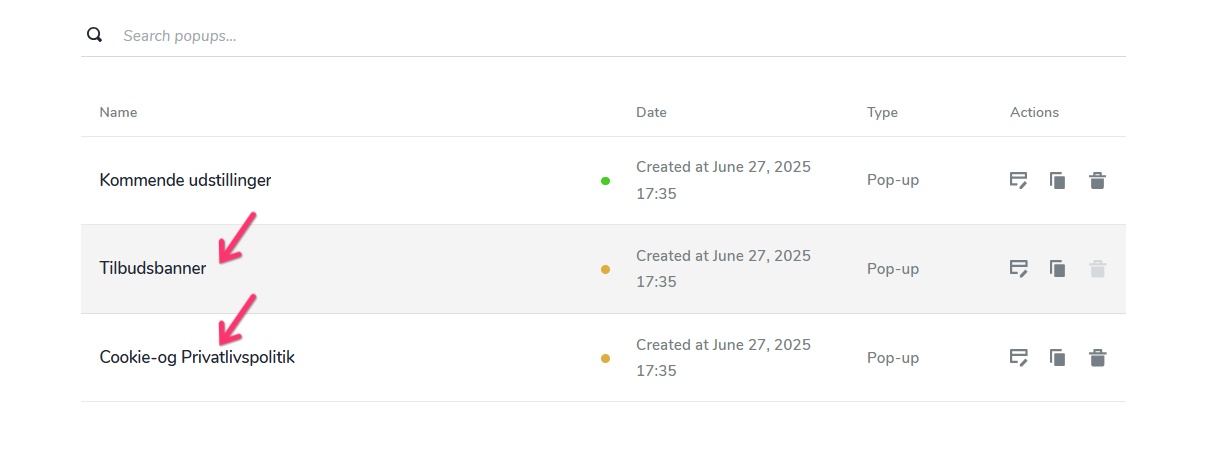
We apologize for the misunderstanding. There are two blank popups in your project. Setting these Popups to "Draft Mode" restores the scrolling in your website.
Are you using these popups? If not, you could delete these.
 0
0
Please sign in to leave a comment.
Comments
3 comments