Better solution for missing global blocks after Brizy updates

I mustn't be the only one frustrated by needing to make minor changes to global blocks on every site after every update.
Through testing, I've discovered that sites updated through ManageWP exhibit the problem while sites updated directly through WP normally update fine.
I'm very keen to find a better solution or work out how to avoid lost global blocks. Does anyone have their own strategies or approaches to avoid the issue? I was thinking it should be possible to create a plugin to detect Brizy upgrades and trigger an an update?
Appreciate anyone willing to share their experience!
-

Hi Dustin,
Thanks for your feedback and for sharing your insights about updates via ManageWP vs. directly through WordPress.
From what I’ve observed, the issue still occurs but seems to happen less frequently on sites running Brizy 2.7.4 and Brizy Pro 2.7.2, so it might help to ensure you're on the latest versions.
Your idea of detecting updates with a plugin is a smart one. We’d also be interested to hear if others have found reliable workarounds.
Best regards,
Ariel H.0 -
Thanks Ariel,
It could be that the sites I tested were upgrading from different Brizy versions. That's another variable I hadn't considered... When you're administering hundreds of sites, "less frequently" is still a significant issue.
It would be helpful if I could better understand how Brizy's recompilation process is triggered. So far, I've tried writing a plugin to look for posts with custom meta fields (e.g., _brizy, _brizy_data, _brizy_options) and programmatically re-saving them (wp_update_post()).
This doesn't seem to work so I assume I'm missing something. I'd appreciate any advice you could offer!
0 -
Hi Dustin,
Thank you for the update.
I understand that with many sites, even occasional issues can become a big concern.
As far as I know, Brizy’s recompilation doesn’t get triggered by wp_update_post() or meta updates alone. It usually happens when changes are made through the Brizy editor itself. In some cases, making small tweaks (like adding 1px padding, adding a period or increasing the font-size) and saving can force a recompile.
Unfortunately, I am not aware of an official way to trigger this programmatically at the moment. In any case, our developers are working on improvements to the compiler to help address this, though I don’t have a confirmed timeline. Sorry for the inconvenience.
If you have any further questions, please let us know.
Best regards,
Ariel H.0 -
Hi Ariel,
If you could ask a developer how to trigger the recompile programmatically that would be a huge help.
I'm currently holding off on updates so I don't have to spend a day checking and updating sites (and not for the first time). I realise it's a long shot but I can only ask!
Thanks.
0 -
Hi Dustin,
Thank you for taking time to write this feedback.
I’ll pass this along in our internal chat so the team’s aware. I can’t guarantee it’ll be implemented right away, but it’ll be seen by the team.
I also recommend posting this in our Ideas and Roadmap page at https://www.brizy.io/ideas-and-roadmap. This allows other users to vote for the feature, which helps increase its visibility and priority.
Best regards,
Ariel H.0 -
Thanks Ariel,
Sorry to be a jerk about it, but seeing this going unfixed for years (?) is pretty frustrating.
When random sections of your client's sites disappear after each update, causing repeated embarrassment and costing you hours to fix, I'd say that qualifies as a serious bug.
I'll certainly post this as an "improvement" idea.
PS. Can't wait for some more fantastic AI features! :|
0 -

Unfortunately this just happened to me now after an update. How can I get this fixed? It's really too much work going over this page by page.
0 -
Hi David,
I apologize the this occurred again.
We understand how frustrating it is to go through pages one by one. Our team is aware of the issue and working on improvements to the compiler, though it may take some time. This will be resolved gradually in upcoming updates. Thank you for your patience and understanding.
In the meantime, if you can provide the credentials for the sites affected, we’ll be glad to help fix this directly from our end. Please add us as an Admin user to your WordPress Dashboard and send the following details to communitysupport@brizy.io.
Community Post link: https://support.brizy.io/hc/en-us/community/posts/28367123206546
WordPress Admin URL:
Username:
Password:Looking forward to your reply.
Best regards,
Ariel H.0 -
Hi Ariel,
I made all the pages like they should again.
I will provide you guys with the credentials because on all pages Spotify is not working. it shows up but I can't start a song.
Regards,
David
0 -
Hi David,
Thank you for the update. Just to confirm, have you already sent the credentials so we can inspect your website and check the issue with Spotify? We don’t have them yet in our community support email inbox.
Best regards,
Ariel H.0 -
Hi Ariel,
Credentials are send.
Thank you in advance :-)
Best regards,
David0 -
Hi David,
Thank you for your cooperation.
We tried logging in but are blocked by this message:
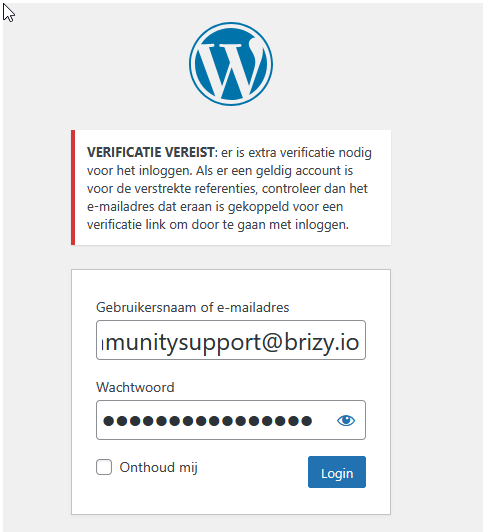
This seems to come from a security plugin (like Wordfence, iThemes Security, or similar). Could you confirm which plugin is handling this and temporarily disable it so we can log in?
Best regards,
Ariel H.0 -
It is probably the Wordfence plugin, I will disable it when Im home again.
0 -
Wordfence is disabled
0 -
Hi David,
Thank you for your cooperation.
We’ve inspected your site and Spotify appears to be working as expected. Here’s a screencast for reference: https://youtu.be/VEUWo4fYnpw
Could you please try accessing it from another browser and see if the issue persists?
Best regards,
Ariel H.0 -
Hi Ariel,
That's a page that is still Wordpress and not totally Brizy.
Try this one please:
https://artiestenstal.nl/vocalisten/volkszangers/henk-dissel-nu-boeken/
It used to work all fine before :-)
Thanbk you in advance.
Best regards,
David
0 -
Hi David, thank you for the update. Here is the screencast - https://www.youtube.com/watch?v=03T-MKZ5tCc
Please let me know if there are other pages you need to check.Best regards
Ariel H.0 -
Hi Ariel,
The problem is clearly in my Chrome Browser, will check that and see why :-)
Regards,
David0
Please sign in to leave a comment.
Comments
18 comments