Issues with all sites after recent update
Completed
I am having issues with evey site I have built using Brizy. Headers, footers, images, forms, etc. are all messed up. A few were fixed with the following update, some were fixed by what I saw in a previous post suggesting that I make a small change to the blocks with the issue. And some I had to roll back before the update because they kept reverting to having the issues even after they appeared to be fixed. Please help. This is eating up so much of my team's time.
-

Hello Cari,
We are happy to fix the errors after the recent update if you give us access to your websites. Please add a new user to the WordPress Dashboard of each websites and send the following details to communitysupport@brizy.io
- Support Forum link: https://support.brizy.io/hc/en-us/community/posts/28124751102610
- WordPress Admin URL:
- Username
- Password
Please let us know in this forum when you send us the email.
0 -
I have sent over the email. Thank you
0 -
Hello Cari,
We have worked on these websites. Here is what we have done
-
https://tothelectricllc.com. We could not sign in to this website due to 2 factor authentication error. Google Authenticator returned an error “Could not generate code for this account. Try removing it from Authenticator and setting it up again”
-
https://yourwaypropertyservices.com/ Updated the plugins. We have corrected any missing content that we could locate. Please check if everything works as it should.
-
https://kcexteriorpros.com/. Updated the plugins. We were unable to spot a page that has missing content. After the plugins were updated, everything appeared to be in order.
-
https://burgerjoint.us/. After updating the plugins and resolving the header and footer issues, no additional missing content was discovered.|
- https://galcreature.com Plugins were updated. This project appears to be new. The frontend shows the dummy content I have added to the homepage.
Please check if everything works fine with the above websites. If you can fix the issue with Google Authenticator or remove 2FA for tothelectricllc.com temporarily, we can fix the issues here as well.
0 -
https://tothelectricllc.com. We could not sign in to this website due to 2 factor authentication error. Google Authenticator returned an error “Could not generate code for this account. Try removing it from Authenticator and setting it up again”
-
Thank you for taking care of what you could.
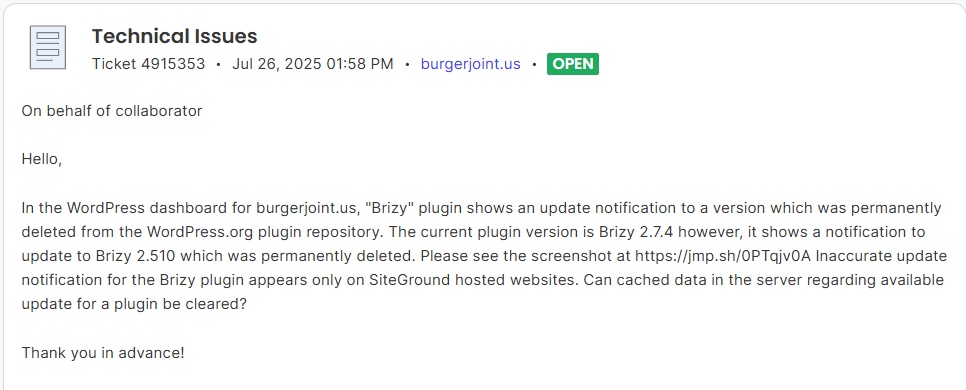
1. Is there no fix for this issue: "There is a new version of Brizy available. View version 2.510 details or update now." on the burgerjoint.us website as well as https://kcexteriorpros.com/? The Burger Joint is switching to a new website management company in August, and I would like to have this resolved before then, as this will be an ongoing issue, which is not optimal for anyone involved.
2. I removed the Two-factor Authentication for Admin & Editors Users for the website https://tothelectricllc.com
0 -
Hello Cari,
- This issue appears specific to sites hosted on SiteGround. Server-side caching mechanisms, such as that of Speed Optimizer plugin's and WordPress's own internal caching can store information about available updates for plugins and themes. Even after plugin is removed from the WordPress.org repository, or its update information is no longer available from its original source, the cached data on the server or within WordPress might still reflect the last known status, including an "available update" notification.
Can you send an invitation to communitysupport@brizy.io to collaborate on your SiteGround account so that we can interact with their Support? We will try and resolve this with their help. Kindly follow the procedure at https://www.siteground.com/kb/can-add-collaborator-website
- When attempting to sign in to the WordPress Dashboard at https://tothelectricllc.com/wp-login.php, I see a "302 Found" error which indicates that the requested resource has been temporarily moved to a different URL. Can you give us revised instructions to sign in?
0 - This issue appears specific to sites hosted on SiteGround. Server-side caching mechanisms, such as that of Speed Optimizer plugin's and WordPress's own internal caching can store information about available updates for plugins and themes. Even after plugin is removed from the WordPress.org repository, or its update information is no longer available from its original source, the cached data on the server or within WordPress might still reflect the last known status, including an "available update" notification.
-
1. I sent an invite over for Burger Joint for Siteground. I am waiting on a verification code for KC Exteriors so I can invite you to collaborate. I will send a message here confirming once I have done it successfully.
2. Can you try this link to login: https://tothelectricllc.com/wp-admin/
0 -
I have also sent over an invite to siteground for
kcexteriorpros.com
0 -
Hello Cari,
I have opened a ticket with SiteGround for burgerjoint.us. We will wait for their response.
I am still unable to sign in to tothelectricllc.com. Here is what happens: https://jmp.sh/9ejYNRjr
0 -
Hello Cari,
The SiteGround Support team has fixed the issue on both burgerjoint.us and kcexteriorpros.com. You can see the tickets in your account. Feel free to revoke access to your SiteGround account
0 -
Thank you so much for your help!
0 -
Regarding this issue: "I am still unable to sign in to tothelectricllc.com. Here is what happens: https://jmp.sh/9ejYNRjr"
My team is also having issues logging in from the login screen. I cannot figure out what the issue is. Can I give you the login to the SiteGround account, and you can access it from there?
0 -
Hello Cari,
Yes; please send an invite to our email communitysupport@brizy.io and inform us here.
0 -
I have sent an invite. Please keep me updated. I did speak with support on siteground and this is what they said:
Alright, I have taken a deeper look at your database and I believe I have found out what is responsible for most of the data in the Postmeta table.
It would be a plugin, specifically the page builder called Brizy.
and they told me to have you look into it. Thank you
0 -
Hello Cari,
We have updated Brizy plugins to its latest versions. I have randomly checked 7-10 pages and everything in the website frontend looks good. I didn't make any changes the editor. Please check and confirm if everything works fine.
Can you please give us the context of your discussion with SiteGround Support? What was your question to them?
0 -
I have other technical issues
Aug 1, 2025 12:29 PMJordan Toth: Hi, Our website is having a database issue saying we need to upgrade our plan. We have the "grow big" account. I cant beleive that we are having issues with this as we already have an upgraded account. Could you please help me get this figured out how to reduce the size of the database? I do not know how to fix the issues and I am nervous to make these changes. I did try to follow the guide I was sent a link to but all of the changes I tried to make on the wordpress side are not implementing and they go right back to disabled.
Jordan Toth: This question is related to website: tothelectricllc.com
Mihail S.: Hello and Welcome to our live chat!
Mihail S.: I will check on this for you right away!
Jordan Toth: thank you
Mihail S.: Alright, looks like almost all of this is related to a specific table called Postmeta.
Mihail S.: We might have a relatively easy way if it works to clean that, so definitely worth a try.
Mihail S.: So here is how we can do that: I have already extended the limitation itself until the 5th, so that nothing is currently limited.
Mihail S.: Try installing this plugin from WordPress Admin > Plugins > Add New: https://bg.wordpress.org/plugins/advanced-database-cleaner/
Jordan Toth: ok. give me a minute
Mihail S.: Take your time, just let me know once the plugin is installed.
Jordan Toth: its installed
Mihail S.: Thank you!
Mihail S.: Alright, if you do go to the WP DB Cleaner settings on the left side navigation bar, you should see that the plugin detected a few things from the database that can be cleaned.
Mihail S.: Selecting those should result in a reduction of the size of the database, although, I cannot for sure say how much exactly that would end up being. Before you do remove these, you can click on the little info button next to each category with detected data to see exactly what it would be removing.
Mihail S.: Usually, it is temporary or unused data, so nothing vital to the operation of the site.
Jordan Toth: ok, ill take a look
Mihail S.: Alright - before you do initiate this clean, I do recommend creating a backup from Site Tools > Security > Backups just to be safe.
Mihail S.: But I do not expect any issues.
Jordan Toth: ok. i cleaned it
Mihail S.: Alright, let me take a quick look, since the size won't update immediately.
Jordan Toth: ok
Mihail S.: Hmm, there is definitely some improvement here, but not quite as much as I was hoping for.
Mihail S.: Checking on one last thing now.
Jordan Toth: ok
Mihail S.: Alright, I have taken a deeper look at your database and I believe I have found out what is responsible for most of the data in the Postmeta table.
Mihail S.: It would be a plugin, specifically the page builder called Brizy.
Jordan Toth: ok. But I have many site built using this builder and hac=vent had any issues
Jordan Toth: haven't
Mihail S.: There is likely an easy way to clear this data, but I would suggest reaching out to the plugin developer and checking with them how it can safely be done.
Mihail S.: Since doing so without this can be quite tricky and does carry some risk. We only want to target temporary/unnecessary data, rather than anything vital.
Jordan Toth: ok. I will contact them
Mihail S.: Perfect! Take your time, I expect this is a relatively common request for them, so they should have some quick and easy ways to clear out most of this data. I have extended the limit on this case until the 5th, so you do have a bit of time to check on this.
Mihail S.: That being said, Unless you have any further questions for me, keep in mind that we are available at any time and have a great rest of your week!
0 -
Hello Cari,
As per the Siteground knowledgebase article at https://world.siteground.com/kb/reduce-database-size/, your hosting plan "Grow Big" has an upper limit of 1000 MB for the database.
In the Site Tools for your website tothelectricllc.com, under Site > My SQL, you can see the current database size. Please see the screenshot at https://jmp.sh/CTyJGXdj Your live site uses 242MB and staging site uses 280 MB. Your live and and staging websites combined uses a total of 522MB which is well within the upper limit of 1000 MB.

Do you know how you may have exceeded the upper limit of 1000 MB? Are you hosting multiple sites on your Grow Big hosting plan? If you are, kindly check the database size for each of those websites.
0 -
I guess it just took a while for the changes I made yesterday to populate. I confirmed with SiteGround that it is all good now. Thank you.
0
Please sign in to leave a comment.
Comments
17 comments