Migration complete - some pagespeed/sitemap related questions

Hi George ,
I've completed my migration after a day or so of wondering if I'd blown everything up changing nameservers, DNS host etc....so somewhat relieved! :) Now just have to hope my rankings recover.
I do need to try and look into performance , which has fallen quite a lot vs my old Wix website (which was horrible for many years but recently started to improve).
What I want to follow up on from my own testing:
- Lighthouse says my sight is redirecting from https://x.com/ to https://x.com/. (extra dot at the end) and slowing things down. Never seen anything like this before?
- it seems that my above the fold hero image is lazy loading and slowing down things (the main culprit). - will try image as background rather than image and see if that makes a difference.
- I saw an answer you gave to someone about delaying the loading of GA4 code - is this something worth looking into?
- my sitemap.xml looks a total mess with a bunch of slugs like /sample-blue-flannel , /sample-boardshorts and /sample-sunglasses all through it. I expect this to cause issues so have not updated with Search Console yet.
Thanks for your help through this ,
Brent
-
Hero image as background made some difference but I have figured out something else of concern
When the test location is Canada I get great load speeds and a GTMetrix Score of 93.
When I test as a user in Australia (where our local business is based) I get load times THREE TIMES longer and a score around 50-60% , and that's on desktop , which is a massive difference (I've since managed to close this gap with image compression etc.....but it's still 70 vs 93).
Is this huge difference because Brizy servers are not well set up for Australian websites?0 -

Hello Brent,
- "Lighthouse says my sight is redirecting from https://x.com/ to https://x.com/. (extra dot at the end) and slowing things down" I have never seen this feedback. Can you share a screenshot of this audit report?
- Images added using the Brizy Image element are lazy loaded at the moment; background images are not. Moving the image to the background of a column would be a good work around this issue.
- Usually GA4 code does not slow down a website. If the code interferes with any other feature on the page, and if moving it to the footer helps, you can do it; however this will not improve page performance.
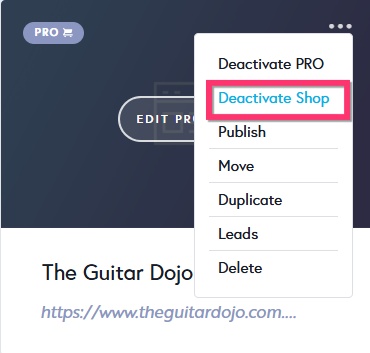
- This is because you have activated Brizy Shop feature for your project. Activating the shop feature imported a few sample products to your project and these products are published on URLs like https://www.theguitardojo.com.au/shop/sample-blue-flannel To remove these products from your website, kindly deactivate the Shop feature by selecting the "Deactivate Shop" option in your project thumbnail.
- Some users in Australia and South Asia have reported slower speeds compared to other regions. This can be attributed to factors like network infrastructure and routing complexities. Our CDN provider Bunny CDN has been actively working to improve performance in these areas. To overcome this issue, you could consider using the Server Sync option to publish your website on a server located in Australia
0 -
Thanks for the answers.
- the Lighthouse warning is no longer occurring but for the first 24 hrs it was there suggesting that I test the redirected link (with the dot) as that may be faster. I didn't bother to take a screenshot at the time unfortunately.
- I thought the whole idea of lazy loading was to lazy load the images NOT above the fold only. Anyway .....I have reverted to a background image and that has helped a bit in addition to image compression
- I will forget about GA4 as you're right - all analytics suggest it makes little difference
- I have deactivated Shop - thanks.
- that's a shame re Bunny CDN - it really is a huge difference in Australia. I don't really have the desire to get into organizing my own servers so I guess I'll have to suck it up until it's fixed.
0 -
A couple more............:o)
I am finding that when I embed code that the code element disappears and cannot be located for editing and the only way is to delete the element and start over. Is this normal or is it me? The Editor is playing up a bit for me today and having to reload periodically even for text , so may be that.Re the poor speeds in Australia , is hosting via Vercel still an option?
0 -
Hello Brent,
The Embed element can get lost within a Brizy page. To make the Embed element easier to locate in a Brizy page, kindly follow the steps suggested at https://jmp.sh/0mh4h7G9
We have discontinued the 3rd party hosting on Vercel, Netlify and Render (via Github) in Brizy Cloud from 1st of January 2025. We are no more supporting this feature (even though in some dashboards, you may still see it). You can see the announcement regarding this at https://www.facebook.com/groups/152314615532419/?multi_permalinks=1772035960226935
0 -
Thanks George - appreciate your help. I have used embed before and been able to find , but today it was literally gone . I think it may have been part of bigger issues I was having today , but will also use your tips - thanks.
That's a shame about the 3rd part hosting. Given non-techies like me aren't going to try and use Server Sync , hopefully improvements with the native hosting /CDN will be on the roadmap so people outside the Americas can enjoy solid pageload speeds in the not too distant future.
CheersBrent
0
Please sign in to leave a comment.
Comments
6 comments