Website full of Bugs

Hi guys,
We're an agency who have been using Brizy for over 4 years now for client websites.
One website in particular is getting progressively more glitchy as each update is rolled out. For example, accordion elements automatically close unless "collapsible" is enabled. We fixed this with CSS, however, new bugs are appearing such as buttons sticking together in our contact form, see below:
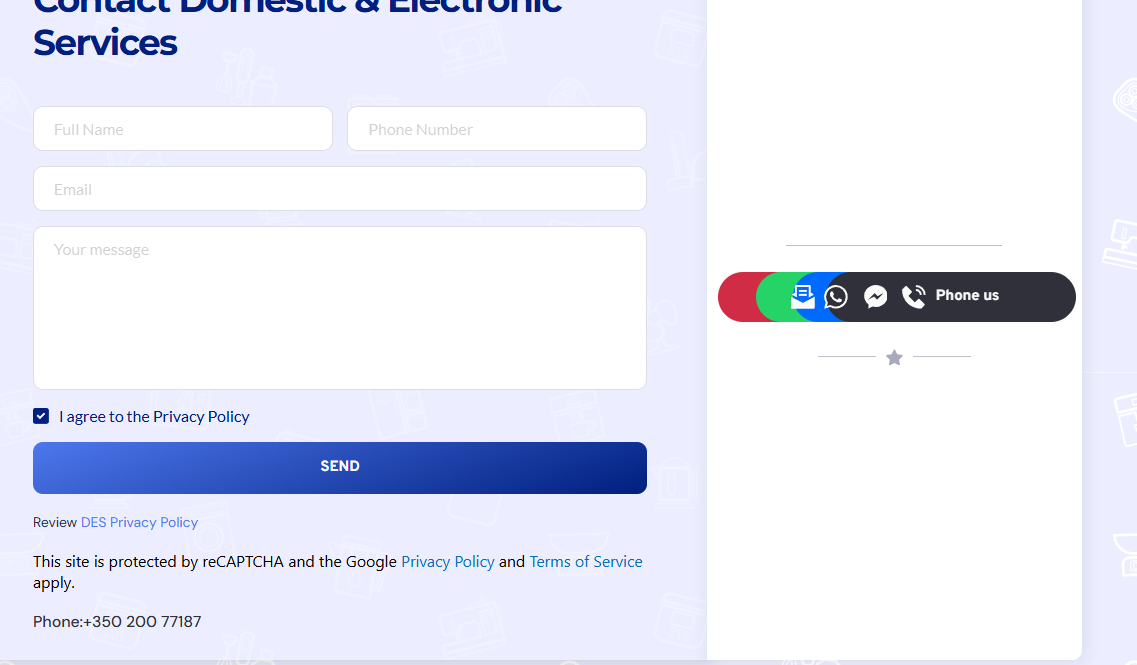
We really need your support team to log in and see what is happening as we have been speaking back and forth with support and we are no closer to a solution.
Your time would be much appreciated.
-
As mentioned, horizontal alignment is broken too - see preview in the back end editor which is fixed on the front end with code (nav bar icons aligned vertically when they should be horizontal). The black button is also misaligned
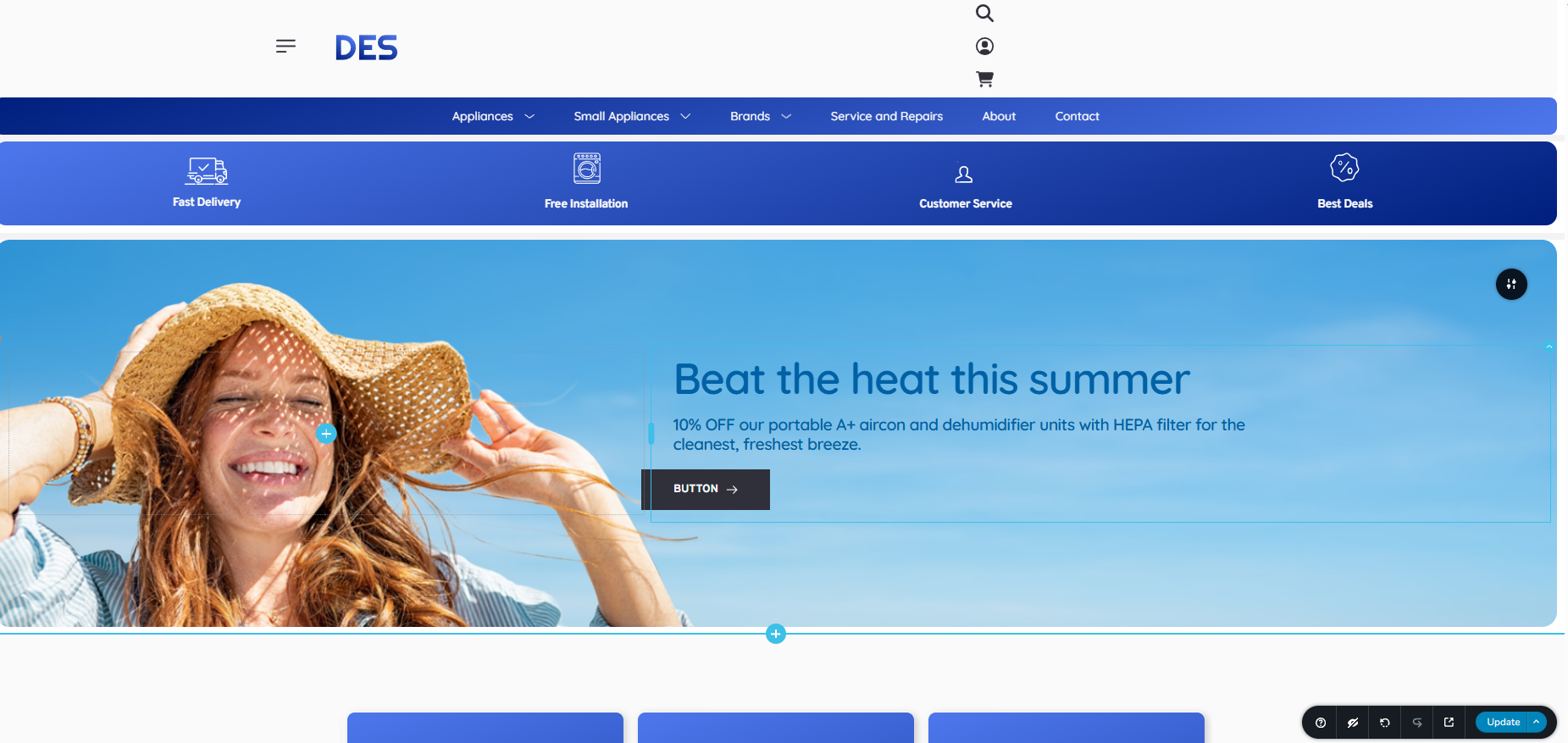 0
0 -
For button alignment, see how it appears in the front end
 0
0 -

Hi Chris,
Thank you for contacting us.
To investigate further, please provide temporary access to your WordPress admin. You can add us as an Admin user from your Dashboard and send the following details to communitysupport@brizy.io:
Community Post link: https://support.brizy.io/hc/en-us/community/posts/27481091158546
WordPress Admin URL:
Username:
Password:Looking forward to your response.
Best regards,
Ariel H.0 -
Hi Ariel, thanks for this. I have sent the email, however I am a bit worred because my last support request via email remains unresolved (about similar issues included in my email). Are you able to confirm that my email has been recieved? I'd really appreciate it
0 -
Hi Chris,
Thank you for sharing your site's credentials.
We were able to log in and check, but it appears that the issue is quite complex. It looks like the page may be corrupted, and even reverting to previous versions, which usually helps restore the layout, didn’t resolve the problem this time.
Would it be possible for you to create a staging version of your website so we can investigate further without affecting the live site? Here’s a helpful guide on how to create a staging site:
https://www.wpbeginner.com/wp-tutorials/how-to-create-staging-environment-for-a-wordpress-site/If that’s not an option on your end, please allow us to duplicate the site in a secure staging server to continue the troubleshooting.
Looking forward to your reply.
Best regards,
Ariel H.0 -
Hi Ariel,
That makes sense, there are numerous corrupted pages it seems for sure.
The staging part is an issue, can you please go ahead and duplicate the site for staging on your side?
If you require anything further to assist please let me know.
Thanks
0 -
Hi Chris,
I’ve asked a colleague to take a closer look at the issue. I’ll get back to you as soon as I have an update.
Best regards,
Ariel H.0 -
Thank you kindly Ariel. If you need anything further just let me know! I'll await for your update.
0 -
Hi Chris,
Thank you for your patience.
We’ve made some progress on the issue. First, we removed the custom CSS that was added to the header, which resolved the alignment issue. We also found a bug related to the hover effects, when enabled, some buttons were not displaying correctly. Disabling the hover effect allowed all buttons to show properly, and we’ve added a simple CSS scale effect to restore the hover animation for now.
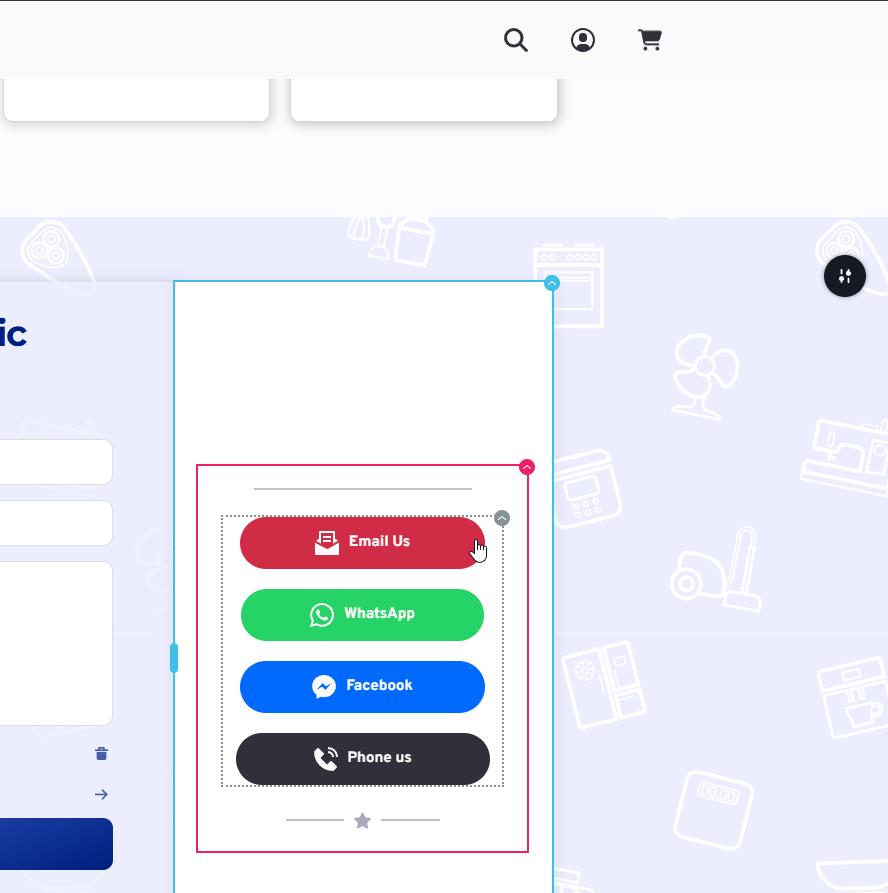
We’ll escalate the hover effect bug to our developers so it can be addressed in a future update. in the meantime, we recommend applying the same approach to fix any similar layout issues on the rest of your pages.
Best regards,
Ariel H.0
Please sign in to leave a comment.
Comments
9 comments