Wordpress pro plugin

Hi,
Where do I find the wordpress pro plugin. The tutorial video shows it on login, but I only have the free version to download. Also I have downloaded the HTML for AI page I have created but when I try to upload the theme to wordpress it says it is missing the css files.
-

Hello Darren,
You have purchased the AppSumo Brizy Cloud 2024 plan and this gives you access to Pro features on 5 Brizy Cloud projects.
Anyone can download the free version of Brizy WordPress, which is a separate product. You must have a Pro plan available at https://www.brizy.io/pricing-wordpress, in order to download the Brizy Pro version.
0 -
Hi. Thanks for your response. So my pro account doesn't have wordpress pro plugin? I need to be able to upload my creations to my wordpress website, this is why I purchased this product as it says it does that.
As you can see above I have followed your training video and downloaded my page created on Brizy, but it doesn't work when uploading on wordpress. Can you please help with getting my page onto wordpress? I have followed all your training videos, but I still can't get my page onto wordpress.
Thanks
Darren
0 -
Hello Darren,
You can import the design created in Brizy Cloud to a WordPress project following the procedure at https://jmp.sh/KMzrWz7n
Which training video and are you following to download you page created on Brizy Cloud to WordPress? What is not working when uploading on WordPress?
0 -
Hi. Thank you for the video.
I followed the video steps on your site and it told me to download the html file.
I have followed the video you attached, but when I try to upload the zip file I get the following error message: Attempt to import a Pro block in a non Pro environment".
How do we fix this?
Thanks for your help
Darren
0 -
Hello Darren,
The error message confirms that you cannot import a PRO layout to a Free version of Brizy WordPress. You could import the free blocks to your WordPress project following these steps.
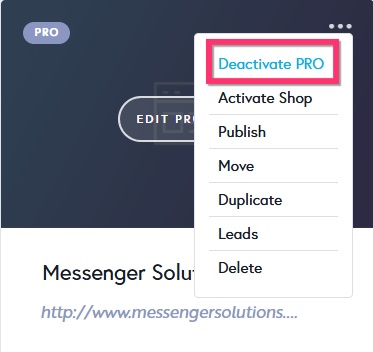
- Deactivate Pro features in your Brizy Cloud project temporarily by selecting the "Deactivate PRO" option in your project thumbnail
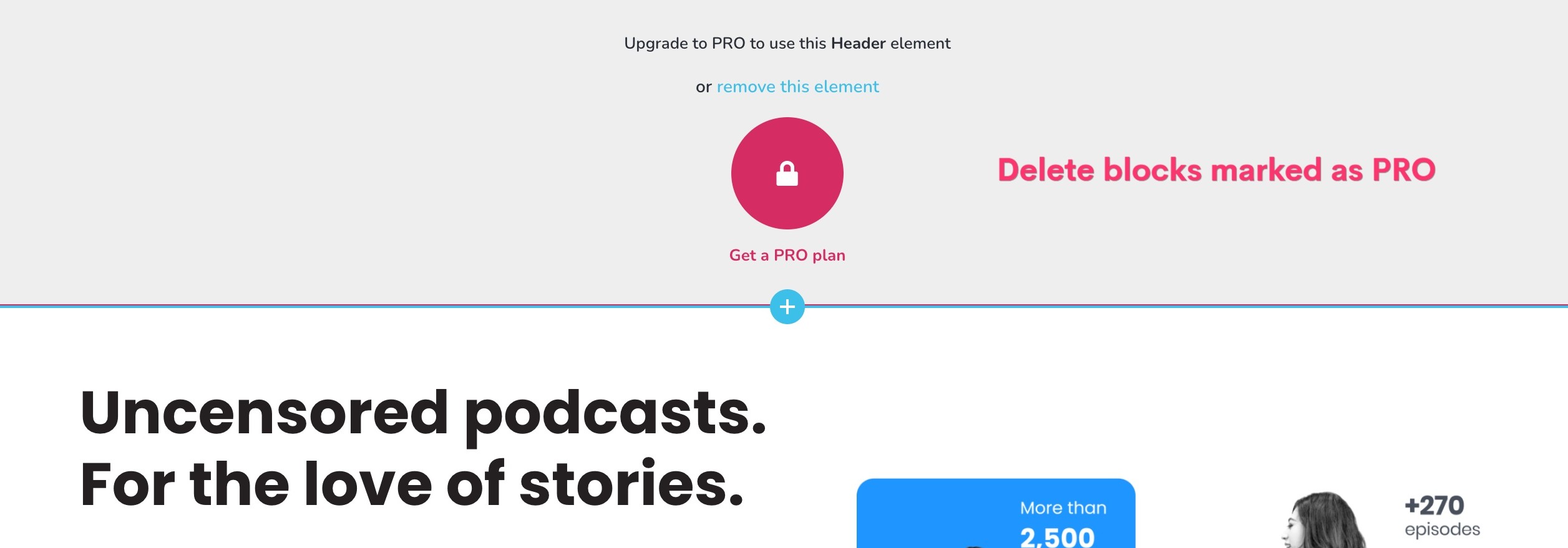
- Some blocks and elements will be marked as PRO. Delete all such blocks and elements
- Follow the process at https://jmp.sh/KMzrWz7n to import the design to your WordPress project
0 - Deactivate Pro features in your Brizy Cloud project temporarily by selecting the "Deactivate PRO" option in your project thumbnail
-
Hi, I want to import it all. I've paid for the pro version and nowhere does it state I can't transfer it to wordpress. If this is not possible I shall need a refund as that's what I purchased it for.
Thanks
Darren
0 -
Hello Darren,
Brizy Cloud AppSumo Lifetime deal at https://appsumo.com/products/m/brizy/ does neither say that you cannot transfer it to WordPress not does it state that you can transfer it to WordPress. If you need a refund, kindly request AppSumo, following the procedure at https://help.appsumo.com/article/33-refund-request
0 -
One of the reviews specifically mentions wordpress. I think it's very misleading that if you pay for the pro account you don't get access to all of the features. How would I be able to upload my pages designed in Brizy to my website? Having them hosted on Brizy isn't very useful.
0 -
Hello Darren,
You have access to all the features mentioned at https://appsumo.com/products/m/brizy/ with your AppSumo Brizy Cloud Ltd purchase. Since you haven't bought Brizy (WordPress) Pro, you don't have access to it.
Adding Brizy Cloud-designed pages to an already-existing WordPress project is not possible without Brizy Pro. However, you can use Brizy Cloud for project development and use one of these two publishing options to publish your website on an external hosting server.
0
Please sign in to leave a comment.
Comments
9 comments