403 when activating Pro License?

Hi,
I have just purchased Brizy Pro and cannot activate. Getting 403 error.
My IP is: 198.54.126.7
Before you ask I cannot "move" the hosting as this would move the entire estate and all IPs would change which would effect all hosting/IP/SSL
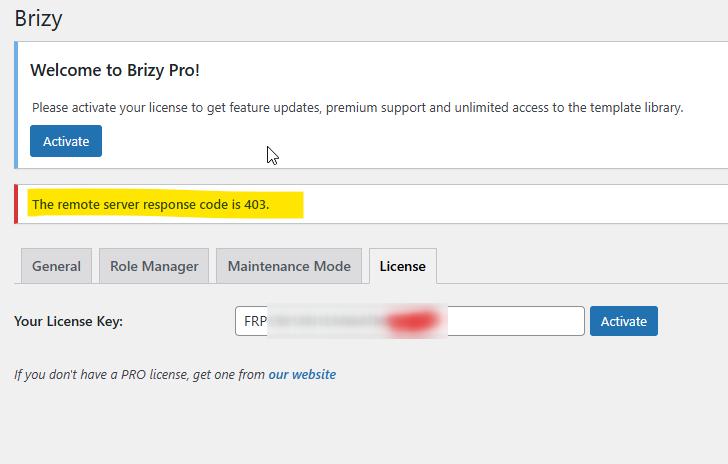
Please whitelist.
Regards,
Ben
-

Hi Benjamin,
Thank you for reaching out to us.
Please provide us with temporary access to your WP Admin page so we can take a look. Kindly add us as an Admin user to your WordPress Dashboard and send the following details to communitysupport@brizy.io.
Community Post link: https://support.brizy.io/hc/en-us/community/posts/27312917670418
WordPress Admin URL:
Username:
Password:
WP License:Looking forward to your reply.
Best regards,
Ariel H.0 -
Good morning Ariel.
Hope you are well.
Did you receive the logins? Have you attempted a fix?
Need a solution as soon as possible, please.
Many thanks.
Ben0 -
Hi Benjamin,
Thank you for your patience. The Error 403 issue when activating the license is still being worked on by our team.
Since you didn’t include your Brizy Pro license key, we’ve used a temporary license to activate Brizy Pro for now.
As a temporary solution, you can activate your license by creating a local copy of your WordPress site using Local by Flywheel, XAMPP, or MAMP. First, download the database from your live site. Then, activate the license on your local site. After that, back up the database and upload it to your live site. You can follow the steps in this video: https://youtu.be/5UrND0ua6fk
Another option is to build your site locally and move it to your live site once it’s finished.
Please let me know if you have any questions.
Best regards,
Ariel H.0
Please sign in to leave a comment.
Comments
3 comments