Can't update hero images as images are not showing

Images are not showing in most of homepage area of https://adhyapictures[.]com
the plugin is already on the latest update. And switch back to the old version did not work
Kindly help 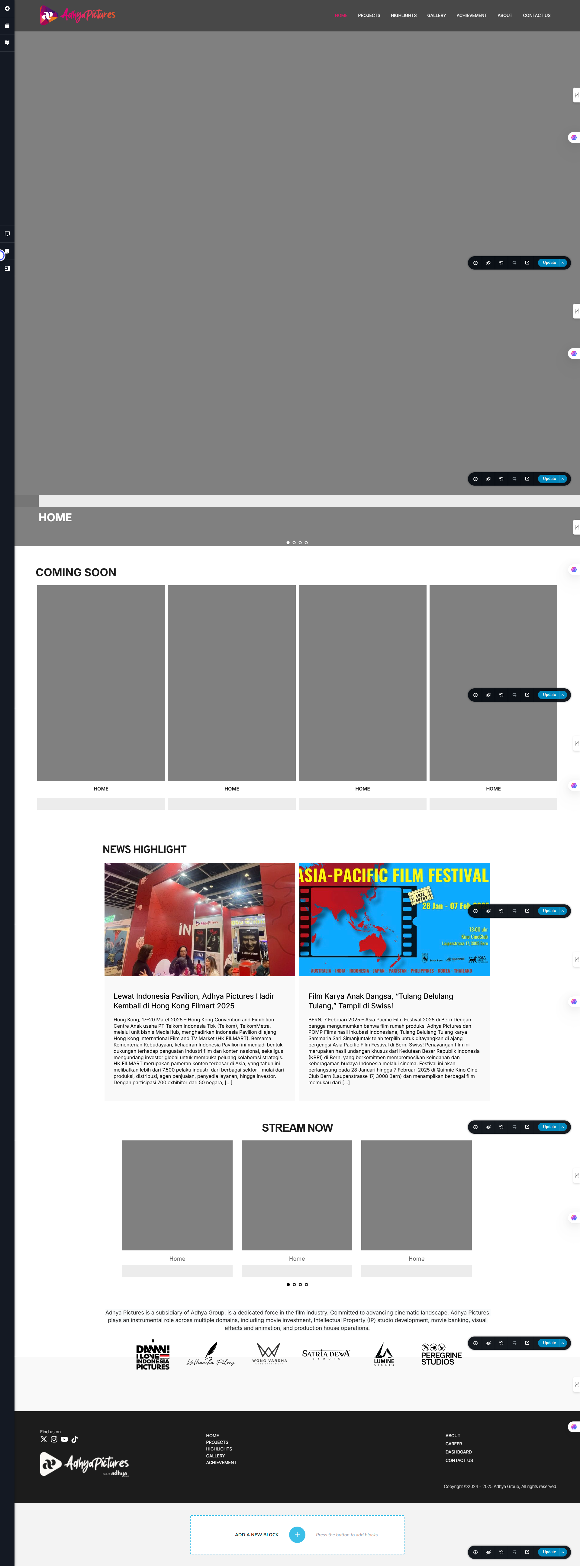
-

Hi Dee,Thanks for reaching out.
Please ensure you're using the following versions:

If the issue continues, try to isolate it by disabling all other plugins except Brizy and Brizy Pro. It’s also a good idea to temporarily switch to a default theme like Twenty Twenty-Four to see if the theme might be causing a conflict.If this didn't help, please share your WordPress admin login details with us so we can take a closer look. Please add us as an Admin user to your WordPress Dashboard and send the following details to communitysupport@brizy.io.
Community Post link: https://support.brizy.io/hc/en-us/community/posts/27102527456530
WordPress Admin URL:
Username:
Password:Also make a full backup of your site as a precaution.
Looking forward to your reply.
Best regards,
Ariel H.0 -
how do I roll back ? to brizy 2.6.19 and Brizy Pro 2.6.12? in download sections only the newest one
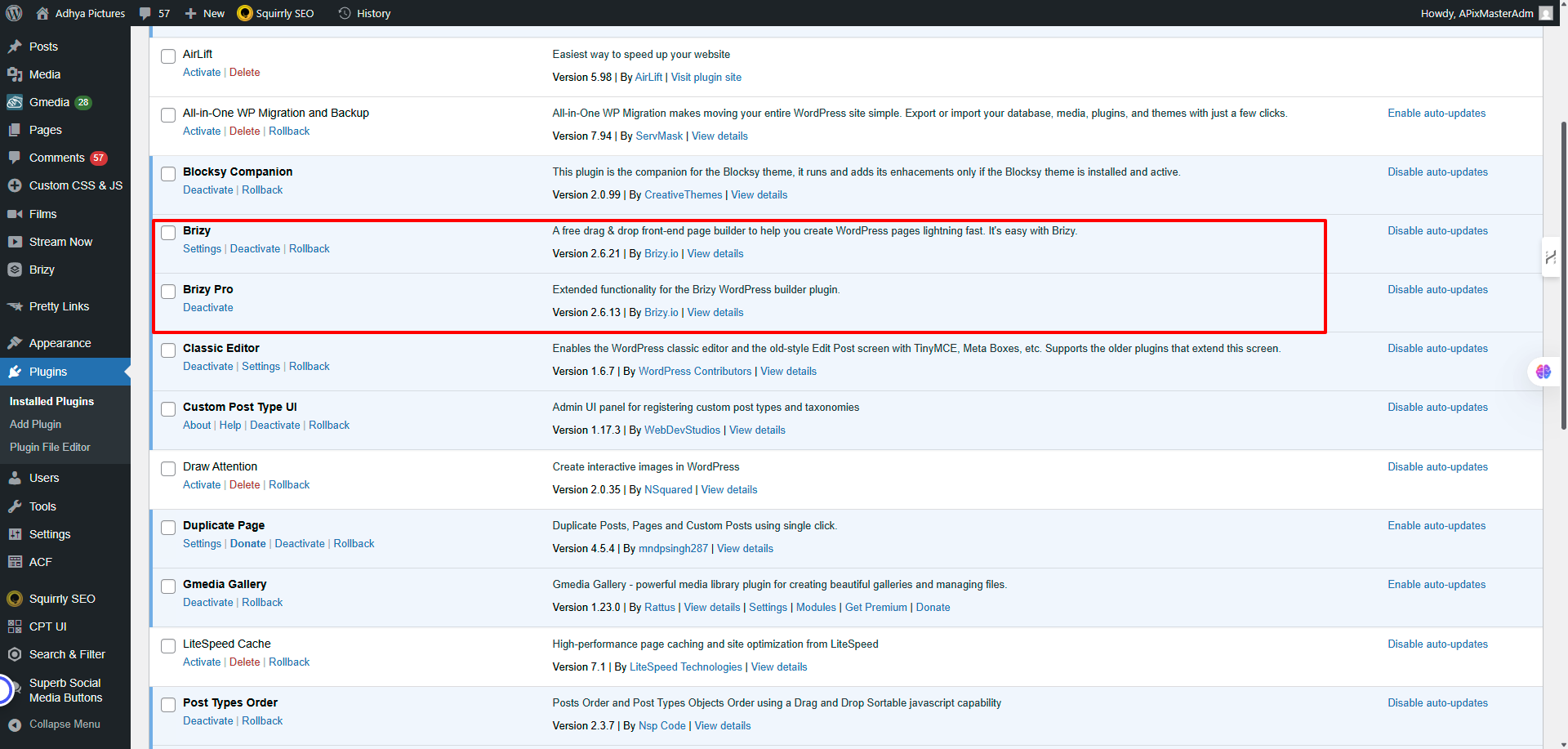 0
0 -
am using blocksy as all my theme does it have conflicts. the solutions should have also included the required files as it is much needed
0 -
Hi Dee
Sorry about that, please share your WordPress admin login details with us so we can take a closer look. Please add us as an Admin user to your WordPress Dashboard and send the following details to communitysupport@brizy.io.
Community Post link: https://support.brizy.io/hc/en-us/community/posts/27102527456530
WordPress Admin URL:
Username:
Password:Also make a full backup of your site as a precaution.
Looking forward to your reply.
Best regards,
Ariel H.0 -
@ariel H what's the fast way to get support as this is really gets into nerve every update always have problem now on most of the modules. as client was simple just to move the image slider to the next one no need to upload but it keeps on not showing up.
I changed to twenty four as expected not working too. Please make sure the update also no hack hole as this is a client not my own site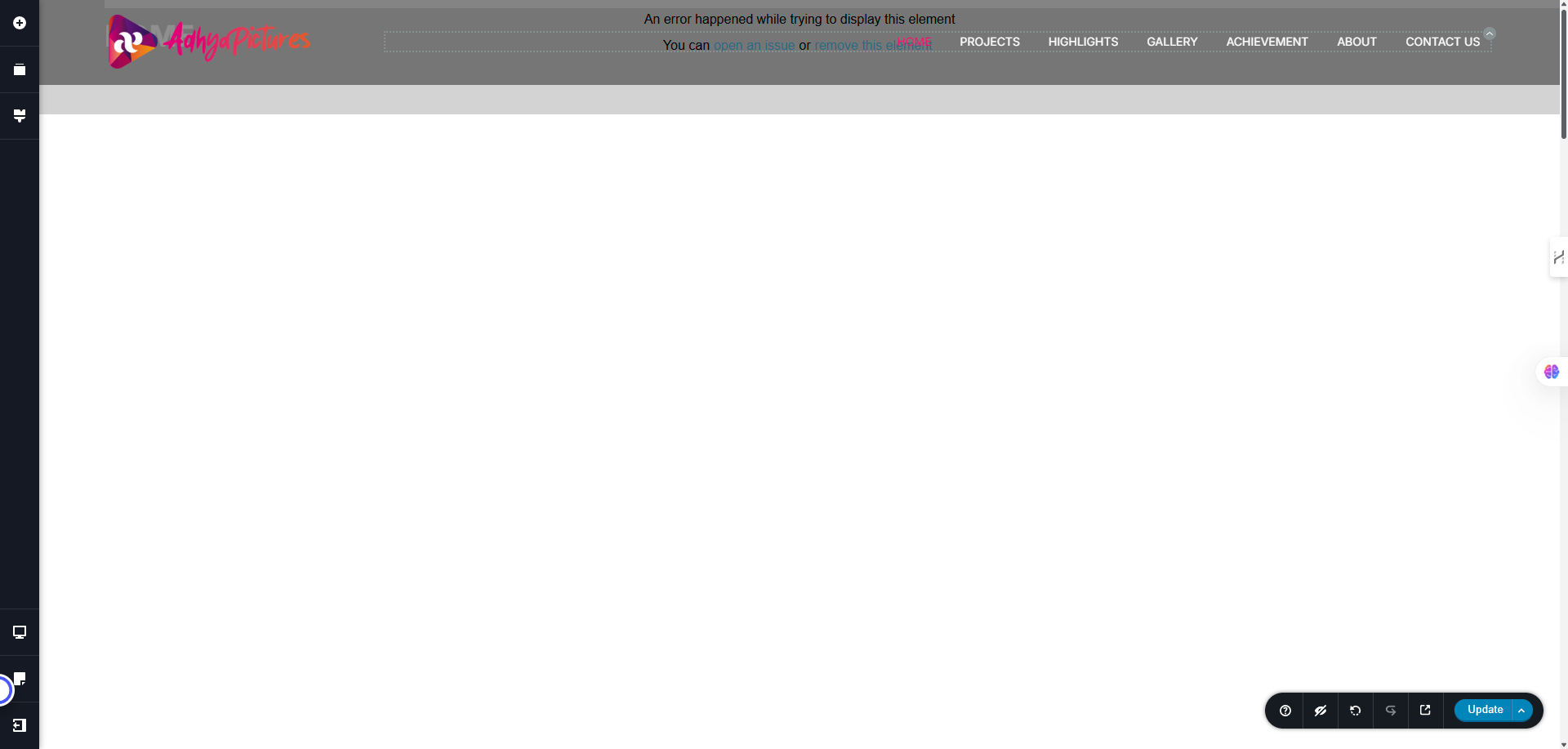 0
0 -
Hi Dee, please provide us temporary access to your WP Admin credentials so I can check now.
0 -
I just dropped the access here?
0 -
Hi Dee, feel free to share your login details here. They won't be published unless we approve it.
0 -
Hi Dee,
We're currently looking into the issue you reported. In the meantime, could you update the following server settings?
- PHP Max Input Variables: 8000
- PHP Memory Limit: 512M or higher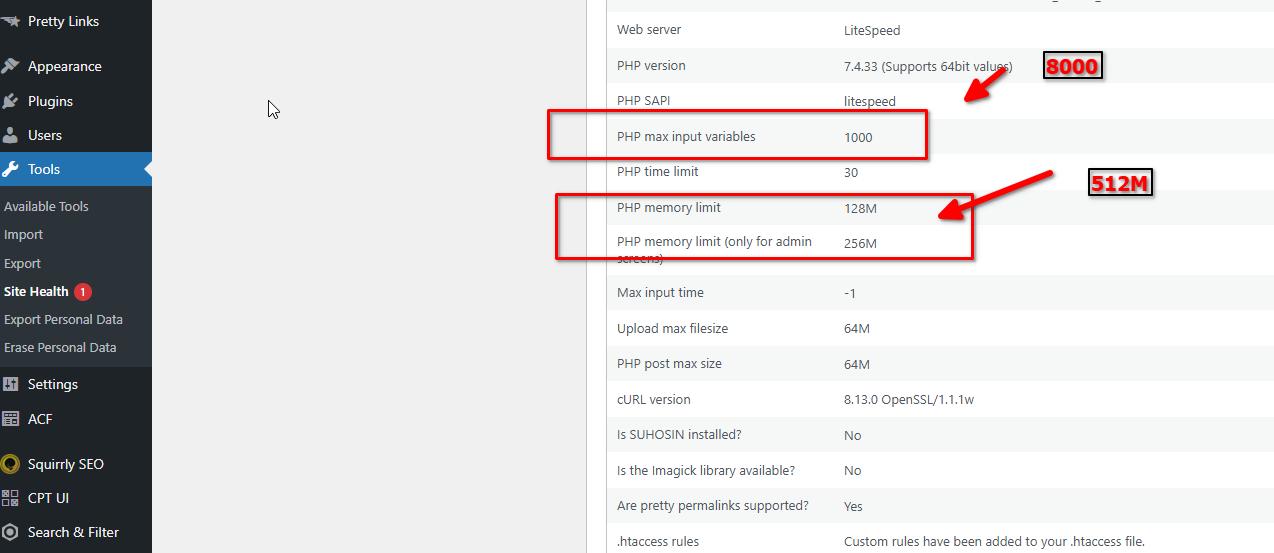
A higher max input variable is especially useful for saving large complex layouts. Increasing the memory limit ensures the site can handle media-rich content without running into performance issues.
Once you've made these changes, please update us so we can continue troubleshooting.
Best regards,
Ariel H.0 -
Just did the changes. kindly see
0 -
Hi Dee,
Thank you for your patience while we looked into the issue. We've completed our initial troubleshooting but haven't been able to pinpoint the exact cause just yet.
To proceed and escalate this to the next level of support, could you please provide your cPanel credentials?
Looking forward to your response.
Best regards,
Ariel H.0 -
Hi Ariel H.
The server is on client side to do that I was only given a remote access by appointment. Any direct email that I can connect you guys with the client server administrator?
They don't want to share the details. Why this is happening with the new update? Before the plugin was okay and could do what was meant to do. What's the other options? Is frustrating every time there is a new update we have to go through this since I see the road map for wordpress is less and less more to the cloud base0 -
Hi Dee,
Thanks for getting back to us. The issue on the homepage appears to be caused by missing parameters in the Brizy AJAX request. Since we've already ruled out plugin conflicts, the problem may be related to the database, a corrupted or incomplete entry could be preventing Brizy from processing the request correctly.
To move forward, please check if you have a previous backup of your database and try restoring it to see if that resolves the issue.
Once we’ve confirmed whether this solution works, I’ll provide you with the email address where you can reach out directly regarding server access if needed.
Let me know how it goes.
Best regards,
Ariel H.0 -
@ariel H
To move forward, please check if you have a previous backup of your database and try restoring it to see if that resolves the issue.There is no backup and if I requested this will be a layer of decisions.
Is there a hotfix or a quick win to make this works or any patch or update on the plugins? as we are providing the service using Brizy and we have seen unstability for our clients while we are under contracts with the clients.0 -
Hi Dee,
I asked a colleague to look into this issue, and he confirmed that the dynamic elements in the carousel are currently not visible in the Brizy editor, they only appear on the front end.
That said, we've already submitted a feature request so this can be addressed in a future version of Brizy.
We apologize for the inconvenience, and we appreciate your patience and understanding.
Best regards,
Ariel H.0 -
Thanks Ariel H so perhaps I do not need to set escalation to the web admin team ? If that's the case how long would it take to get the latest update
0 -
Hi Dee,
Thank you for the update. There's no need to escalate this to the web admin team at this time. While we currently don't have an ETA on when this feature might become available, you're more than welcome to submit it as a feature request on our Ideas and Roadmap page at https://www.brizy.io/ideas-and-roadmap. This platform helps us better track suggestions and prioritize feature requests based on user needs and community feedback.
Best regards,
Ariel H.0 -
Dear Ariel H.
I think this is a bug fixed not another ideas and roadmap as these are part of your core module in Brizy. I do think this is not right if we have to wait for fixed as these are part of main elements to make up a beautiful aesthetic websites.
Who can I speak to escalate this ? as this is not getting resolved and our client is unhappy about it. How do you guys compensate this bugs ?0 -
Hi Dee,
Thank you for your feedback, I understand your concerns.
We typically encourage submitting them through our Ideas and Roadmap page, especially if it's a request for behavior changes or improvements.
That said, I’ve noted your feedback and make sure it’s relayed to our team for further review. At the moment, we don’t have a formal escalation or compensation process, but we do take reports like this seriously and aim to improve with every update.
Best regards,
Ariel H.0 -
Hi Ariel
I have not see any update in the plugins error on the AJAX loader for almost 1 week. Right now we are missing milestone because of this critical just moving the hero image to the next one to make it shown as homepage would required. What is the suggestible work around from your side as Brizy Support and Developer? Need it urgently0 -
Hi Dee,
Thanks for following up, and I completely understand how critical this is for your workflow.
At the moment, we don’t have a quick solution available, but I want to assure you that our developers have been informed about the AJAX loader issue and are actively looking into it.
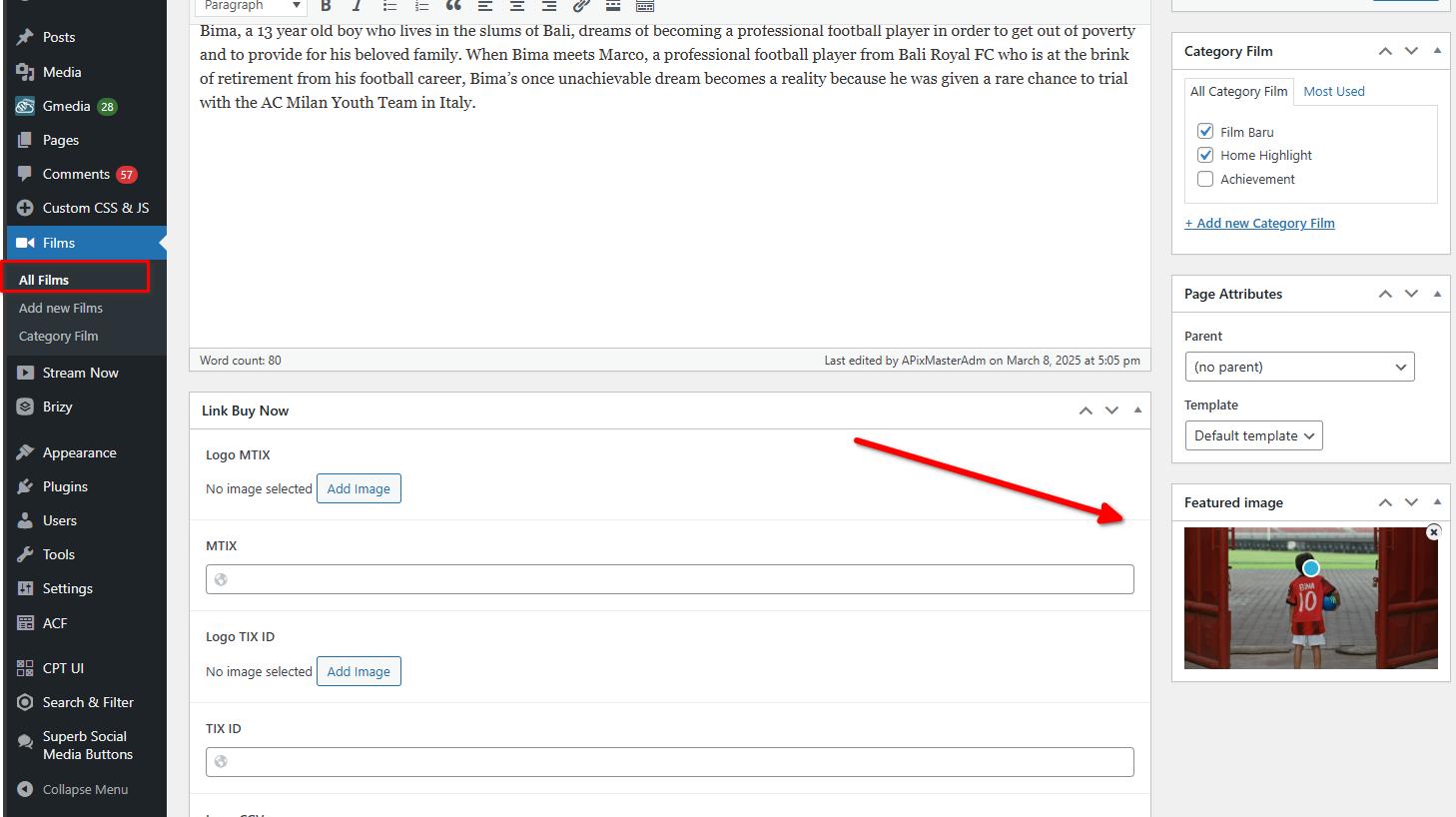
In the meantime, you can manually update the dynamic elements or the images in the Films Custom Post Type.
Best regards,
Ariel0 -
Hi Ariel. This fixed the issue for a while I saw the 2.6.14 the latest version update but seems the latest update did not solve it
only did this in the changelog
2.6.14 - 2025-06-10
* Improved: Enhanced performance for image resizing.
2.6.13 - 2025-05-26
* Fixed: Plugin name for WL users.
any schedule when this will be roll out the fixed? as this really halts the business of agency with unstable update0 -
Hi Dee,
Thank you for the update.
Unfortunately, we don’t have a specific timeline or ETA at the moment. We understand how important this is for your workflow and appreciate your patience.
Best regards,
Ariel H.0 -
Hi Ariel
I am revisiting the case as right now the site is opening to some script problem and injection problem. I have read some of the case here https://support.brizy.io/hc/en-us/community/posts/28381609073938-WordPress-Brizy-Plugin-2-7-4-is-vulnerable-to-Cross-Site-Scripting-XSS
And it seems that until now I can't even update the site. What's the update on the changes ?
Regards
Dee0 -
Hi Dee,
Thank you for keeping in touch
Just to clarify, the Cross Site Scripting (XSS) vulnerability warning and the issue with updating your site are two separate matters.
Regarding the XSS vulnerability, we’ve already addressed this in the latest versions of Brizy and Brizy Pro. However, it may take some time for Patchstack to review and update their database accordingly.
As for the update issue you mentioned, could you please provide some screenshots to help us understand what’s happening on your end?
If you're referring to dynamic elements inside a carousel not appearing in the Brizy editor but showing correctly on the front end, this is a known issue we're currently working on. Unfortunately, we don’t have an estimated time for a fix yet.
Best regards,
Ariel H.0
Please sign in to leave a comment.
Comments
25 comments