Brizy loads old version of page and returns "Unable to save entity. The data version is wrong."

Hey,
on this page https://maddesign.media/podcast/ when I open the brizy page builder (brizy template of the page) the page in the builder is an old version of the page. When I change it and save the brizy_update_item request returns 500 Internal Server Error with "Unable to save entity. The data version is wrong.". So there is currently no possibility for me to change this page.
This also happened on some normal pages that are not templates. This seems to be an issue since one of the last updates.
Brizy 2.6.21
Brizy Pro 2.6.13
-

Hi Frederick,
Thank you for reaching out to us.
Please try disabling all other plugins except Brizy and Brizy Pro, then check if the issue still occurs.
If the problem persists, please share your WordPress admin login details with us so we can take a closer look. Please add us as an Admin user to your WordPress Dashboard and send the following details to communitysupport@brizy.io.
Community Post link: https://support.brizy.io/hc/en-us/community/posts/27047582474002
WordPress Admin URL:
Username:
Password:Looking forward to your reply.
Best regards,
Ariel H.0 -
Hi Luka,
Thank you for your cooperation.
We tried accessing your WordPress Admin, but the link you provided redirects to the homepage. Could you please confirm the correct login URL?
In the meantime, please try uninstalling both Brizy and Brizy Pro manually. Delete them, then download the latest versions from your account console and reinstall them.

Give that a try and let me know how it goes.
Best regards,
Ariel H.0 -
Hey,
sorry, I forgot that we have geo-blocking enabled for the login. We are disabling it. I will let You know when it is disabled.
Best regards
0 -
I have disabled geo-blocking and resent the email with the login URL
0 -
Hi Frederick,
Thank you for your response. We’re still unable to log in to your website, as shown in this screencast: https://youtu.be/Nw_GQjIpz1U
To avoid affecting your live site while we troubleshoot the issue, could you please create a staging version of your website and send us the login credentials instead? Kindly ensure that all plugins are disabled before sharing the details.
To create a staging version of your site, please follow this guide: https://www.wpbeginner.com/wp-tutorials/how-to-create-staging-environment-for-a-wordpress-site/Looking forward to your update.
Best regards,
Ariel H.0 -
Sorry for the late response. I have resent new login details and a link to a staging site where the issue also occurs.
Here is what I did until now:- Created staging site
- Switched from our custom theme to twentytwentyfive theme
- Disabled all plugins except Brizy, Brizy Pro and Staging Plugin
- Reinstalled Brizy and Brizy Pro with the zip from the Brizy Website
Issue still occurs.
How to reproduce issue:- Go to Brizy > Vorlagen (Templates) > Prodcast - Archive > Edit with Brizy
- Then do a random change and revert it (e.g add a letter to title and remove it again), then save. If the save goes through close Brizy editor of the template and reopen it again. Repeat Step 2. Then the the issue should be that 1 the version of the template is an older one and when you save the save does not go through (brizy_update_item request returns 500 Internal Server Error with "Unable to save entity. The data version is wrong.") and after a while the editor shows an error.
I found out how to temporarily avoid the issue: By logging out and logging back in brizy loads the post with the incremented dataVersion (correct) and this allows to save the post. When you reload the page builder again the previous version is loaded again and the issue occurs again because it is an old version. Maybe this is helpful for finding the issue.0 -
Hi Frederick,
Thanks for your cooperation.
We ran into a 403 Forbidden error during troubleshooting.
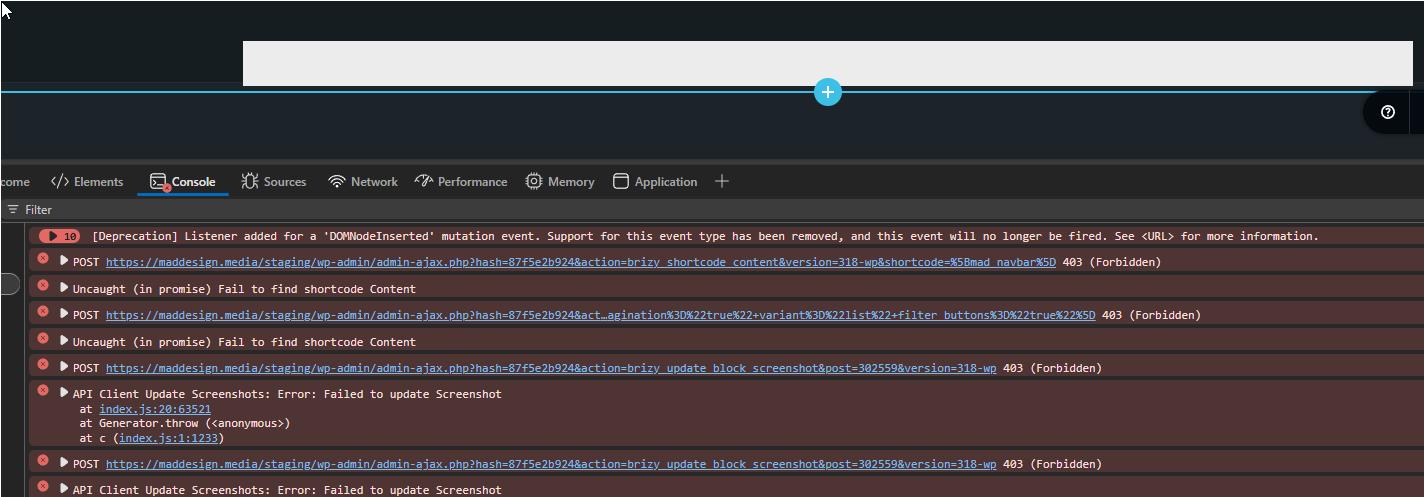
This means Brizy can’t retrieve content because of server restrictions, commonly due to ModSecurity, firewall settings, or file permissions. We recommend checking or temporarily disabling ModSecurity, reviewing permissions, and clearing any server-side cache. Your hosting provider can help with this if needed.
You also mentioned that logging out and back in lets the post load correctly, but reloading the builder reverts to the old version. This can happen with aggressive caching, and flushing server-side cache has helped in similar cases.
Lastly, we noticed that reinstalling just Brizy brings back both Brizy and Brizy Pro, even after uninstalling them. That’s unusual and may also be related to caching.
Please try this and let me know how it goes.
Best regards,
Ariel H.0
Please sign in to leave a comment.
Comments
7 comments