Brizy Page Builder on my WordPress site is not saving changes.

Brizy Page Builder on my WordPress site is not saving changes. I have checked and we do not have ModSecurity in our Cpanel or Wordfence Security in our installed plugins. I have also checked for other security plugins, we do not have any of them installed. Whenever I try to update any change, it shows me the error - the error "This page needs a refresh. You've probably updated the page in a different tab or browser".
-

Hi Anmol,
We're sorry to hear you're having this issue with Brizy.
Please provide us with temporary access to your WP Admin page so we can take a look. Please add us as an Admin user to your WordPress Dashboard and send the following details to communitysupport@brizy.io.
Community Post link: https://support.brizy.io/hc/en-us/community/posts/26828919988242
WordPress Admin URL:
Username:
Password:Additionally, we will also need temporary access to FTP/cPanel:
cPanel host address:
Username:
Password:Best regards,
Ariel H.0 -
Details sent.
0 -
Hi Anmol,
Thank you for your cooperation. I tried accessing both the WordPress and cPanel credentials, but unfortunately, they don’t seem to be working on my end.
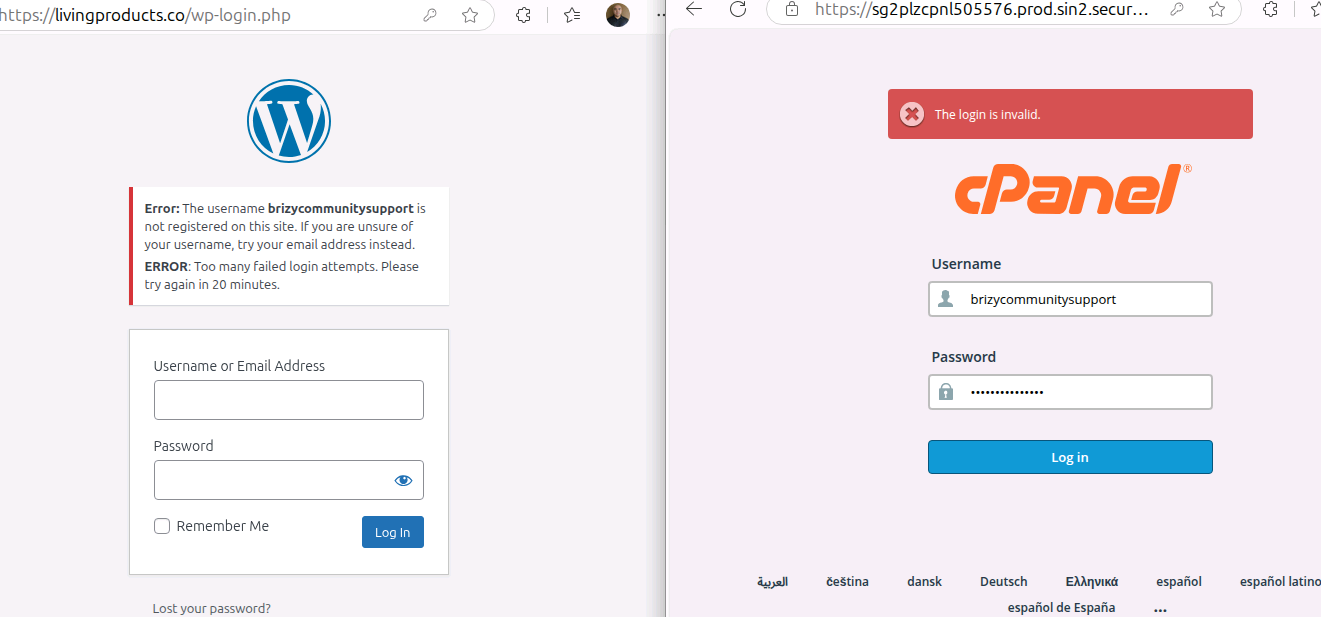
Just to be sure, I copied and pasted the username and password exactly as provided and made sure there were no extra spaces.
Could you kindly review the credentials and send the correct login details when you get a chance?
Looking forward to your reply.
Kind regards,
Ariel H.0 -
Shared the new credentials over email.
0 -
Hi Ariel,
Any update?
0 -
Hi Anmol,
Thanks for providing the credentials. We already have access to your WordPress admin, but we’ll also need access to your cPanel. The credentials you shared appear to be for FTP, which may not be helpful in this case.
The issue seems to be more related to your server configuration rather than Brizy itself, so having cPanel access will allow us to investigate further.
Looking forward to your update.
Best regards,
Ariel0 -
Sent again. Please check.
0 -
Hi Anmol,
Thanks for your patience. We're now checking your website, and I’ll get back to you as soon as we’ve finished inspecting it.
Best regards,
Ariel H.0 -
Hi Anmol,
Thank you for your patience. The website is now live, but we’re still investigating some issues with editing pages. Could you please confirm if the website was recently migrated to this server?
Looking forward to your reply.
Best regards,
Ariel H.0 -
Hi Ariel,
No, the website wasn't recently migrated.
0 -
Can you please let me know if the issue has been resolved?
0 -
Hi Anmol,
Thank you for the update.
It looks like the issue may be related to ModSecurity or a Web Application Firewall on your server. I’ve created a duplicate of your site in my test environment, and the issue isn’t occurring there.
I also noticed that your cPanel doesn’t have the option to disable ModSecurity, so you may need to check this further with your hosting provider. If you'd like access to the test site to inspect it from your end, just let me know and I’ll send over the login link.
Best regards,
Ariel H.0 -
Yes, please! Can you please share the link to the test site?
0 -
This is the reply I am getting from GoDaddy team - "As I have checked, on shared hosting by default, there is no option to disable or enable Mod_security. This functionality is only available if you have a VPS or Dedicated server with WHM access. Since you are on shared hosting, that option is restricted."
"I understand your concern, but on shared hosting, there is no option to disable ModSecurity as it would affect other users on the shared server as well."
I asked them to confirm if ModSecurity logs are showing any blocks for my domain, especially when saving a Brizy page. If yes, to provide the exact rule IDs so I can understand what’s triggering it.
They have replied with this - I have checked the ModSecurity logs, and they are functioning correctly, with no blocks reported for your specific domain. I would suggest upgrading the VPS to have complete access to your server.
Also, my brizy site was saving / publishing successfully till a week back.0 -
Hi, Ariel!
Can you please help us resolve this?0 -
Hi Anmol,
Thank you for the update.
Regarding the server restrictions, there’s unfortunately not much we can do from our side, as these are limitations imposed by your current hosting provider. While upgrading to a VPS would give you more control, it is not required.
To give you a clearer picture, I’ve set up a test site on a regular shared hosting environment where ModSecurity is also enabled, and the issue you’re experiencing does not occur there. You can access the test site using the same login details you previously shared:
https://staging.brizywp.online/case8242/wp-admin
This confirms that Brizy can function correctly on shared hosting, as long as there are no restrictive limits or rules interfering on the server side.
Best regards,
Ariel H.0 -
Hi Ariel,
Can you please help me with a solution here? What do we need to do?
Brizy was working fine for us until a week back, there are no changes from our end. We are looking to get a solution from you.0 -
Hi Anmol,
I understand your concern, and I truly appreciate your patience.
Unfortunately, these kinds of server-level limitations are beyond our control, and there’s not much we can do from the Brizy side to override them. If you had a chance to check the staging site I prepared for you, you’ll see that Brizy has no issues updating pages there. I also created a screencast in case you didn’t get the chance to try it out: https://youtu.be/H0wbxyfR0NA
At this point, I would kindly suggest considering a move to a hosting provider that doesn’t impose such restrictions. Brizy works well even on standard shared hosting environments, as long as there are no server rules interfering with requests.
Please let me know if you need help setting up the site on a different host.
Best regards,
Ariel0 -
Can we try hosting on Brizy Cloud? Would it be possible to move the pages effortlessly?
0 -
Hi Anmol,
Thank you for the update.
Yes, you can host on Brizy Cloud, and it's possible to move pages easily. You can sync layouts between Brizy WP and Brizy Cloud (both ways) - https://www.youtube.com/watch?v=iid5ZagYpuE
However, do keep in mind that if you're using features provided by WordPress plugins, those won’t carry over to Brizy Cloud. You'll want to weigh whether your websites are better suited to Brizy WP or Brizy Cloud based on the features you need.
You can find more details about the differences here: https://support.brizy.io/hc/en-us/articles/360026950732
Best regards,
Ariel H.0 -
Thank you, I'll go through it. Can you also please let me know which hosting provider you would recommend that works seamlessly with Brizy?
0 -
Also, can you let me know the steps for setting up the site on a different host.
0 -

Hello Anmol,
Hosting companies featured at https://www.brizy.io/hosting-partners will work well with Brizy. Any hosting providers who offer cloud servers will also will work well with Brizy like. XCloud Managed servers at https://xcloud.host/
To migrate your website to the new host, kindly consider the procedure at Wordpress Backup And Migrate Site With WPvivid Plugin
0
Please sign in to leave a comment.
Comments
23 comments