Accordion not working

Hello everyone,
since the last update, the accordion element does not work on any of my customer pages. It opens for a millisecond and closes again immediately. I have already seen that more people have described the problem here.
Currently installed versions:
Brizy - 2.6.17
Brizy Pro - 2.6.10
Disabling all caching or optimization plugins did not help.
Even if only the Brizy plugins are activated, the problem occurs.
Is there already an idea for a solution?
I would like to be able to give my paying customers an answer as soon as possible.
Best regards
-

Hi Kevin,
Thanks for reaching out, and I’m sorry for the inconvenience.
Please try adding 1px padding to the affected block, then save your changes and preview the live site. This simple tweak can sometimes help resolve similar issues.
If this didn't help, also try disabling all plugins except Brizy and Brizy Pro to see if that resolves the issue. You can also temporarily switch to a different theme to check if the problem is theme-related. If you've added any custom code to your pages, try temporarily removing it as well.
If disabling other plugins fixes the issue, re-enable them one by one while testing the page to identify the conflicting plugin. If switching themes resolves it, consider using a more compatible theme such as Blocksy or Astra.
If the issue continues, please send temporary access to your WordPress Admin Dashboard to communitysupport@brizy.io with the subject line: 26239805480338. If you’ve changed your WordPress default admin login URL, please make sure to include the correct login link as well.
Looking forward to your response.
Best regards,
Ariel H.0 -
Hey Ariel,
unfortunately none of the solutions described worked. I sent an email with access data to one of my customers' websites with the problem.
I hope that an upcoming update can solve the problem promptly or that there is an alternative solution to fix it.
Thank you and best regards
0 -

Same problem on all my client websites. The pixel trick doesn't help.
0 -
Hi Kevin,
Thank you for your cooperation. I've reached out to a colleague to investigate this issue, and I'll follow up with you as soon as I have an update.
Best regards,
Ariel H.0 -
Hi Reto,
Thank you for contacting us. Sorry about that, we’ve received similar reports and are currently investigating the cause of the issue. Please send temporary access to your WordPress Admin Dashboard to communitysupport@brizy.io with the subject line: 26239805480338. If you’ve changed your WordPress default admin login URL, kindly include the correct login link as well.
Best regards,
Ariel H.0 -
With this workaround, the accordions work again:
1. save the entire layout of the page as a favourite.
2. delete the entire content of the page.
3. import layout again.0 -
This effort after Brizy updates cannot and must not be the rule. Unfortunately, it has been happening far too often recently. Sometimes global blocks are lost, sometimes the menus, sometimes the variable fonts. Please test more thoroughly before a roll-out. Thank you.
1 -
Hi Reto,
Thanks for sharing this workaround! We’ll try this approach with other users who run into the same issue.
Bes regards,
Ariel H.0 -
Hi Reto,
Thank you for your feedback, and we truly understand your frustration. We're aware that some issues can occur during updates, and we’re actively working to make this process more stable and reliable.
Kind regards,
Ariel H.0 -
Hey everyone,
First and foremost, I would like to thank Reto. His tip has at least produced a short-term solution, but now I have to go this way on all my clients' pages and, for example, reassign the global status to all global blocks. I also noticed that after the last updates on some pages the block order on the live site was changed. Any change to the blocks in the editor solves this problem.
All in all, I am still satisfied with working with Brizy, but the updates are an absolute disaster every time and take up a lot of time, nerves and money in connection with my customers. The support here is okay, but sometimes days of downtime of Brizy elements on pages are unacceptable. It's a real shame, as Brizy is otherwise a really great product.
Regards
0 -

Hey everyone,
From my end try everything suggested here as well as the layout import twick with no luck...
Since last update the Accordion element in the front end is not working, while inside the builder itself you can see the Accordion function just fine but when view the front same issue with the open for a milisecond and close again.
Iam using Blocksy + child with no other plugins nor complex theme addons.
Just pure Brizy + Blocksy with same issue after trubleshoting via CSS and JS I notice that:
.brz .brz-accordion__item>.brz-accordion__content
this selector are the problem and the cause with wrong calculation of its height if you twick the height of this element I can see the content of the Accordion once again hope this will help speeding the long term sol.
Thanks for any update and fix suggestions .0 -
Hi Itamar,
Thank you for sharing your solution and insights. We appreciate you jumping in to help, this will definitely be useful for others with the same issue.
Cheers!
0 -

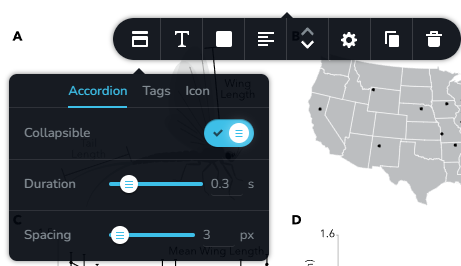
On my site, changing the accordion to collapsible made it function again. I don't like this effect on my site as much because it means there is always one section open, but it's a temporary stop-gap at least. I hope there will be a Brizy update that corrects this soon.
 0
0 -
Hi Katherine,
Thank you for sharing your workaround.
We're still working on a fix for the accordion issue, and we truly appreciate your patience in the meantime. I understand the collapsible option isn’t ideal for your layout, but I’m glad it serves as a temporary solution for now.
We’ll keep you posted once an update addressing this is released.
Best regards,
Ariel H.0 -
I got tired of waiting for fix to this accordion issue, so here a script users can add to restore the regular functioning. This can be pasted in the footer using Header and Footer Scripts Plugin
<script>
document.addEventListener("DOMContentLoaded", function () {
setTimeout(() => {
console.log("Using height-based accordion animation...");// Clone to remove Brizy listeners
document.querySelectorAll('.brz-accordion__nav').forEach(original => {
const clone = original.cloneNode(true);
original.parentNode.replaceChild(clone, original);
});const headers = document.querySelectorAll('.brz-accordion__nav');
console.log("Headers found:", headers.length);headers.forEach(header => {
header.addEventListener('click', function () {
const item = this.closest('.brz-accordion__item');
const content = item.querySelector('.brz-accordion__content');
if (!item || !content) return;const isOpen = item.classList.contains('open');
if (isOpen) {
// collapse
content.style.height = content.scrollHeight + "px"; // start at full height
requestAnimationFrame(() => {
content.style.transition = "height 0.4s ease";
content.style.height = "0px";
});
item.classList.remove("open");
} else {
// expand
content.style.height = "0px"; // reset first
content.style.display = "block";
content.style.overflow = "hidden";
item.classList.add("open");
const fullHeight = content.scrollHeight + "px";
requestAnimationFrame(() => {
content.style.transition = "height 0.4s ease";
content.style.height = fullHeight;
});
}
});
});
}, 1000);
});
</script>0 -
Hi Katherine,
Thank you for sharing your script! I appreciate you taking the time to provide a workaround for users.
An update to fix the accordion issue will be rolled out soon, though we don’t have an exact timeline yet. We appreciate your patience and support.
Kind regards,
Ariel H0 -

I'm very frustrated that it's been over a year and there's still no definitive solution... I improved my friend's script, but it's still a makeshift solution.
<script>
document.addEventListener("DOMContentLoaded", function () {
setTimeout(() => {
console.log("Usando animação de acordeão baseada em altura...");
// Clonar para remover os listeners nativos do Brizy
document.querySelectorAll('.brz-accordion__nav').forEach(original => {
const clone = original.cloneNode(true);
original.parentNode.replaceChild(clone, original);
});
const headers = document.querySelectorAll('.brz-accordion__nav');
console.log("Cabeçalhos encontrados:", headers.length);
headers.forEach(header => {
header.addEventListener('click', function () {
const item = this.closest('.brz-accordion__item');
const content = item.querySelector('.brz-accordion__content');
if (!item || !content) return;
const isOpen = item.classList.contains('open');// --- INÍCIO DA NOVA LÓGICA ---
// Se o item que acabamos de clicar não estiver aberto,
// vamos procurar e fechar todos os outros que estiverem abertos.
if (!isOpen) {
document.querySelectorAll('.brz-accordion__item.open').forEach(openedItem => {
// Garante que não estamos tentando fechar o item que acabou de ser clicado
if (openedItem !== item) {
const openedContent = openedItem.querySelector('.brz-accordion__content');
if (openedContent) {
// Aplica a mesma animação de recolhimento
openedContent.style.height = openedContent.scrollHeight + "px";
requestAnimationFrame(() => {
openedContent.style.transition = "height 0.4s ease";
openedContent.style.height = "0px";
});
openedItem.classList.remove("open");
}
}
});
}
// --- FIM DA NOVA LÓGICA ---// Lógica original de expandir/recolher o item clicado
if (isOpen) {
// recolher
content.style.height = content.scrollHeight + "px"; // iniciar na altura total
requestAnimationFrame(() => {
content.style.transition = "height 0.4s ease";
content.style.height = "0px";
});
item.classList.remove("open");
} else {
// expandir
content.style.height = "0px"; // redefinir primeiro
content.style.display = "block";
content.style.overflow = "hidden";
item.classList.add("open");
const fullHeight = content.scrollHeight + "px";
requestAnimationFrame(() => {
content.style.transition = "height 0.4s ease";
content.style.height = fullHeight;
});
}
});
});
}, 1000);
});
</script>0 -
Hi Ricardo,
Thank you for reaching out
The issue has already been fixed on our side, so what you’re experiencing maybe different. Could you please share your site’s credentials and the URL of the page where the problem occurs so we can inspect it directly?
Kindly send the following details to communitysupport@brizy.io:
Community Post: https://support.brizy.io/hc/en-us/community/posts/26239805480338
WordPress Admin URL:
Username:
Password:We’ll review it as soon as we receive the access.
Best regards,
Ariel H.0 -
Hi Ricardo,
Just following up on my previous email to check if you had a chance to review it. Please let us know when you’re ready to share the details so we can proceed and help you fix the issue.
Kind regards,
Ariel H.0
Please sign in to leave a comment.
Comments
19 comments